ขอบคุณมากๆคับ
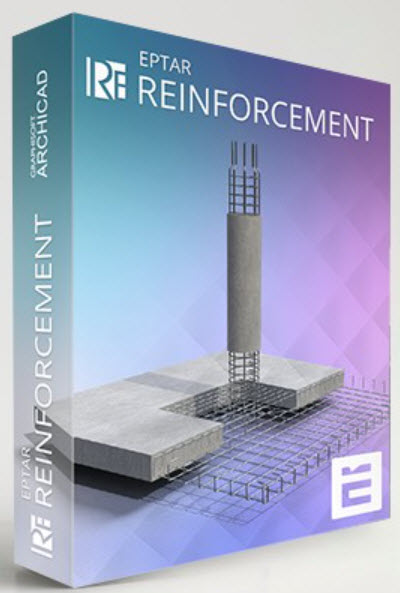
ดาวน์โหลด ปลั๊กอิน EPTAR Reinforcement 7.0.5.0 for ArchiCAD 29 WIN ปลั๊กอินสร้างแบบเหล็กเสริมคอนกรีตสำหรับ ArchiCAD 29 ฟรี
EPTAR Reinforcement 7 เป็นปลั๊กอินสำหรับ ArchiCAD ที่ออกแบบมาเพื่อช่วยสร้างแบบเหล็กเสริมคอนกรีต (Reinforcement) อย่างแม่นยำและเป็นระบบ เหมาะสำหรับวิศวกรโครงสร้าง สถาปนิก และผู้ทำแบบก่อสร้างที่ต้องการเพิ่มความถูกต้องและความรวดเร็วในงานออกแบบโครงสร้างคอนกรีตเสริมเหล็ก
ด้วยเครื่องมืออัตโนมัติและฟังก์ชันที่ครบครัน EPTAR Reinforcement 7 ช่วยสร้าง ตีราคา และจัดทำรายการเหล็กเสริม (BOQ) ได้ง่ายขึ้น รองรับการทำงานร่วมกับโมเดล BIM ของ ArchiCAD ทำให้การทำงานด้านโครงสร้างเป็นระบบมากขึ้น ลดข้อผิดพลาด และช่วยให้ส่งงานได้เร็วขึ้น
จุดเด่นของ EPTAR Reinforcement 7
เหมาะสำหรับใคร
- สร้างเหล็กเสริมคอนกรีตใน ArchiCAD ได้แบบอัตโนมัติและปรับแต่งได้
- รองรับเหล็กเสริมพื้น เสา คาน ผนัง และองค์ประกอบโครงสร้างทุกชนิด
- จัดทำรายการวัสดุ (Material List / BOQ) อัตโนมัติ
- ปรับรูปร่าง เหลี่ยม ดัดงอ และความยาวเหล็กได้ตามมาตรฐานวิศวกรรม
- แสดงผลแบบ 2D และ 3D ช่วยให้ตรวจแบบได้ง่ายขึ้น
- ลดเวลาการทำแบบโครงสร้างและลดความผิดพลาดจากการทำงานด้วยมือ
- รองรับการทำงานร่วมกับ BIM ทำให้การออกแบบโครงสร้างมีประสิทธิภาพสูงขึ้น
EPTAR Reinforcement 7 คือปลั๊กอินเสริมสำหรับ ArchiCAD ที่ช่วยทำงานด้านเหล็กเสริมคอนกรีตได้อย่างแม่นยำ รวดเร็ว และเป็นมืออาชีพ รองรับโครงสร้างทุกประเภทและสามารถสร้างแบบ 2D/3D พร้อมรายการวัสดุได้ในคลิกเดียว เหมาะสำหรับผู้ที่ทำงานด้านโครงสร้างและต้องการเพิ่มคุณภาพและความเร็วในการออกแบบอย่างแท้จริง
- วิศวกรโครงสร้างและบริษัทออกแบบโครงสร้าง
- สถาปนิกที่ใช้ ArchiCAD และต้องการแบบเหล็กเสริมที่ถูกต้อง
- ผู้เขียนแบบ (Draftsman) และผู้ถอดปริมาณงานก่อสร้าง
- นักศึกษาและผู้เรียนด้านวิศวกรรมที่ต้องการปลั๊กอินเพิ่มประสิทธิภาพงาน
Features:
New Functions (Version 7)
Main Features (Includes features from earlier versions)
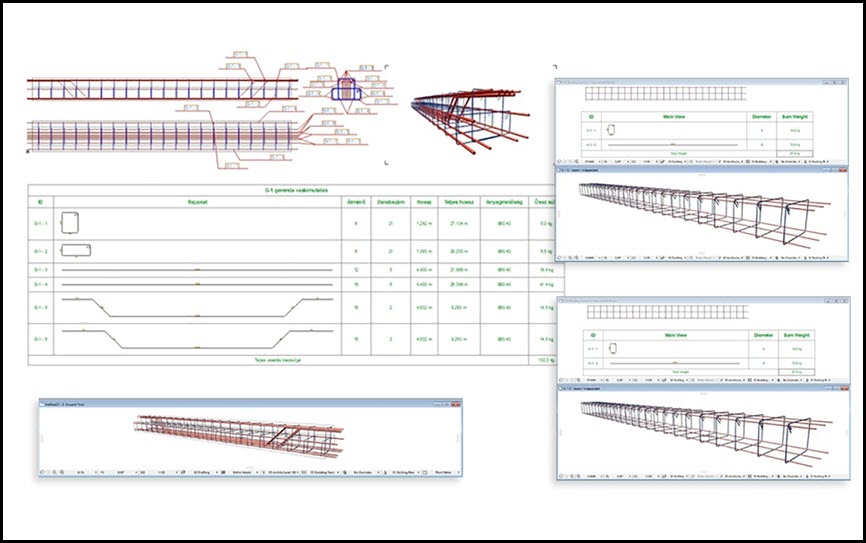
- Unfolded Bar Drawings: Create unfolded drawings of reinforcement bars for structural components.
- Cross-Sectional Drawings: Generate cross-sectional drawings of beam and column reinforcements at custom locations.
- Flexible Component Drawing Placement: Component and cross-sectional drawings can now be placed in separate views, not just on the floor plan. These drawings automatically update when the element's reinforcement is modified, offering greater documentation flexibility.
- Long Rebar Splices: Support for drawing splices for long rebars.
- Customizable Bent End Angles: Define custom angle specifications for bent rebar ends.
- New rf_single_edge element: A new, simpler element for placing independent edge reinforcements with custom-angle stirrups.
- New Parameter Palette: A dedicated palette for quickly adjusting the most commonly used parameters of selected elements without opening the full Settings window.
- Thermal Bridge Breaker: A new element available in the library.
- Multi-Directional Custom Rebar: Create custom reinforcement bars that can be bent in multiple directions, even in 3D.
User Interface & Listing
Reinforcement Modeling
- Redesigned Tool Palette.
- New Listing Functions:
- Selection management palette with element ID and graphical marking.
- Zoom function for selected elements.
- Automatic numbering of elements and rebars (with option to start from a specified number).
- Handling of identical rebars in complex elements.
- Option to apply prefixes.
- Ensures elements are not listed twice.
- Measurement units moved to the header for easier XLS export.
- Lists now have their own dedicated layer.
- Cutting list can include additional, custom text content.
- Automatic Update System: Notifies users when a newer version is available.
- ABOUT Window: Provides information about the software.
Documentation & Output
- Column/Pillar Reinforcement:
- Indication of rebar rotation in 3D (toggleable in Model View Options).
- Support for multiple stirrup types.
- Manual resizing option for placed reinforcement.
- Automatic placement for circular and simple profiled columns with many settings.
- Slab Reinforcement:
- Reinforcement only in the core of slabs.
- Accurate usage of structural core definition.
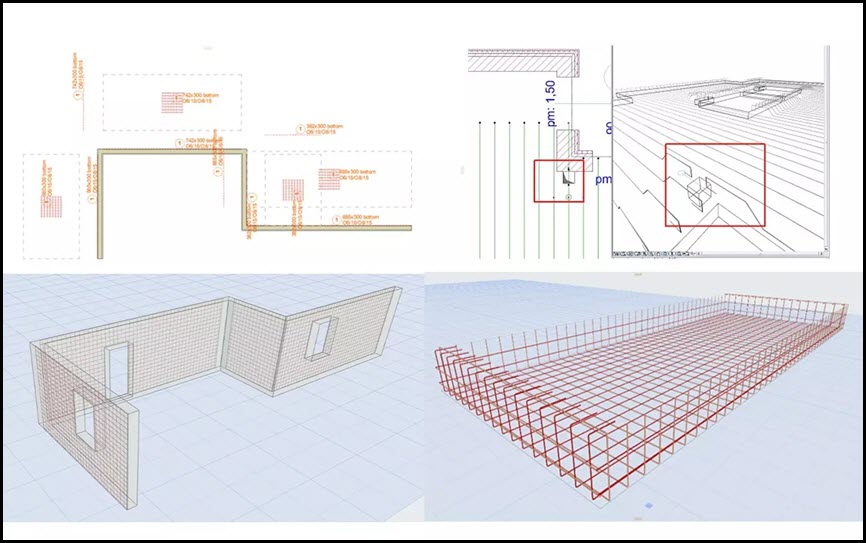
- Reinforcement of concrete slab edges by placing shear rebars in corners of holes.
- Wall Reinforcement:
- Concrete cover correction.
- Reinforcement of slanted walls cropped to a roof.
- Handling of Archicad openings in the wall.
- Reinforcement of concrete wall edges by placing shear rebars in corners of openings.
- Automatic reinforcement of straight, slanted, and curved walls.
- Reverse bending direction of rebars in slab and wall.
- Beam Reinforcement:
- Correct section dimensions.
- Automatic placement in simple profiled beams using rf_beam complex element.
- Roof Reinforcement:
- Rebars in two directions and in top/bottom regions with a direction selector.
- Using RF_EDGE element (single roof).
- Mesh element in top/bottom regions.
- Automatic reinforcement with Mesh and Rebar elements.
- Automatic reinforcement of complex roofs and multiple roof surfaces.
- General Rebar & Stirrups:
- Creation of splice drawings for straight rebars.
- New handling and representation of curved rebar layouts.
- Option to set custom rebar weight (in kg/m).
- Option to set rebar diameter by group.
- Stirrups can be sized by external dimensions, not along the axis.
- Spiral stirrup for manual or automatic placement.
- Preset common rebar and stirrup forms; custom polygonal forms can also be set.
- Steel elements can be rotated for complex constructions (e.g., stairs).
- Distributable rebars along curves.
- Multiple layers of rebar can be placed at a time.
- Placement of upturned or folded mesh.
- Automatic array of meshes and bars.
- Unlimited rebar placement.
- Complex Elements:
- RF_CHAIR is included in the Cutting list with necessary parameters.
- ID handling for RF_BEAM, RF_COLUMN, and RF_EDGE elements (yellow sign warning for duplicate IDs).
- List of beam and column reinforcement elements.
- Unlimited use of columns, beams, and crownings.
- Drawing & Display:
- Extended 2D view types of rebars.
- Indication of rebar rotation in the 3D window.
- Exact display of rebar bending in 3D.
- Many view and display options.
- Global display settings (2D, 3D, labels, texts).
- Displaying views on the floor plan.
- ABOUT window.
- Labeling:
- Every element can be labeled using the reinforcement's own label.
- All groups in a beam or pillar can be labeled separately with real parameters.
- Option to indicate different text content in floorplan labels of rebar and mesh.
- Intelligent markers.
- Label option for views and custom label texts.
- Cutting List:
- Generation of automatic cutting lists.
- RF_CHAIR is included with necessary parameters.
- More exact Cutting list for Mesh and Rebar.
- The different length rebars can be displayed separately.
- For mesh, multidirectional rebars can be listed separately.
- For circular cross-sections, the radius of the stirrup is displayed.
- Joint length value is displayed.
- Option to select all elements listed in an already placed Cutting list on the floor plan.
- Mesh Board Designer.
- Exporting List: Export to TXT (and implies XLS for further processing as per "Measurement units have been moved from the list to the header to avoid confusion during further processing in XLS export").
What’s new
Screenshot
System Requirements
ArchiCAD INT 29 WIN
File Info
Official Website : https://www.eptar.hu/reinforcement
License : Trial
Software Version : 7.0.5.0
File Name : EPTARR7.0.5.0ACAD29.rar
File Size : 160 MB
File Type : *.rar
Server : Pixeldrain | Box
Upload date : 10/12/2025
Last modified : 10/12/2025
Password : sbz
*** Hidden text: cannot be quoted. ***
รหัสแตกไฟล์คือ sbz

คุณกำลังใช้เบราว์เซอร์ที่ล้าสมัย อาจแสดงเว็บไซต์นี้หรือเว็บไซต์อื่นไม่ถูกต้อง
คุณควรอัปเกรดหรือใช้ เบราว์เซอร์สำรอง
คุณควรอัปเกรดหรือใช้ เบราว์เซอร์สำรอง
แบ่งปัน EPTAR Reinforcement 7.0.5.0 for ArchiCAD 29 WIN
- เริ่มกระทู้โดย admin_lnwza
- วันที่เริ่มกระทู้


ดาวน์โหลด ปลั๊กอิน EPTAR Reinforcement 7.0.5.0 for ArchiCAD 29 WIN ปลั๊กอินสร้างแบบเหล็กเสริมคอนกรีตสำหรับ ArchiCAD 29 ฟรี
EPTAR Reinforcement 7 เป็นปลั๊กอินสำหรับ ArchiCAD ที่ออกแบบมาเพื่อช่วยสร้างแบบเหล็กเสริมคอนกรีต (Reinforcement) อย่างแม่นยำและเป็นระบบ เหมาะสำหรับวิศวกรโครงสร้าง สถาปนิก และผู้ทำแบบก่อสร้างที่ต้องการเพิ่มความถูกต้องและความรวดเร็วในงานออกแบบโครงสร้างคอนกรีตเสริมเหล็ก
ด้วยเครื่องมืออัตโนมัติและฟังก์ชันที่ครบครัน EPTAR Reinforcement 7 ช่วยสร้าง ตีราคา และจัดทำรายการเหล็กเสริม (BOQ) ได้ง่ายขึ้น รองรับการทำงานร่วมกับโมเดล BIM ของ ArchiCAD ทำให้การทำงานด้านโครงสร้างเป็นระบบมากขึ้น ลดข้อผิดพลาด และช่วยให้ส่งงานได้เร็วขึ้น
จุดเด่นของ EPTAR Reinforcement 7
เหมาะสำหรับใคร
- สร้างเหล็กเสริมคอนกรีตใน ArchiCAD ได้แบบอัตโนมัติและปรับแต่งได้
- รองรับเหล็กเสริมพื้น เสา คาน ผนัง และองค์ประกอบโครงสร้างทุกชนิด
- จัดทำรายการวัสดุ (Material List / BOQ) อัตโนมัติ
- ปรับรูปร่าง เหลี่ยม ดัดงอ และความยาวเหล็กได้ตามมาตรฐานวิศวกรรม
- แสดงผลแบบ 2D และ 3D ช่วยให้ตรวจแบบได้ง่ายขึ้น
- ลดเวลาการทำแบบโครงสร้างและลดความผิดพลาดจากการทำงานด้วยมือ
- รองรับการทำงานร่วมกับ BIM ทำให้การออกแบบโครงสร้างมีประสิทธิภาพสูงขึ้น
EPTAR Reinforcement 7 คือปลั๊กอินเสริมสำหรับ ArchiCAD ที่ช่วยทำงานด้านเหล็กเสริมคอนกรีตได้อย่างแม่นยำ รวดเร็ว และเป็นมืออาชีพ รองรับโครงสร้างทุกประเภทและสามารถสร้างแบบ 2D/3D พร้อมรายการวัสดุได้ในคลิกเดียว เหมาะสำหรับผู้ที่ทำงานด้านโครงสร้างและต้องการเพิ่มคุณภาพและความเร็วในการออกแบบอย่างแท้จริง
- วิศวกรโครงสร้างและบริษัทออกแบบโครงสร้าง
- สถาปนิกที่ใช้ ArchiCAD และต้องการแบบเหล็กเสริมที่ถูกต้อง
- ผู้เขียนแบบ (Draftsman) และผู้ถอดปริมาณงานก่อสร้าง
- นักศึกษาและผู้เรียนด้านวิศวกรรมที่ต้องการปลั๊กอินเพิ่มประสิทธิภาพงาน
Features:
New Functions (Version 7)
Main Features (Includes features from earlier versions)
- Unfolded Bar Drawings: Create unfolded drawings of reinforcement bars for structural components.
- Cross-Sectional Drawings: Generate cross-sectional drawings of beam and column reinforcements at custom locations.
- Flexible Component Drawing Placement: Component and cross-sectional drawings can now be placed in separate views, not just on the floor plan. These drawings automatically update when the element's reinforcement is modified, offering greater documentation flexibility.
- Long Rebar Splices: Support for drawing splices for long rebars.
- Customizable Bent End Angles: Define custom angle specifications for bent rebar ends.
- New rf_single_edge element: A new, simpler element for placing independent edge reinforcements with custom-angle stirrups.
- New Parameter Palette: A dedicated palette for quickly adjusting the most commonly used parameters of selected elements without opening the full Settings window.
- Thermal Bridge Breaker: A new element available in the library.
- Multi-Directional Custom Rebar: Create custom reinforcement bars that can be bent in multiple directions, even in 3D.
User Interface & Listing
Reinforcement Modeling
- Redesigned Tool Palette.
- New Listing Functions:
- Selection management palette with element ID and graphical marking.
- Zoom function for selected elements.
- Automatic numbering of elements and rebars (with option to start from a specified number).
- Handling of identical rebars in complex elements.
- Option to apply prefixes.
- Ensures elements are not listed twice.
- Measurement units moved to the header for easier XLS export.
- Lists now have their own dedicated layer.
- Cutting list can include additional, custom text content.
- Automatic Update System: Notifies users when a newer version is available.
- ABOUT Window: Provides information about the software.
Documentation & Output
- Column/Pillar Reinforcement:
- Indication of rebar rotation in 3D (toggleable in Model View Options).
- Support for multiple stirrup types.
- Manual resizing option for placed reinforcement.
- Automatic placement for circular and simple profiled columns with many settings.
- Slab Reinforcement:
- Reinforcement only in the core of slabs.
- Accurate usage of structural core definition.
- Reinforcement of concrete slab edges by placing shear rebars in corners of holes.
- Wall Reinforcement:
- Concrete cover correction.
- Reinforcement of slanted walls cropped to a roof.
- Handling of Archicad openings in the wall.
- Reinforcement of concrete wall edges by placing shear rebars in corners of openings.
- Automatic reinforcement of straight, slanted, and curved walls.
- Reverse bending direction of rebars in slab and wall.
- Beam Reinforcement:
- Correct section dimensions.
- Automatic placement in simple profiled beams using rf_beam complex element.
- Roof Reinforcement:
- Rebars in two directions and in top/bottom regions with a direction selector.
- Using RF_EDGE element (single roof).
- Mesh element in top/bottom regions.
- Automatic reinforcement with Mesh and Rebar elements.
- Automatic reinforcement of complex roofs and multiple roof surfaces.
- General Rebar & Stirrups:
- Creation of splice drawings for straight rebars.
- New handling and representation of curved rebar layouts.
- Option to set custom rebar weight (in kg/m).
- Option to set rebar diameter by group.
- Stirrups can be sized by external dimensions, not along the axis.
- Spiral stirrup for manual or automatic placement.
- Preset common rebar and stirrup forms; custom polygonal forms can also be set.
- Steel elements can be rotated for complex constructions (e.g., stairs).
- Distributable rebars along curves.
- Multiple layers of rebar can be placed at a time.
- Placement of upturned or folded mesh.
- Automatic array of meshes and bars.
- Unlimited rebar placement.
- Complex Elements:
- RF_CHAIR is included in the Cutting list with necessary parameters.
- ID handling for RF_BEAM, RF_COLUMN, and RF_EDGE elements (yellow sign warning for duplicate IDs).
- List of beam and column reinforcement elements.
- Unlimited use of columns, beams, and crownings.
- Drawing & Display:
- Extended 2D view types of rebars.
- Indication of rebar rotation in the 3D window.
- Exact display of rebar bending in 3D.
- Many view and display options.
- Global display settings (2D, 3D, labels, texts).
- Displaying views on the floor plan.
- ABOUT window.
- Labeling:
- Every element can be labeled using the reinforcement's own label.
- All groups in a beam or pillar can be labeled separately with real parameters.
- Option to indicate different text content in floorplan labels of rebar and mesh.
- Intelligent markers.
- Label option for views and custom label texts.
- Cutting List:
- Generation of automatic cutting lists.
- RF_CHAIR is included with necessary parameters.
- More exact Cutting list for Mesh and Rebar.
- The different length rebars can be displayed separately.
- For mesh, multidirectional rebars can be listed separately.
- For circular cross-sections, the radius of the stirrup is displayed.
- Joint length value is displayed.
- Option to select all elements listed in an already placed Cutting list on the floor plan.
- Mesh Board Designer.
- Exporting List: Export to TXT (and implies XLS for further processing as per "Measurement units have been moved from the list to the header to avoid confusion during further processing in XLS export").
What’s new
Screenshot
System Requirements
ArchiCAD INT 29 WIN
File Info
Official Website : https://www.eptar.hu/reinforcement
License : Trial
Software Version : 7.0.5.0
File Name : EPTARR7.0.5.0ACAD29.rar
File Size : 160 MB
File Type : *.rar
Server : Pixeldrain | Box
Upload date : 10/12/2025
Last modified : 10/12/2025
Password : sbz
*** Hidden text: cannot be quoted. ***
รหัสแตกไฟล์คือ sbz ขอบคุณครับ
ขอบคุณครับ
ดาวน์โหลด ปลั๊กอิน EPTAR Reinforcement 7.0.5.0 for ArchiCAD 29 WIN ปลั๊กอินสร้างแบบเหล็กเสริมคอนกรีตสำหรับ ArchiCAD 29 ฟรี
EPTAR Reinforcement 7 เป็นปลั๊กอินสำหรับ ArchiCAD ที่ออกแบบมาเพื่อช่วยสร้างแบบเหล็กเสริมคอนกรีต (Reinforcement) อย่างแม่นยำและเป็นระบบ เหมาะสำหรับวิศวกรโครงสร้าง สถาปนิก และผู้ทำแบบก่อสร้างที่ต้องการเพิ่มความถูกต้องและความรวดเร็วในงานออกแบบโครงสร้างคอนกรีตเสริมเหล็ก
ด้วยเครื่องมืออัตโนมัติและฟังก์ชันที่ครบครัน EPTAR Reinforcement 7 ช่วยสร้าง ตีราคา และจัดทำรายการเหล็กเสริม (BOQ) ได้ง่ายขึ้น รองรับการทำงานร่วมกับโมเดล BIM ของ ArchiCAD ทำให้การทำงานด้านโครงสร้างเป็นระบบมากขึ้น ลดข้อผิดพลาด และช่วยให้ส่งงานได้เร็วขึ้น
จุดเด่นของ EPTAR Reinforcement 7
เหมาะสำหรับใคร
- สร้างเหล็กเสริมคอนกรีตใน ArchiCAD ได้แบบอัตโนมัติและปรับแต่งได้
- รองรับเหล็กเสริมพื้น เสา คาน ผนัง และองค์ประกอบโครงสร้างทุกชนิด
- จัดทำรายการวัสดุ (Material List / BOQ) อัตโนมัติ
- ปรับรูปร่าง เหลี่ยม ดัดงอ และความยาวเหล็กได้ตามมาตรฐานวิศวกรรม
- แสดงผลแบบ 2D และ 3D ช่วยให้ตรวจแบบได้ง่ายขึ้น
- ลดเวลาการทำแบบโครงสร้างและลดความผิดพลาดจากการทำงานด้วยมือ
- รองรับการทำงานร่วมกับ BIM ทำให้การออกแบบโครงสร้างมีประสิทธิภาพสูงขึ้น
EPTAR Reinforcement 7 คือปลั๊กอินเสริมสำหรับ ArchiCAD ที่ช่วยทำงานด้านเหล็กเสริมคอนกรีตได้อย่างแม่นยำ รวดเร็ว และเป็นมืออาชีพ รองรับโครงสร้างทุกประเภทและสามารถสร้างแบบ 2D/3D พร้อมรายการวัสดุได้ในคลิกเดียว เหมาะสำหรับผู้ที่ทำงานด้านโครงสร้างและต้องการเพิ่มคุณภาพและความเร็วในการออกแบบอย่างแท้จริง
- วิศวกรโครงสร้างและบริษัทออกแบบโครงสร้าง
- สถาปนิกที่ใช้ ArchiCAD และต้องการแบบเหล็กเสริมที่ถูกต้อง
- ผู้เขียนแบบ (Draftsman) และผู้ถอดปริมาณงานก่อสร้าง
- นักศึกษาและผู้เรียนด้านวิศวกรรมที่ต้องการปลั๊กอินเพิ่มประสิทธิภาพงาน
Features:
New Functions (Version 7)
Main Features (Includes features from earlier versions)
- Unfolded Bar Drawings: Create unfolded drawings of reinforcement bars for structural components.
- Cross-Sectional Drawings: Generate cross-sectional drawings of beam and column reinforcements at custom locations.
- Flexible Component Drawing Placement: Component and cross-sectional drawings can now be placed in separate views, not just on the floor plan. These drawings automatically update when the element's reinforcement is modified, offering greater documentation flexibility.
- Long Rebar Splices: Support for drawing splices for long rebars.
- Customizable Bent End Angles: Define custom angle specifications for bent rebar ends.
- New rf_single_edge element: A new, simpler element for placing independent edge reinforcements with custom-angle stirrups.
- New Parameter Palette: A dedicated palette for quickly adjusting the most commonly used parameters of selected elements without opening the full Settings window.
- Thermal Bridge Breaker: A new element available in the library.
- Multi-Directional Custom Rebar: Create custom reinforcement bars that can be bent in multiple directions, even in 3D.
User Interface & Listing
- Redesigned Tool Palette.
- New Listing Functions:
- Selection management palette with element ID and graphical marking.
- Zoom function for selected elements.
- Automatic numbering of elements and rebars (with option to start from a specified number).
- Handling of identical rebars in complex elements.
- Option to apply prefixes.
- Ensures elements are not listed twice.
- Measurement units moved to the header for easier XLS export.
- Lists now have their own dedicated layer.
- Cutting list can include additional, custom text content.
Reinforcement Modeling
- Automatic Update System: Notifies users when a newer version is available.
- ABOUT Window: Provides information about the software.
Documentation & Output
- Column/Pillar Reinforcement:
- Indication of rebar rotation in 3D (toggleable in Model View Options).
- Support for multiple stirrup types.
- Manual resizing option for placed reinforcement.
- Automatic placement for circular and simple profiled columns with many settings.
- Slab Reinforcement:
- Reinforcement only in the core of slabs.
- Accurate usage of structural core definition.
- Reinforcement of concrete slab edges by placing shear rebars in corners of holes.
- Wall Reinforcement:
- Concrete cover correction.
- Reinforcement of slanted walls cropped to a roof.
- Handling of Archicad openings in the wall.
- Reinforcement of concrete wall edges by placing shear rebars in corners of openings.
- Automatic reinforcement of straight, slanted, and curved walls.
- Reverse bending direction of rebars in slab and wall.
- Beam Reinforcement:
- Correct section dimensions.
- Automatic placement in simple profiled beams using rf_beam complex element.
- Roof Reinforcement:
- Rebars in two directions and in top/bottom regions with a direction selector.
- Using RF_EDGE element (single roof).
- Mesh element in top/bottom regions.
- Automatic reinforcement with Mesh and Rebar elements.
- Automatic reinforcement of complex roofs and multiple roof surfaces.
- General Rebar & Stirrups:
- Creation of splice drawings for straight rebars.
- New handling and representation of curved rebar layouts.
- Option to set custom rebar weight (in kg/m).
- Option to set rebar diameter by group.
- Stirrups can be sized by external dimensions, not along the axis.
- Spiral stirrup for manual or automatic placement.
- Preset common rebar and stirrup forms; custom polygonal forms can also be set.
- Steel elements can be rotated for complex constructions (e.g., stairs).
- Distributable rebars along curves.
- Multiple layers of rebar can be placed at a time.
- Placement of upturned or folded mesh.
- Automatic array of meshes and bars.
- Unlimited rebar placement.
- Complex Elements:
- RF_CHAIR is included in the Cutting list with necessary parameters.
- ID handling for RF_BEAM, RF_COLUMN, and RF_EDGE elements (yellow sign warning for duplicate IDs).
- List of beam and column reinforcement elements.
- Unlimited use of columns, beams, and crownings.
- Drawing & Display:
- Extended 2D view types of rebars.
- Indication of rebar rotation in the 3D window.
- Exact display of rebar bending in 3D.
- Many view and display options.
- Global display settings (2D, 3D, labels, texts).
- Displaying views on the floor plan.
- ABOUT window.
- Labeling:
- Every element can be labeled using the reinforcement's own label.
- All groups in a beam or pillar can be labeled separately with real parameters.
- Option to indicate different text content in floorplan labels of rebar and mesh.
- Intelligent markers.
- Label option for views and custom label texts.
- Cutting List:
- Generation of automatic cutting lists.
- RF_CHAIR is included with necessary parameters.
- More exact Cutting list for Mesh and Rebar.
- The different length rebars can be displayed separately.
- For mesh, multidirectional rebars can be listed separately.
- For circular cross-sections, the radius of the stirrup is displayed.
- Joint length value is displayed.
- Option to select all elements listed in an already placed Cutting list on the floor plan.
- Mesh Board Designer.
- Exporting List: Export to TXT (and implies XLS for further processing as per "Measurement units have been moved from the list to the header to avoid confusion during further processing in XLS export").
What’s new
Screenshot
System Requirements
ArchiCAD INT 29 WIN
File Info
Official Website : https://www.eptar.hu/reinforcement
License : Trial
Software Version : 7.0.5.0
File Name : EPTARR7.0.5.0ACAD29.rar
File Size : 160 MB
File Type : *.rar
Server : Pixeldrain | Box
Upload date : 10/12/2025
Last modified : 10/12/2025
Password : sbz
*** Hidden text: cannot be quoted. ***
รหัสแตกไฟล์คือ sbz
After reply the hidden link will appear?
ดาวน์โหลด ปลั๊กอิน EPTAR Reinforcement 7.0.5.0 for ArchiCAD 29 WIN ปลั๊กอินสร้างแบบเหล็กเสริมคอนกรีตสำหรับ ArchiCAD 29 ฟรี
EPTAR Reinforcement 7 เป็นปลั๊กอินสำหรับ ArchiCAD ที่ออกแบบมาเพื่อช่วยสร้างแบบเหล็กเสริมคอนกรีต (Reinforcement) อย่างแม่นยำและเป็นระบบ เหมาะสำหรับวิศวกรโครงสร้าง สถาปนิก และผู้ทำแบบก่อสร้างที่ต้องการเพิ่มความถูกต้องและความรวดเร็วในงานออกแบบโครงสร้างคอนกรีตเสริมเหล็ก
ด้วยเครื่องมืออัตโนมัติและฟังก์ชันที่ครบครัน EPTAR Reinforcement 7 ช่วยสร้าง ตีราคา และจัดทำรายการเหล็กเสริม (BOQ) ได้ง่ายขึ้น รองรับการทำงานร่วมกับโมเดล BIM ของ ArchiCAD ทำให้การทำงานด้านโครงสร้างเป็นระบบมากขึ้น ลดข้อผิดพลาด และช่วยให้ส่งงานได้เร็วขึ้น
จุดเด่นของ EPTAR Reinforcement 7
เหมาะสำหรับใคร
- สร้างเหล็กเสริมคอนกรีตใน ArchiCAD ได้แบบอัตโนมัติและปรับแต่งได้
- รองรับเหล็กเสริมพื้น เสา คาน ผนัง และองค์ประกอบโครงสร้างทุกชนิด
- จัดทำรายการวัสดุ (Material List / BOQ) อัตโนมัติ
- ปรับรูปร่าง เหลี่ยม ดัดงอ และความยาวเหล็กได้ตามมาตรฐานวิศวกรรม
- แสดงผลแบบ 2D และ 3D ช่วยให้ตรวจแบบได้ง่ายขึ้น
- ลดเวลาการทำแบบโครงสร้างและลดความผิดพลาดจากการทำงานด้วยมือ
- รองรับการทำงานร่วมกับ BIM ทำให้การออกแบบโครงสร้างมีประสิทธิภาพสูงขึ้น
EPTAR Reinforcement 7 คือปลั๊กอินเสริมสำหรับ ArchiCAD ที่ช่วยทำงานด้านเหล็กเสริมคอนกรีตได้อย่างแม่นยำ รวดเร็ว และเป็นมืออาชีพ รองรับโครงสร้างทุกประเภทและสามารถสร้างแบบ 2D/3D พร้อมรายการวัสดุได้ในคลิกเดียว เหมาะสำหรับผู้ที่ทำงานด้านโครงสร้างและต้องการเพิ่มคุณภาพและความเร็วในการออกแบบอย่างแท้จริง
- วิศวกรโครงสร้างและบริษัทออกแบบโครงสร้าง
- สถาปนิกที่ใช้ ArchiCAD และต้องการแบบเหล็กเสริมที่ถูกต้อง
- ผู้เขียนแบบ (Draftsman) และผู้ถอดปริมาณงานก่อสร้าง
- นักศึกษาและผู้เรียนด้านวิศวกรรมที่ต้องการปลั๊กอินเพิ่มประสิทธิภาพงาน
Features:
New Functions (Version 7)
Main Features (Includes features from earlier versions)
- Unfolded Bar Drawings: Create unfolded drawings of reinforcement bars for structural components.
- Cross-Sectional Drawings: Generate cross-sectional drawings of beam and column reinforcements at custom locations.
- Flexible Component Drawing Placement: Component and cross-sectional drawings can now be placed in separate views, not just on the floor plan. These drawings automatically update when the element's reinforcement is modified, offering greater documentation flexibility.
- Long Rebar Splices: Support for drawing splices for long rebars.
- Customizable Bent End Angles: Define custom angle specifications for bent rebar ends.
- New rf_single_edge element: A new, simpler element for placing independent edge reinforcements with custom-angle stirrups.
- New Parameter Palette: A dedicated palette for quickly adjusting the most commonly used parameters of selected elements without opening the full Settings window.
- Thermal Bridge Breaker: A new element available in the library.
- Multi-Directional Custom Rebar: Create custom reinforcement bars that can be bent in multiple directions, even in 3D.
User Interface & Listing
Reinforcement Modeling
- Redesigned Tool Palette.
- New Listing Functions:
- Selection management palette with element ID and graphical marking.
- Zoom function for selected elements.
- Automatic numbering of elements and rebars (with option to start from a specified number).
- Handling of identical rebars in complex elements.
- Option to apply prefixes.
- Ensures elements are not listed twice.
- Measurement units moved to the header for easier XLS export.
- Lists now have their own dedicated layer.
- Cutting list can include additional, custom text content.
- Automatic Update System: Notifies users when a newer version is available.
- ABOUT Window: Provides information about the software.
Documentation & Output
- Column/Pillar Reinforcement:
- Indication of rebar rotation in 3D (toggleable in Model View Options).
- Support for multiple stirrup types.
- Manual resizing option for placed reinforcement.
- Automatic placement for circular and simple profiled columns with many settings.
- Slab Reinforcement:
- Reinforcement only in the core of slabs.
- Accurate usage of structural core definition.
- Reinforcement of concrete slab edges by placing shear rebars in corners of holes.
- Wall Reinforcement:
- Concrete cover correction.
- Reinforcement of slanted walls cropped to a roof.
- Handling of Archicad openings in the wall.
- Reinforcement of concrete wall edges by placing shear rebars in corners of openings.
- Automatic reinforcement of straight, slanted, and curved walls.
- Reverse bending direction of rebars in slab and wall.
- Beam Reinforcement:
- Correct section dimensions.
- Automatic placement in simple profiled beams using rf_beam complex element.
- Roof Reinforcement:
- Rebars in two directions and in top/bottom regions with a direction selector.
- Using RF_EDGE element (single roof).
- Mesh element in top/bottom regions.
- Automatic reinforcement with Mesh and Rebar elements.
- Automatic reinforcement of complex roofs and multiple roof surfaces.
- General Rebar & Stirrups:
- Creation of splice drawings for straight rebars.
- New handling and representation of curved rebar layouts.
- Option to set custom rebar weight (in kg/m).
- Option to set rebar diameter by group.
- Stirrups can be sized by external dimensions, not along the axis.
- Spiral stirrup for manual or automatic placement.
- Preset common rebar and stirrup forms; custom polygonal forms can also be set.
- Steel elements can be rotated for complex constructions (e.g., stairs).
- Distributable rebars along curves.
- Multiple layers of rebar can be placed at a time.
- Placement of upturned or folded mesh.
- Automatic array of meshes and bars.
- Unlimited rebar placement.
- Complex Elements:
- RF_CHAIR is included in the Cutting list with necessary parameters.
- ID handling for RF_BEAM, RF_COLUMN, and RF_EDGE elements (yellow sign warning for duplicate IDs).
- List of beam and column reinforcement elements.
- Unlimited use of columns, beams, and crownings.
- Drawing & Display:
- Extended 2D view types of rebars.
- Indication of rebar rotation in the 3D window.
- Exact display of rebar bending in 3D.
- Many view and display options.
- Global display settings (2D, 3D, labels, texts).
- Displaying views on the floor plan.
- ABOUT window.
- Labeling:
- Every element can be labeled using the reinforcement's own label.
- All groups in a beam or pillar can be labeled separately with real parameters.
- Option to indicate different text content in floorplan labels of rebar and mesh.
- Intelligent markers.
- Label option for views and custom label texts.
- Cutting List:
- Generation of automatic cutting lists.
- RF_CHAIR is included with necessary parameters.
- More exact Cutting list for Mesh and Rebar.
- The different length rebars can be displayed separately.
- For mesh, multidirectional rebars can be listed separately.
- For circular cross-sections, the radius of the stirrup is displayed.
- Joint length value is displayed.
- Option to select all elements listed in an already placed Cutting list on the floor plan.
- Mesh Board Designer.
- Exporting List: Export to TXT (and implies XLS for further processing as per "Measurement units have been moved from the list to the header to avoid confusion during further processing in XLS export").
What’s new
Screenshot
System Requirements
ArchiCAD INT 29 WIN
File Info
Official Website : https://www.eptar.hu/reinforcement
License : Trial
Software Version : 7.0.5.0
File Name : EPTARR7.0.5.0ACAD29.rar
File Size : 160 MB
File Type : *.rar
Server : Pixeldrain | Box
Upload date : 10/12/2025
Last modified : 10/12/2025
Password : sbz
*** Hidden text: cannot be quoted. ***
รหัสแตกไฟล์คือ sbz
thank you very much
ดาวน์โหลด ปลั๊กอิน EPTAR Reinforcement 7.0.5.0 for ArchiCAD 29 WIN ปลั๊กอินสร้างแบบเหล็กเสริมคอนกรีตสำหรับ ArchiCAD 29 ฟรี
EPTAR Reinforcement 7 เป็นปลั๊กอินสำหรับ ArchiCAD ที่ออกแบบมาเพื่อช่วยสร้างแบบเหล็กเสริมคอนกรีต (Reinforcement) อย่างแม่นยำและเป็นระบบ เหมาะสำหรับวิศวกรโครงสร้าง สถาปนิก และผู้ทำแบบก่อสร้างที่ต้องการเพิ่มความถูกต้องและความรวดเร็วในงานออกแบบโครงสร้างคอนกรีตเสริมเหล็ก
ด้วยเครื่องมืออัตโนมัติและฟังก์ชันที่ครบครัน EPTAR Reinforcement 7 ช่วยสร้าง ตีราคา และจัดทำรายการเหล็กเสริม (BOQ) ได้ง่ายขึ้น รองรับการทำงานร่วมกับโมเดล BIM ของ ArchiCAD ทำให้การทำงานด้านโครงสร้างเป็นระบบมากขึ้น ลดข้อผิดพลาด และช่วยให้ส่งงานได้เร็วขึ้น
จุดเด่นของ EPTAR Reinforcement 7
เหมาะสำหรับใคร
- สร้างเหล็กเสริมคอนกรีตใน ArchiCAD ได้แบบอัตโนมัติและปรับแต่งได้
- รองรับเหล็กเสริมพื้น เสา คาน ผนัง และองค์ประกอบโครงสร้างทุกชนิด
- จัดทำรายการวัสดุ (Material List / BOQ) อัตโนมัติ
- ปรับรูปร่าง เหลี่ยม ดัดงอ และความยาวเหล็กได้ตามมาตรฐานวิศวกรรม
- แสดงผลแบบ 2D และ 3D ช่วยให้ตรวจแบบได้ง่ายขึ้น
- ลดเวลาการทำแบบโครงสร้างและลดความผิดพลาดจากการทำงานด้วยมือ
- รองรับการทำงานร่วมกับ BIM ทำให้การออกแบบโครงสร้างมีประสิทธิภาพสูงขึ้น
EPTAR Reinforcement 7 คือปลั๊กอินเสริมสำหรับ ArchiCAD ที่ช่วยทำงานด้านเหล็กเสริมคอนกรีตได้อย่างแม่นยำ รวดเร็ว และเป็นมืออาชีพ รองรับโครงสร้างทุกประเภทและสามารถสร้างแบบ 2D/3D พร้อมรายการวัสดุได้ในคลิกเดียว เหมาะสำหรับผู้ที่ทำงานด้านโครงสร้างและต้องการเพิ่มคุณภาพและความเร็วในการออกแบบอย่างแท้จริง
- วิศวกรโครงสร้างและบริษัทออกแบบโครงสร้าง
- สถาปนิกที่ใช้ ArchiCAD และต้องการแบบเหล็กเสริมที่ถูกต้อง
- ผู้เขียนแบบ (Draftsman) และผู้ถอดปริมาณงานก่อสร้าง
- นักศึกษาและผู้เรียนด้านวิศวกรรมที่ต้องการปลั๊กอินเพิ่มประสิทธิภาพงาน
Features:
New Functions (Version 7)
Main Features (Includes features from earlier versions)
- Unfolded Bar Drawings: Create unfolded drawings of reinforcement bars for structural components.
- Cross-Sectional Drawings: Generate cross-sectional drawings of beam and column reinforcements at custom locations.
- Flexible Component Drawing Placement: Component and cross-sectional drawings can now be placed in separate views, not just on the floor plan. These drawings automatically update when the element's reinforcement is modified, offering greater documentation flexibility.
- Long Rebar Splices: Support for drawing splices for long rebars.
- Customizable Bent End Angles: Define custom angle specifications for bent rebar ends.
- New rf_single_edge element: A new, simpler element for placing independent edge reinforcements with custom-angle stirrups.
- New Parameter Palette: A dedicated palette for quickly adjusting the most commonly used parameters of selected elements without opening the full Settings window.
- Thermal Bridge Breaker: A new element available in the library.
- Multi-Directional Custom Rebar: Create custom reinforcement bars that can be bent in multiple directions, even in 3D.
User Interface & Listing
Reinforcement Modeling
- Redesigned Tool Palette.
- New Listing Functions:
- Selection management palette with element ID and graphical marking.
- Zoom function for selected elements.
- Automatic numbering of elements and rebars (with option to start from a specified number).
- Handling of identical rebars in complex elements.
- Option to apply prefixes.
- Ensures elements are not listed twice.
- Measurement units moved to the header for easier XLS export.
- Lists now have their own dedicated layer.
- Cutting list can include additional, custom text content.
- Automatic Update System: Notifies users when a newer version is available.
- ABOUT Window: Provides information about the software.
Documentation & Output
- Column/Pillar Reinforcement:
- Indication of rebar rotation in 3D (toggleable in Model View Options).
- Support for multiple stirrup types.
- Manual resizing option for placed reinforcement.
- Automatic placement for circular and simple profiled columns with many settings.
- Slab Reinforcement:
- Reinforcement only in the core of slabs.
- Accurate usage of structural core definition.
- Reinforcement of concrete slab edges by placing shear rebars in corners of holes.
- Wall Reinforcement:
- Concrete cover correction.
- Reinforcement of slanted walls cropped to a roof.
- Handling of Archicad openings in the wall.
- Reinforcement of concrete wall edges by placing shear rebars in corners of openings.
- Automatic reinforcement of straight, slanted, and curved walls.
- Reverse bending direction of rebars in slab and wall.
- Beam Reinforcement:
- Correct section dimensions.
- Automatic placement in simple profiled beams using rf_beam complex element.
- Roof Reinforcement:
- Rebars in two directions and in top/bottom regions with a direction selector.
- Using RF_EDGE element (single roof).
- Mesh element in top/bottom regions.
- Automatic reinforcement with Mesh and Rebar elements.
- Automatic reinforcement of complex roofs and multiple roof surfaces.
- General Rebar & Stirrups:
- Creation of splice drawings for straight rebars.
- New handling and representation of curved rebar layouts.
- Option to set custom rebar weight (in kg/m).
- Option to set rebar diameter by group.
- Stirrups can be sized by external dimensions, not along the axis.
- Spiral stirrup for manual or automatic placement.
- Preset common rebar and stirrup forms; custom polygonal forms can also be set.
- Steel elements can be rotated for complex constructions (e.g., stairs).
- Distributable rebars along curves.
- Multiple layers of rebar can be placed at a time.
- Placement of upturned or folded mesh.
- Automatic array of meshes and bars.
- Unlimited rebar placement.
- Complex Elements:
- RF_CHAIR is included in the Cutting list with necessary parameters.
- ID handling for RF_BEAM, RF_COLUMN, and RF_EDGE elements (yellow sign warning for duplicate IDs).
- List of beam and column reinforcement elements.
- Unlimited use of columns, beams, and crownings.
- Drawing & Display:
- Extended 2D view types of rebars.
- Indication of rebar rotation in the 3D window.
- Exact display of rebar bending in 3D.
- Many view and display options.
- Global display settings (2D, 3D, labels, texts).
- Displaying views on the floor plan.
- ABOUT window.
- Labeling:
- Every element can be labeled using the reinforcement's own label.
- All groups in a beam or pillar can be labeled separately with real parameters.
- Option to indicate different text content in floorplan labels of rebar and mesh.
- Intelligent markers.
- Label option for views and custom label texts.
- Cutting List:
- Generation of automatic cutting lists.
- RF_CHAIR is included with necessary parameters.
- More exact Cutting list for Mesh and Rebar.
- The different length rebars can be displayed separately.
- For mesh, multidirectional rebars can be listed separately.
- For circular cross-sections, the radius of the stirrup is displayed.
- Joint length value is displayed.
- Option to select all elements listed in an already placed Cutting list on the floor plan.
- Mesh Board Designer.
- Exporting List: Export to TXT (and implies XLS for further processing as per "Measurement units have been moved from the list to the header to avoid confusion during further processing in XLS export").
What’s new
Screenshot
System Requirements
ArchiCAD INT 29 WIN
File Info
Official Website : https://www.eptar.hu/reinforcement
License : Trial
Software Version : 7.0.5.0
File Name : EPTARR7.0.5.0ACAD29.rar
File Size : 160 MB
File Type : *.rar
Server : Pixeldrain | Box
Upload date : 10/12/2025
Last modified : 10/12/2025
Password : sbz
*** Hidden text: cannot be quoted. ***
รหัสแตกไฟล์คือ sbz
เยี่ยม
ดาวน์โหลด ปลั๊กอิน EPTAR Reinforcement 7.0.5.0 for ArchiCAD 29 WIN ปลั๊กอินสร้างแบบเหล็กเสริมคอนกรีตสำหรับ ArchiCAD 29 ฟรี
EPTAR Reinforcement 7 เป็นปลั๊กอินสำหรับ ArchiCAD ที่ออกแบบมาเพื่อช่วยสร้างแบบเหล็กเสริมคอนกรีต (Reinforcement) อย่างแม่นยำและเป็นระบบ เหมาะสำหรับวิศวกรโครงสร้าง สถาปนิก และผู้ทำแบบก่อสร้างที่ต้องการเพิ่มความถูกต้องและความรวดเร็วในงานออกแบบโครงสร้างคอนกรีตเสริมเหล็ก
ด้วยเครื่องมืออัตโนมัติและฟังก์ชันที่ครบครัน EPTAR Reinforcement 7 ช่วยสร้าง ตีราคา และจัดทำรายการเหล็กเสริม (BOQ) ได้ง่ายขึ้น รองรับการทำงานร่วมกับโมเดล BIM ของ ArchiCAD ทำให้การทำงานด้านโครงสร้างเป็นระบบมากขึ้น ลดข้อผิดพลาด และช่วยให้ส่งงานได้เร็วขึ้น
จุดเด่นของ EPTAR Reinforcement 7
เหมาะสำหรับใคร
- สร้างเหล็กเสริมคอนกรีตใน ArchiCAD ได้แบบอัตโนมัติและปรับแต่งได้
- รองรับเหล็กเสริมพื้น เสา คาน ผนัง และองค์ประกอบโครงสร้างทุกชนิด
- จัดทำรายการวัสดุ (Material List / BOQ) อัตโนมัติ
- ปรับรูปร่าง เหลี่ยม ดัดงอ และความยาวเหล็กได้ตามมาตรฐานวิศวกรรม
- แสดงผลแบบ 2D และ 3D ช่วยให้ตรวจแบบได้ง่ายขึ้น
- ลดเวลาการทำแบบโครงสร้างและลดความผิดพลาดจากการทำงานด้วยมือ
- รองรับการทำงานร่วมกับ BIM ทำให้การออกแบบโครงสร้างมีประสิทธิภาพสูงขึ้น
EPTAR Reinforcement 7 คือปลั๊กอินเสริมสำหรับ ArchiCAD ที่ช่วยทำงานด้านเหล็กเสริมคอนกรีตได้อย่างแม่นยำ รวดเร็ว และเป็นมืออาชีพ รองรับโครงสร้างทุกประเภทและสามารถสร้างแบบ 2D/3D พร้อมรายการวัสดุได้ในคลิกเดียว เหมาะสำหรับผู้ที่ทำงานด้านโครงสร้างและต้องการเพิ่มคุณภาพและความเร็วในการออกแบบอย่างแท้จริง
- วิศวกรโครงสร้างและบริษัทออกแบบโครงสร้าง
- สถาปนิกที่ใช้ ArchiCAD และต้องการแบบเหล็กเสริมที่ถูกต้อง
- ผู้เขียนแบบ (Draftsman) และผู้ถอดปริมาณงานก่อสร้าง
- นักศึกษาและผู้เรียนด้านวิศวกรรมที่ต้องการปลั๊กอินเพิ่มประสิทธิภาพงาน
Features:
New Functions (Version 7)
Main Features (Includes features from earlier versions)
- Unfolded Bar Drawings: Create unfolded drawings of reinforcement bars for structural components.
- Cross-Sectional Drawings: Generate cross-sectional drawings of beam and column reinforcements at custom locations.
- Flexible Component Drawing Placement: Component and cross-sectional drawings can now be placed in separate views, not just on the floor plan. These drawings automatically update when the element's reinforcement is modified, offering greater documentation flexibility.
- Long Rebar Splices: Support for drawing splices for long rebars.
- Customizable Bent End Angles: Define custom angle specifications for bent rebar ends.
- New rf_single_edge element: A new, simpler element for placing independent edge reinforcements with custom-angle stirrups.
- New Parameter Palette: A dedicated palette for quickly adjusting the most commonly used parameters of selected elements without opening the full Settings window.
- Thermal Bridge Breaker: A new element available in the library.
- Multi-Directional Custom Rebar: Create custom reinforcement bars that can be bent in multiple directions, even in 3D.
User Interface & Listing
Reinforcement Modeling
- Redesigned Tool Palette.
- New Listing Functions:
- Selection management palette with element ID and graphical marking.
- Zoom function for selected elements.
- Automatic numbering of elements and rebars (with option to start from a specified number).
- Handling of identical rebars in complex elements.
- Option to apply prefixes.
- Ensures elements are not listed twice.
- Measurement units moved to the header for easier XLS export.
- Lists now have their own dedicated layer.
- Cutting list can include additional, custom text content.
- Automatic Update System: Notifies users when a newer version is available.
- ABOUT Window: Provides information about the software.
Documentation & Output
- Column/Pillar Reinforcement:
- Indication of rebar rotation in 3D (toggleable in Model View Options).
- Support for multiple stirrup types.
- Manual resizing option for placed reinforcement.
- Automatic placement for circular and simple profiled columns with many settings.
- Slab Reinforcement:
- Reinforcement only in the core of slabs.
- Accurate usage of structural core definition.
- Reinforcement of concrete slab edges by placing shear rebars in corners of holes.
- Wall Reinforcement:
- Concrete cover correction.
- Reinforcement of slanted walls cropped to a roof.
- Handling of Archicad openings in the wall.
- Reinforcement of concrete wall edges by placing shear rebars in corners of openings.
- Automatic reinforcement of straight, slanted, and curved walls.
- Reverse bending direction of rebars in slab and wall.
- Beam Reinforcement:
- Correct section dimensions.
- Automatic placement in simple profiled beams using rf_beam complex element.
- Roof Reinforcement:
- Rebars in two directions and in top/bottom regions with a direction selector.
- Using RF_EDGE element (single roof).
- Mesh element in top/bottom regions.
- Automatic reinforcement with Mesh and Rebar elements.
- Automatic reinforcement of complex roofs and multiple roof surfaces.
- General Rebar & Stirrups:
- Creation of splice drawings for straight rebars.
- New handling and representation of curved rebar layouts.
- Option to set custom rebar weight (in kg/m).
- Option to set rebar diameter by group.
- Stirrups can be sized by external dimensions, not along the axis.
- Spiral stirrup for manual or automatic placement.
- Preset common rebar and stirrup forms; custom polygonal forms can also be set.
- Steel elements can be rotated for complex constructions (e.g., stairs).
- Distributable rebars along curves.
- Multiple layers of rebar can be placed at a time.
- Placement of upturned or folded mesh.
- Automatic array of meshes and bars.
- Unlimited rebar placement.
- Complex Elements:
- RF_CHAIR is included in the Cutting list with necessary parameters.
- ID handling for RF_BEAM, RF_COLUMN, and RF_EDGE elements (yellow sign warning for duplicate IDs).
- List of beam and column reinforcement elements.
- Unlimited use of columns, beams, and crownings.
- Drawing & Display:
- Extended 2D view types of rebars.
- Indication of rebar rotation in the 3D window.
- Exact display of rebar bending in 3D.
- Many view and display options.
- Global display settings (2D, 3D, labels, texts).
- Displaying views on the floor plan.
- ABOUT window.
- Labeling:
- Every element can be labeled using the reinforcement's own label.
- All groups in a beam or pillar can be labeled separately with real parameters.
- Option to indicate different text content in floorplan labels of rebar and mesh.
- Intelligent markers.
- Label option for views and custom label texts.
- Cutting List:
- Generation of automatic cutting lists.
- RF_CHAIR is included with necessary parameters.
- More exact Cutting list for Mesh and Rebar.
- The different length rebars can be displayed separately.
- For mesh, multidirectional rebars can be listed separately.
- For circular cross-sections, the radius of the stirrup is displayed.
- Joint length value is displayed.
- Option to select all elements listed in an already placed Cutting list on the floor plan.
- Mesh Board Designer.
- Exporting List: Export to TXT (and implies XLS for further processing as per "Measurement units have been moved from the list to the header to avoid confusion during further processing in XLS export").
What’s new
Screenshot
System Requirements
ArchiCAD INT 29 WIN
File Info
Official Website : https://www.eptar.hu/reinforcement
License : Trial
Software Version : 7.0.5.0
File Name : EPTARR7.0.5.0ACAD29.rar
File Size : 160 MB
File Type : *.rar
Server : Pixeldrain | Box
Upload date : 10/12/2025
Last modified : 10/12/2025
Password : sbz
*** Hidden text: cannot be quoted. ***
รหัสแตกไฟล์คือ sbz
- สมัครเมื่อ
- 20 สิงหาคม 2024
- โพสต์
- 4

เป็นโปรแกรมที่ดีมากขอบคุณครับที่แบ่งปัน
ดาวน์โหลด ปลั๊กอิน EPTAR Reinforcement 7.0.5.0 for ArchiCAD 29 WIN ปลั๊กอินสร้างแบบเหล็กเสริมคอนกรีตสำหรับ ArchiCAD 29 ฟรี
EPTAR Reinforcement 7 เป็นปลั๊กอินสำหรับ ArchiCAD ที่ออกแบบมาเพื่อช่วยสร้างแบบเหล็กเสริมคอนกรีต (Reinforcement) อย่างแม่นยำและเป็นระบบ เหมาะสำหรับวิศวกรโครงสร้าง สถาปนิก และผู้ทำแบบก่อสร้างที่ต้องการเพิ่มความถูกต้องและความรวดเร็วในงานออกแบบโครงสร้างคอนกรีตเสริมเหล็ก
ด้วยเครื่องมืออัตโนมัติและฟังก์ชันที่ครบครัน EPTAR Reinforcement 7 ช่วยสร้าง ตีราคา และจัดทำรายการเหล็กเสริม (BOQ) ได้ง่ายขึ้น รองรับการทำงานร่วมกับโมเดล BIM ของ ArchiCAD ทำให้การทำงานด้านโครงสร้างเป็นระบบมากขึ้น ลดข้อผิดพลาด และช่วยให้ส่งงานได้เร็วขึ้น
จุดเด่นของ EPTAR Reinforcement 7
เหมาะสำหรับใคร
- สร้างเหล็กเสริมคอนกรีตใน ArchiCAD ได้แบบอัตโนมัติและปรับแต่งได้
- รองรับเหล็กเสริมพื้น เสา คาน ผนัง และองค์ประกอบโครงสร้างทุกชนิด
- จัดทำรายการวัสดุ (Material List / BOQ) อัตโนมัติ
- ปรับรูปร่าง เหลี่ยม ดัดงอ และความยาวเหล็กได้ตามมาตรฐานวิศวกรรม
- แสดงผลแบบ 2D และ 3D ช่วยให้ตรวจแบบได้ง่ายขึ้น
- ลดเวลาการทำแบบโครงสร้างและลดความผิดพลาดจากการทำงานด้วยมือ
- รองรับการทำงานร่วมกับ BIM ทำให้การออกแบบโครงสร้างมีประสิทธิภาพสูงขึ้น
EPTAR Reinforcement 7 คือปลั๊กอินเสริมสำหรับ ArchiCAD ที่ช่วยทำงานด้านเหล็กเสริมคอนกรีตได้อย่างแม่นยำ รวดเร็ว และเป็นมืออาชีพ รองรับโครงสร้างทุกประเภทและสามารถสร้างแบบ 2D/3D พร้อมรายการวัสดุได้ในคลิกเดียว เหมาะสำหรับผู้ที่ทำงานด้านโครงสร้างและต้องการเพิ่มคุณภาพและความเร็วในการออกแบบอย่างแท้จริง
- วิศวกรโครงสร้างและบริษัทออกแบบโครงสร้าง
- สถาปนิกที่ใช้ ArchiCAD และต้องการแบบเหล็กเสริมที่ถูกต้อง
- ผู้เขียนแบบ (Draftsman) และผู้ถอดปริมาณงานก่อสร้าง
- นักศึกษาและผู้เรียนด้านวิศวกรรมที่ต้องการปลั๊กอินเพิ่มประสิทธิภาพงาน
Features:
New Functions (Version 7)
Main Features (Includes features from earlier versions)
- Unfolded Bar Drawings: Create unfolded drawings of reinforcement bars for structural components.
- Cross-Sectional Drawings: Generate cross-sectional drawings of beam and column reinforcements at custom locations.
- Flexible Component Drawing Placement: Component and cross-sectional drawings can now be placed in separate views, not just on the floor plan. These drawings automatically update when the element's reinforcement is modified, offering greater documentation flexibility.
- Long Rebar Splices: Support for drawing splices for long rebars.
- Customizable Bent End Angles: Define custom angle specifications for bent rebar ends.
- New rf_single_edge element: A new, simpler element for placing independent edge reinforcements with custom-angle stirrups.
- New Parameter Palette: A dedicated palette for quickly adjusting the most commonly used parameters of selected elements without opening the full Settings window.
- Thermal Bridge Breaker: A new element available in the library.
- Multi-Directional Custom Rebar: Create custom reinforcement bars that can be bent in multiple directions, even in 3D.
User Interface & Listing
- Redesigned Tool Palette.
- New Listing Functions:
- Selection management palette with element ID and graphical marking.
- Zoom function for selected elements.
- Automatic numbering of elements and rebars (with option to start from a specified number).
- Handling of identical rebars in complex elements.
- Option to apply prefixes.
- Ensures elements are not listed twice.
- Measurement units moved to the header for easier XLS export.
- Lists now have their own dedicated layer.
- Cutting list can include additional, custom text content.
Reinforcement Modeling
- Automatic Update System: Notifies users when a newer version is available.
- ABOUT Window: Provides information about the software.
Documentation & Output
- Column/Pillar Reinforcement:
- Indication of rebar rotation in 3D (toggleable in Model View Options).
- Support for multiple stirrup types.
- Manual resizing option for placed reinforcement.
- Automatic placement for circular and simple profiled columns with many settings.
- Slab Reinforcement:
- Reinforcement only in the core of slabs.
- Accurate usage of structural core definition.
- Reinforcement of concrete slab edges by placing shear rebars in corners of holes.
- Wall Reinforcement:
- Concrete cover correction.
- Reinforcement of slanted walls cropped to a roof.
- Handling of Archicad openings in the wall.
- Reinforcement of concrete wall edges by placing shear rebars in corners of openings.
- Automatic reinforcement of straight, slanted, and curved walls.
- Reverse bending direction of rebars in slab and wall.
- Beam Reinforcement:
- Correct section dimensions.
- Automatic placement in simple profiled beams using rf_beam complex element.
- Roof Reinforcement:
- Rebars in two directions and in top/bottom regions with a direction selector.
- Using RF_EDGE element (single roof).
- Mesh element in top/bottom regions.
- Automatic reinforcement with Mesh and Rebar elements.
- Automatic reinforcement of complex roofs and multiple roof surfaces.
- General Rebar & Stirrups:
- Creation of splice drawings for straight rebars.
- New handling and representation of curved rebar layouts.
- Option to set custom rebar weight (in kg/m).
- Option to set rebar diameter by group.
- Stirrups can be sized by external dimensions, not along the axis.
- Spiral stirrup for manual or automatic placement.
- Preset common rebar and stirrup forms; custom polygonal forms can also be set.
- Steel elements can be rotated for complex constructions (e.g., stairs).
- Distributable rebars along curves.
- Multiple layers of rebar can be placed at a time.
- Placement of upturned or folded mesh.
- Automatic array of meshes and bars.
- Unlimited rebar placement.
- Complex Elements:
- RF_CHAIR is included in the Cutting list with necessary parameters.
- ID handling for RF_BEAM, RF_COLUMN, and RF_EDGE elements (yellow sign warning for duplicate IDs).
- List of beam and column reinforcement elements.
- Unlimited use of columns, beams, and crownings.
- Drawing & Display:
- Extended 2D view types of rebars.
- Indication of rebar rotation in the 3D window.
- Exact display of rebar bending in 3D.
- Many view and display options.
- Global display settings (2D, 3D, labels, texts).
- Displaying views on the floor plan.
- ABOUT window.
- Labeling:
- Every element can be labeled using the reinforcement's own label.
- All groups in a beam or pillar can be labeled separately with real parameters.
- Option to indicate different text content in floorplan labels of rebar and mesh.
- Intelligent markers.
- Label option for views and custom label texts.
- Cutting List:
- Generation of automatic cutting lists.
- RF_CHAIR is included with necessary parameters.
- More exact Cutting list for Mesh and Rebar.
- The different length rebars can be displayed separately.
- For mesh, multidirectional rebars can be listed separately.
- For circular cross-sections, the radius of the stirrup is displayed.
- Joint length value is displayed.
- Option to select all elements listed in an already placed Cutting list on the floor plan.
- Mesh Board Designer.
- Exporting List: Export to TXT (and implies XLS for further processing as per "Measurement units have been moved from the list to the header to avoid confusion during further processing in XLS export").
What’s new
Screenshot
System Requirements
ArchiCAD INT 29 WIN
File Info
Official Website : https://www.eptar.hu/reinforcement
License : Trial
Software Version : 7.0.5.0
File Name : EPTARR7.0.5.0ACAD29.rar
File Size : 160 MB
File Type : *.rar
Server : Pixeldrain | Box
Upload date : 10/12/2025
Last modified : 10/12/2025
Password : sbz
*** Hidden text: cannot be quoted. ***
รหัสแตกไฟล์คือ sbz
Thansk
ดาวน์โหลด ปลั๊กอิน EPTAR Reinforcement 7.0.5.0 for ArchiCAD 29 WIN ปลั๊กอินสร้างแบบเหล็กเสริมคอนกรีตสำหรับ ArchiCAD 29 ฟรี
EPTAR Reinforcement 7 เป็นปลั๊กอินสำหรับ ArchiCAD ที่ออกแบบมาเพื่อช่วยสร้างแบบเหล็กเสริมคอนกรีต (Reinforcement) อย่างแม่นยำและเป็นระบบ เหมาะสำหรับวิศวกรโครงสร้าง สถาปนิก และผู้ทำแบบก่อสร้างที่ต้องการเพิ่มความถูกต้องและความรวดเร็วในงานออกแบบโครงสร้างคอนกรีตเสริมเหล็ก
ด้วยเครื่องมืออัตโนมัติและฟังก์ชันที่ครบครัน EPTAR Reinforcement 7 ช่วยสร้าง ตีราคา และจัดทำรายการเหล็กเสริม (BOQ) ได้ง่ายขึ้น รองรับการทำงานร่วมกับโมเดล BIM ของ ArchiCAD ทำให้การทำงานด้านโครงสร้างเป็นระบบมากขึ้น ลดข้อผิดพลาด และช่วยให้ส่งงานได้เร็วขึ้น
จุดเด่นของ EPTAR Reinforcement 7
เหมาะสำหรับใคร
- สร้างเหล็กเสริมคอนกรีตใน ArchiCAD ได้แบบอัตโนมัติและปรับแต่งได้
- รองรับเหล็กเสริมพื้น เสา คาน ผนัง และองค์ประกอบโครงสร้างทุกชนิด
- จัดทำรายการวัสดุ (Material List / BOQ) อัตโนมัติ
- ปรับรูปร่าง เหลี่ยม ดัดงอ และความยาวเหล็กได้ตามมาตรฐานวิศวกรรม
- แสดงผลแบบ 2D และ 3D ช่วยให้ตรวจแบบได้ง่ายขึ้น
- ลดเวลาการทำแบบโครงสร้างและลดความผิดพลาดจากการทำงานด้วยมือ
- รองรับการทำงานร่วมกับ BIM ทำให้การออกแบบโครงสร้างมีประสิทธิภาพสูงขึ้น
EPTAR Reinforcement 7 คือปลั๊กอินเสริมสำหรับ ArchiCAD ที่ช่วยทำงานด้านเหล็กเสริมคอนกรีตได้อย่างแม่นยำ รวดเร็ว และเป็นมืออาชีพ รองรับโครงสร้างทุกประเภทและสามารถสร้างแบบ 2D/3D พร้อมรายการวัสดุได้ในคลิกเดียว เหมาะสำหรับผู้ที่ทำงานด้านโครงสร้างและต้องการเพิ่มคุณภาพและความเร็วในการออกแบบอย่างแท้จริง
- วิศวกรโครงสร้างและบริษัทออกแบบโครงสร้าง
- สถาปนิกที่ใช้ ArchiCAD และต้องการแบบเหล็กเสริมที่ถูกต้อง
- ผู้เขียนแบบ (Draftsman) และผู้ถอดปริมาณงานก่อสร้าง
- นักศึกษาและผู้เรียนด้านวิศวกรรมที่ต้องการปลั๊กอินเพิ่มประสิทธิภาพงาน
Features:
New Functions (Version 7)
Main Features (Includes features from earlier versions)
- Unfolded Bar Drawings: Create unfolded drawings of reinforcement bars for structural components.
- Cross-Sectional Drawings: Generate cross-sectional drawings of beam and column reinforcements at custom locations.
- Flexible Component Drawing Placement: Component and cross-sectional drawings can now be placed in separate views, not just on the floor plan. These drawings automatically update when the element's reinforcement is modified, offering greater documentation flexibility.
- Long Rebar Splices: Support for drawing splices for long rebars.
- Customizable Bent End Angles: Define custom angle specifications for bent rebar ends.
- New rf_single_edge element: A new, simpler element for placing independent edge reinforcements with custom-angle stirrups.
- New Parameter Palette: A dedicated palette for quickly adjusting the most commonly used parameters of selected elements without opening the full Settings window.
- Thermal Bridge Breaker: A new element available in the library.
- Multi-Directional Custom Rebar: Create custom reinforcement bars that can be bent in multiple directions, even in 3D.
User Interface & Listing
Reinforcement Modeling
- Redesigned Tool Palette.
- New Listing Functions:
- Selection management palette with element ID and graphical marking.
- Zoom function for selected elements.
- Automatic numbering of elements and rebars (with option to start from a specified number).
- Handling of identical rebars in complex elements.
- Option to apply prefixes.
- Ensures elements are not listed twice.
- Measurement units moved to the header for easier XLS export.
- Lists now have their own dedicated layer.
- Cutting list can include additional, custom text content.
- Automatic Update System: Notifies users when a newer version is available.
- ABOUT Window: Provides information about the software.
Documentation & Output
- Column/Pillar Reinforcement:
- Indication of rebar rotation in 3D (toggleable in Model View Options).
- Support for multiple stirrup types.
- Manual resizing option for placed reinforcement.
- Automatic placement for circular and simple profiled columns with many settings.
- Slab Reinforcement:
- Reinforcement only in the core of slabs.
- Accurate usage of structural core definition.
- Reinforcement of concrete slab edges by placing shear rebars in corners of holes.
- Wall Reinforcement:
- Concrete cover correction.
- Reinforcement of slanted walls cropped to a roof.
- Handling of Archicad openings in the wall.
- Reinforcement of concrete wall edges by placing shear rebars in corners of openings.
- Automatic reinforcement of straight, slanted, and curved walls.
- Reverse bending direction of rebars in slab and wall.
- Beam Reinforcement:
- Correct section dimensions.
- Automatic placement in simple profiled beams using rf_beam complex element.
- Roof Reinforcement:
- Rebars in two directions and in top/bottom regions with a direction selector.
- Using RF_EDGE element (single roof).
- Mesh element in top/bottom regions.
- Automatic reinforcement with Mesh and Rebar elements.
- Automatic reinforcement of complex roofs and multiple roof surfaces.
- General Rebar & Stirrups:
- Creation of splice drawings for straight rebars.
- New handling and representation of curved rebar layouts.
- Option to set custom rebar weight (in kg/m).
- Option to set rebar diameter by group.
- Stirrups can be sized by external dimensions, not along the axis.
- Spiral stirrup for manual or automatic placement.
- Preset common rebar and stirrup forms; custom polygonal forms can also be set.
- Steel elements can be rotated for complex constructions (e.g., stairs).
- Distributable rebars along curves.
- Multiple layers of rebar can be placed at a time.
- Placement of upturned or folded mesh.
- Automatic array of meshes and bars.
- Unlimited rebar placement.
- Complex Elements:
- RF_CHAIR is included in the Cutting list with necessary parameters.
- ID handling for RF_BEAM, RF_COLUMN, and RF_EDGE elements (yellow sign warning for duplicate IDs).
- List of beam and column reinforcement elements.
- Unlimited use of columns, beams, and crownings.
- Drawing & Display:
- Extended 2D view types of rebars.
- Indication of rebar rotation in the 3D window.
- Exact display of rebar bending in 3D.
- Many view and display options.
- Global display settings (2D, 3D, labels, texts).
- Displaying views on the floor plan.
- ABOUT window.
- Labeling:
- Every element can be labeled using the reinforcement's own label.
- All groups in a beam or pillar can be labeled separately with real parameters.
- Option to indicate different text content in floorplan labels of rebar and mesh.
- Intelligent markers.
- Label option for views and custom label texts.
- Cutting List:
- Generation of automatic cutting lists.
- RF_CHAIR is included with necessary parameters.
- More exact Cutting list for Mesh and Rebar.
- The different length rebars can be displayed separately.
- For mesh, multidirectional rebars can be listed separately.
- For circular cross-sections, the radius of the stirrup is displayed.
- Joint length value is displayed.
- Option to select all elements listed in an already placed Cutting list on the floor plan.
- Mesh Board Designer.
- Exporting List: Export to TXT (and implies XLS for further processing as per "Measurement units have been moved from the list to the header to avoid confusion during further processing in XLS export").
What’s new
Screenshot
System Requirements
ArchiCAD INT 29 WIN
File Info
Official Website : https://www.eptar.hu/reinforcement
License : Trial
Software Version : 7.0.5.0
File Name : EPTARR7.0.5.0ACAD29.rar
File Size : 160 MB
File Type : *.rar
Server : Pixeldrain | Box
Upload date : 10/12/2025
Last modified : 10/12/2025
Password : sbz
*** Hidden text: cannot be quoted. ***
รหัสแตกไฟล์คือ sbz
- สมัครเมื่อ
- 14 พฤษภาคม 2026
- โพสต์
- 3

thanks a milion, verry rare...
- สมัครเมื่อ
- 24 พฤษภาคม 2026
- โพสต์
- 1
thx a lot
- สมัครเมื่อ
- 28 พฤษภาคม 2026
- โพสต์
- 1
than you!!!!!
thank you
ดาวน์โหลด ปลั๊กอิน EPTAR Reinforcement 7.0.5.0 for ArchiCAD 29 WIN ปลั๊กอินสร้างแบบเหล็กเสริมคอนกรีตสำหรับ ArchiCAD 29 ฟรี
EPTAR Reinforcement 7 เป็นปลั๊กอินสำหรับ ArchiCAD ที่ออกแบบมาเพื่อช่วยสร้างแบบเหล็กเสริมคอนกรีต (Reinforcement) อย่างแม่นยำและเป็นระบบ เหมาะสำหรับวิศวกรโครงสร้าง สถาปนิก และผู้ทำแบบก่อสร้างที่ต้องการเพิ่มความถูกต้องและความรวดเร็วในงานออกแบบโครงสร้างคอนกรีตเสริมเหล็ก
ด้วยเครื่องมืออัตโนมัติและฟังก์ชันที่ครบครัน EPTAR Reinforcement 7 ช่วยสร้าง ตีราคา และจัดทำรายการเหล็กเสริม (BOQ) ได้ง่ายขึ้น รองรับการทำงานร่วมกับโมเดล BIM ของ ArchiCAD ทำให้การทำงานด้านโครงสร้างเป็นระบบมากขึ้น ลดข้อผิดพลาด และช่วยให้ส่งงานได้เร็วขึ้น
จุดเด่นของ EPTAR Reinforcement 7
เหมาะสำหรับใคร
- สร้างเหล็กเสริมคอนกรีตใน ArchiCAD ได้แบบอัตโนมัติและปรับแต่งได้
- รองรับเหล็กเสริมพื้น เสา คาน ผนัง และองค์ประกอบโครงสร้างทุกชนิด
- จัดทำรายการวัสดุ (Material List / BOQ) อัตโนมัติ
- ปรับรูปร่าง เหลี่ยม ดัดงอ และความยาวเหล็กได้ตามมาตรฐานวิศวกรรม
- แสดงผลแบบ 2D และ 3D ช่วยให้ตรวจแบบได้ง่ายขึ้น
- ลดเวลาการทำแบบโครงสร้างและลดความผิดพลาดจากการทำงานด้วยมือ
- รองรับการทำงานร่วมกับ BIM ทำให้การออกแบบโครงสร้างมีประสิทธิภาพสูงขึ้น
EPTAR Reinforcement 7 คือปลั๊กอินเสริมสำหรับ ArchiCAD ที่ช่วยทำงานด้านเหล็กเสริมคอนกรีตได้อย่างแม่นยำ รวดเร็ว และเป็นมืออาชีพ รองรับโครงสร้างทุกประเภทและสามารถสร้างแบบ 2D/3D พร้อมรายการวัสดุได้ในคลิกเดียว เหมาะสำหรับผู้ที่ทำงานด้านโครงสร้างและต้องการเพิ่มคุณภาพและความเร็วในการออกแบบอย่างแท้จริง
- วิศวกรโครงสร้างและบริษัทออกแบบโครงสร้าง
- สถาปนิกที่ใช้ ArchiCAD และต้องการแบบเหล็กเสริมที่ถูกต้อง
- ผู้เขียนแบบ (Draftsman) และผู้ถอดปริมาณงานก่อสร้าง
- นักศึกษาและผู้เรียนด้านวิศวกรรมที่ต้องการปลั๊กอินเพิ่มประสิทธิภาพงาน
Features:
New Functions (Version 7)
Main Features (Includes features from earlier versions)
- Unfolded Bar Drawings: Create unfolded drawings of reinforcement bars for structural components.
- Cross-Sectional Drawings: Generate cross-sectional drawings of beam and column reinforcements at custom locations.
- Flexible Component Drawing Placement: Component and cross-sectional drawings can now be placed in separate views, not just on the floor plan. These drawings automatically update when the element's reinforcement is modified, offering greater documentation flexibility.
- Long Rebar Splices: Support for drawing splices for long rebars.
- Customizable Bent End Angles: Define custom angle specifications for bent rebar ends.
- New rf_single_edge element: A new, simpler element for placing independent edge reinforcements with custom-angle stirrups.
- New Parameter Palette: A dedicated palette for quickly adjusting the most commonly used parameters of selected elements without opening the full Settings window.
- Thermal Bridge Breaker: A new element available in the library.
- Multi-Directional Custom Rebar: Create custom reinforcement bars that can be bent in multiple directions, even in 3D.
User Interface & Listing
Reinforcement Modeling
- Redesigned Tool Palette.
- New Listing Functions:
- Selection management palette with element ID and graphical marking.
- Zoom function for selected elements.
- Automatic numbering of elements and rebars (with option to start from a specified number).
- Handling of identical rebars in complex elements.
- Option to apply prefixes.
- Ensures elements are not listed twice.
- Measurement units moved to the header for easier XLS export.
- Lists now have their own dedicated layer.
- Cutting list can include additional, custom text content.
- Automatic Update System: Notifies users when a newer version is available.
- ABOUT Window: Provides information about the software.
Documentation & Output
- Column/Pillar Reinforcement:
- Indication of rebar rotation in 3D (toggleable in Model View Options).
- Support for multiple stirrup types.
- Manual resizing option for placed reinforcement.
- Automatic placement for circular and simple profiled columns with many settings.
- Slab Reinforcement:
- Reinforcement only in the core of slabs.
- Accurate usage of structural core definition.
- Reinforcement of concrete slab edges by placing shear rebars in corners of holes.
- Wall Reinforcement:
- Concrete cover correction.
- Reinforcement of slanted walls cropped to a roof.
- Handling of Archicad openings in the wall.
- Reinforcement of concrete wall edges by placing shear rebars in corners of openings.
- Automatic reinforcement of straight, slanted, and curved walls.
- Reverse bending direction of rebars in slab and wall.
- Beam Reinforcement:
- Correct section dimensions.
- Automatic placement in simple profiled beams using rf_beam complex element.
- Roof Reinforcement:
- Rebars in two directions and in top/bottom regions with a direction selector.
- Using RF_EDGE element (single roof).
- Mesh element in top/bottom regions.
- Automatic reinforcement with Mesh and Rebar elements.
- Automatic reinforcement of complex roofs and multiple roof surfaces.
- General Rebar & Stirrups:
- Creation of splice drawings for straight rebars.
- New handling and representation of curved rebar layouts.
- Option to set custom rebar weight (in kg/m).
- Option to set rebar diameter by group.
- Stirrups can be sized by external dimensions, not along the axis.
- Spiral stirrup for manual or automatic placement.
- Preset common rebar and stirrup forms; custom polygonal forms can also be set.
- Steel elements can be rotated for complex constructions (e.g., stairs).
- Distributable rebars along curves.
- Multiple layers of rebar can be placed at a time.
- Placement of upturned or folded mesh.
- Automatic array of meshes and bars.
- Unlimited rebar placement.
- Complex Elements:
- RF_CHAIR is included in the Cutting list with necessary parameters.
- ID handling for RF_BEAM, RF_COLUMN, and RF_EDGE elements (yellow sign warning for duplicate IDs).
- List of beam and column reinforcement elements.
- Unlimited use of columns, beams, and crownings.
- Drawing & Display:
- Extended 2D view types of rebars.
- Indication of rebar rotation in the 3D window.
- Exact display of rebar bending in 3D.
- Many view and display options.
- Global display settings (2D, 3D, labels, texts).
- Displaying views on the floor plan.
- ABOUT window.
- Labeling:
- Every element can be labeled using the reinforcement's own label.
- All groups in a beam or pillar can be labeled separately with real parameters.
- Option to indicate different text content in floorplan labels of rebar and mesh.
- Intelligent markers.
- Label option for views and custom label texts.
- Cutting List:
- Generation of automatic cutting lists.
- RF_CHAIR is included with necessary parameters.
- More exact Cutting list for Mesh and Rebar.
- The different length rebars can be displayed separately.
- For mesh, multidirectional rebars can be listed separately.
- For circular cross-sections, the radius of the stirrup is displayed.
- Joint length value is displayed.
- Option to select all elements listed in an already placed Cutting list on the floor plan.
- Mesh Board Designer.
- Exporting List: Export to TXT (and implies XLS for further processing as per "Measurement units have been moved from the list to the header to avoid confusion during further processing in XLS export").
What’s new
Screenshot
System Requirements
ArchiCAD INT 29 WIN
File Info
Official Website : https://www.eptar.hu/reinforcement
License : Trial
Software Version : 7.0.5.0
File Name : EPTARR7.0.5.0ACAD29.rar
File Size : 160 MB
File Type : *.rar
Server : Pixeldrain | Box
Upload date : 10/12/2025
Last modified : 10/12/2025
Password : sbz
*** Hidden text: cannot be quoted. ***
รหัสแตกไฟล์คือ sbz
- สมัครเมื่อ
- 16 เมษายน 2025
- โพสต์
- 16
thank