แบ่งปัน EPTAR Reinforcement 7.0.5.0 for ArchiCAD 29 WIN

Suebwong_p

 
0%
สมัครเมื่อ
27 พฤศจิกายน 2025
โพสต์
4
Country flag

EPTAR Reinforcement 7 for ArchiCAD 29


ดาวน์โหลด ปลั๊กอิน EPTAR Reinforcement 7.0.5.0 for ArchiCAD 29 WIN ปลั๊กอินสร้างแบบเหล็กเสริมคอนกรีตสำหรับ ArchiCAD 29 ฟรี​


EPTAR Reinforcement 7 เป็นปลั๊กอินสำหรับ ArchiCAD ที่ออกแบบมาเพื่อช่วยสร้างแบบเหล็กเสริมคอนกรีต (Reinforcement) อย่างแม่นยำและเป็นระบบ เหมาะสำหรับวิศวกรโครงสร้าง สถาปนิก และผู้ทำแบบก่อสร้างที่ต้องการเพิ่มความถูกต้องและความรวดเร็วในงานออกแบบโครงสร้างคอนกรีตเสริมเหล็ก

ด้วยเครื่องมืออัตโนมัติและฟังก์ชันที่ครบครัน EPTAR Reinforcement 7 ช่วยสร้าง ตีราคา และจัดทำรายการเหล็กเสริม (BOQ) ได้ง่ายขึ้น รองรับการทำงานร่วมกับโมเดล BIM ของ ArchiCAD ทำให้การทำงานด้านโครงสร้างเป็นระบบมากขึ้น ลดข้อผิดพลาด และช่วยให้ส่งงานได้เร็วขึ้น

จุดเด่นของ EPTAR Reinforcement 7
  • สร้างเหล็กเสริมคอนกรีตใน ArchiCAD ได้แบบอัตโนมัติและปรับแต่งได้
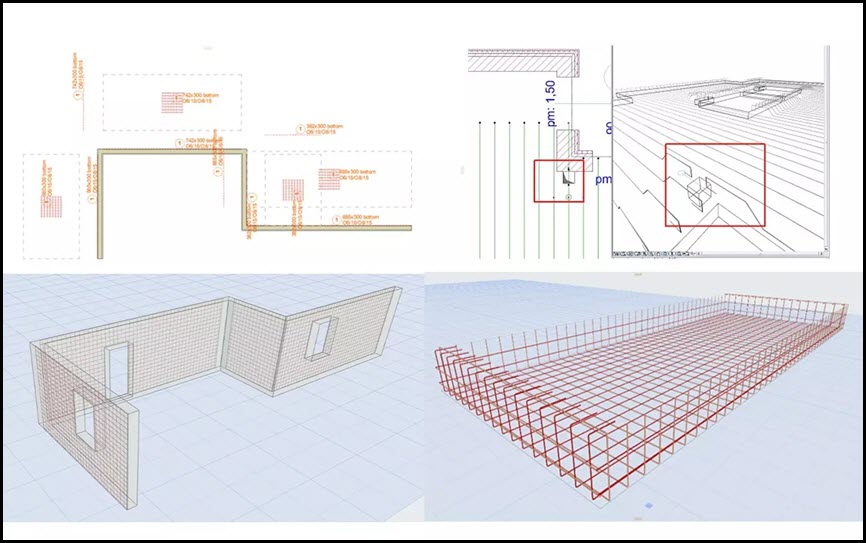
  • รองรับเหล็กเสริมพื้น เสา คาน ผนัง และองค์ประกอบโครงสร้างทุกชนิด
  • จัดทำรายการวัสดุ (Material List / BOQ) อัตโนมัติ
  • ปรับรูปร่าง เหลี่ยม ดัดงอ และความยาวเหล็กได้ตามมาตรฐานวิศวกรรม
  • แสดงผลแบบ 2D และ 3D ช่วยให้ตรวจแบบได้ง่ายขึ้น
  • ลดเวลาการทำแบบโครงสร้างและลดความผิดพลาดจากการทำงานด้วยมือ
  • รองรับการทำงานร่วมกับ BIM ทำให้การออกแบบโครงสร้างมีประสิทธิภาพสูงขึ้น
เหมาะสำหรับใคร
  • วิศวกรโครงสร้างและบริษัทออกแบบโครงสร้าง
  • สถาปนิกที่ใช้ ArchiCAD และต้องการแบบเหล็กเสริมที่ถูกต้อง
  • ผู้เขียนแบบ (Draftsman) และผู้ถอดปริมาณงานก่อสร้าง
  • นักศึกษาและผู้เรียนด้านวิศวกรรมที่ต้องการปลั๊กอินเพิ่มประสิทธิภาพงาน
EPTAR Reinforcement 7 คือปลั๊กอินเสริมสำหรับ ArchiCAD ที่ช่วยทำงานด้านเหล็กเสริมคอนกรีตได้อย่างแม่นยำ รวดเร็ว และเป็นมืออาชีพ รองรับโครงสร้างทุกประเภทและสามารถสร้างแบบ 2D/3D พร้อมรายการวัสดุได้ในคลิกเดียว เหมาะสำหรับผู้ที่ทำงานด้านโครงสร้างและต้องการเพิ่มคุณภาพและความเร็วในการออกแบบอย่างแท้จริง

Features:

New Functions (Version 7)

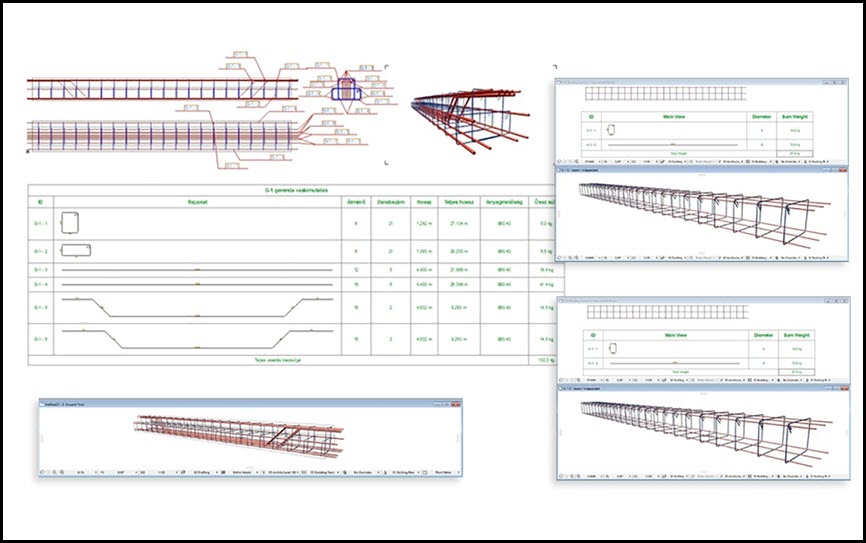
  • Unfolded Bar Drawings: Create unfolded drawings of reinforcement bars for structural components.
  • Cross-Sectional Drawings: Generate cross-sectional drawings of beam and column reinforcements at custom locations.
  • Flexible Component Drawing Placement: Component and cross-sectional drawings can now be placed in separate views, not just on the floor plan. These drawings automatically update when the element's reinforcement is modified, offering greater documentation flexibility.
  • Long Rebar Splices: Support for drawing splices for long rebars.
  • Customizable Bent End Angles: Define custom angle specifications for bent rebar ends.
  • New rf_single_edge element: A new, simpler element for placing independent edge reinforcements with custom-angle stirrups.
  • New Parameter Palette: A dedicated palette for quickly adjusting the most commonly used parameters of selected elements without opening the full Settings window.
  • Thermal Bridge Breaker: A new element available in the library.
  • Multi-Directional Custom Rebar: Create custom reinforcement bars that can be bent in multiple directions, even in 3D.
Main Features (Includes features from earlier versions)

User Interface & Listing

  • Redesigned Tool Palette.
  • New Listing Functions:
  • Selection management palette with element ID and graphical marking.
  • Zoom function for selected elements.
  • Automatic numbering of elements and rebars (with option to start from a specified number).
  • Handling of identical rebars in complex elements.
  • Option to apply prefixes.
  • Ensures elements are not listed twice.
  • Measurement units moved to the header for easier XLS export.
  • Lists now have their own dedicated layer.
  • Cutting list can include additional, custom text content.
  • Automatic Update System: Notifies users when a newer version is available.
  • ABOUT Window: Provides information about the software.
Reinforcement Modeling
  • Column/Pillar Reinforcement:
  • Indication of rebar rotation in 3D (toggleable in Model View Options).
  • Support for multiple stirrup types.
  • Manual resizing option for placed reinforcement.
  • Automatic placement for circular and simple profiled columns with many settings.
  • Slab Reinforcement:
  • Reinforcement only in the core of slabs.
  • Accurate usage of structural core definition.
  • Reinforcement of concrete slab edges by placing shear rebars in corners of holes.
  • Wall Reinforcement:
  • Concrete cover correction.
  • Reinforcement of slanted walls cropped to a roof.
  • Handling of Archicad openings in the wall.
  • Reinforcement of concrete wall edges by placing shear rebars in corners of openings.
  • Automatic reinforcement of straight, slanted, and curved walls.
  • Reverse bending direction of rebars in slab and wall.
  • Beam Reinforcement:
  • Correct section dimensions.
  • Automatic placement in simple profiled beams using rf_beam complex element.
  • Roof Reinforcement:
  • Rebars in two directions and in top/bottom regions with a direction selector.
  • Using RF_EDGE element (single roof).
  • Mesh element in top/bottom regions.
  • Automatic reinforcement with Mesh and Rebar elements.
  • Automatic reinforcement of complex roofs and multiple roof surfaces.
  • General Rebar & Stirrups:
  • Creation of splice drawings for straight rebars.
  • New handling and representation of curved rebar layouts.
  • Option to set custom rebar weight (in kg/m).
  • Option to set rebar diameter by group.
  • Stirrups can be sized by external dimensions, not along the axis.
  • Spiral stirrup for manual or automatic placement.
  • Preset common rebar and stirrup forms; custom polygonal forms can also be set.
  • Steel elements can be rotated for complex constructions (e.g., stairs).
  • Distributable rebars along curves.
  • Multiple layers of rebar can be placed at a time.
  • Placement of upturned or folded mesh.
  • Automatic array of meshes and bars.
  • Unlimited rebar placement.
  • Complex Elements:
  • RF_CHAIR is included in the Cutting list with necessary parameters.
  • ID handling for RF_BEAM, RF_COLUMN, and RF_EDGE elements (yellow sign warning for duplicate IDs).
  • List of beam and column reinforcement elements.
  • Unlimited use of columns, beams, and crownings.
  • Drawing & Display:
  • Extended 2D view types of rebars.
  • Indication of rebar rotation in the 3D window.
  • Exact display of rebar bending in 3D.
  • Many view and display options.
  • Global display settings (2D, 3D, labels, texts).
  • Displaying views on the floor plan.
  • ABOUT window.
Documentation & Output
  • Labeling:
  • Every element can be labeled using the reinforcement's own label.
  • All groups in a beam or pillar can be labeled separately with real parameters.
  • Option to indicate different text content in floorplan labels of rebar and mesh.
  • Intelligent markers.
  • Label option for views and custom label texts.
  • Cutting List:
  • Generation of automatic cutting lists.
  • RF_CHAIR is included with necessary parameters.
  • More exact Cutting list for Mesh and Rebar.
  • The different length rebars can be displayed separately.
  • For mesh, multidirectional rebars can be listed separately.
  • For circular cross-sections, the radius of the stirrup is displayed.
  • Joint length value is displayed.
  • Option to select all elements listed in an already placed Cutting list on the floor plan.
  • Mesh Board Designer.
  • Exporting List: Export to TXT (and implies XLS for further processing as per "Measurement units have been moved from the list to the header to avoid confusion during further processing in XLS export").

What’s new


Screenshot

EPTAR Reinforcement 7 for ArchiCAD 29

EPTAR Reinforcement 7 for ArchiCAD 29

System Requirements

ArchiCAD INT 29 WIN
File Info

Official Website : https://www.eptar.hu/reinforcement
License : Trial
Software Version
: 7.0.5.0
File Name : EPTARR7.0.5.0ACAD29.rar
File Size : 160 MB
File Type
: *.rar
Server : Pixeldrain | Box
Upload date : 10/12/2025
Last modified : 10/12/2025
Password : sbz

*** Hidden text: cannot be quoted. ***


รหัสแตกไฟล์คือ sbz
thank you
 

pleum007

User title ladder


8%
สมัครเมื่อ
20 ธันวาคม 2025
โพสต์
5
Country flag

EPTAR Reinforcement 7 for ArchiCAD 29


ดาวน์โหลด ปลั๊กอิน EPTAR Reinforcement 7.0.5.0 for ArchiCAD 29 WIN ปลั๊กอินสร้างแบบเหล็กเสริมคอนกรีตสำหรับ ArchiCAD 29 ฟรี​


EPTAR Reinforcement 7 เป็นปลั๊กอินสำหรับ ArchiCAD ที่ออกแบบมาเพื่อช่วยสร้างแบบเหล็กเสริมคอนกรีต (Reinforcement) อย่างแม่นยำและเป็นระบบ เหมาะสำหรับวิศวกรโครงสร้าง สถาปนิก และผู้ทำแบบก่อสร้างที่ต้องการเพิ่มความถูกต้องและความรวดเร็วในงานออกแบบโครงสร้างคอนกรีตเสริมเหล็ก

ด้วยเครื่องมืออัตโนมัติและฟังก์ชันที่ครบครัน EPTAR Reinforcement 7 ช่วยสร้าง ตีราคา และจัดทำรายการเหล็กเสริม (BOQ) ได้ง่ายขึ้น รองรับการทำงานร่วมกับโมเดล BIM ของ ArchiCAD ทำให้การทำงานด้านโครงสร้างเป็นระบบมากขึ้น ลดข้อผิดพลาด และช่วยให้ส่งงานได้เร็วขึ้น

จุดเด่นของ EPTAR Reinforcement 7
  • สร้างเหล็กเสริมคอนกรีตใน ArchiCAD ได้แบบอัตโนมัติและปรับแต่งได้
  • รองรับเหล็กเสริมพื้น เสา คาน ผนัง และองค์ประกอบโครงสร้างทุกชนิด
  • จัดทำรายการวัสดุ (Material List / BOQ) อัตโนมัติ
  • ปรับรูปร่าง เหลี่ยม ดัดงอ และความยาวเหล็กได้ตามมาตรฐานวิศวกรรม
  • แสดงผลแบบ 2D และ 3D ช่วยให้ตรวจแบบได้ง่ายขึ้น
  • ลดเวลาการทำแบบโครงสร้างและลดความผิดพลาดจากการทำงานด้วยมือ
  • รองรับการทำงานร่วมกับ BIM ทำให้การออกแบบโครงสร้างมีประสิทธิภาพสูงขึ้น
เหมาะสำหรับใคร
  • วิศวกรโครงสร้างและบริษัทออกแบบโครงสร้าง
  • สถาปนิกที่ใช้ ArchiCAD และต้องการแบบเหล็กเสริมที่ถูกต้อง
  • ผู้เขียนแบบ (Draftsman) และผู้ถอดปริมาณงานก่อสร้าง
  • นักศึกษาและผู้เรียนด้านวิศวกรรมที่ต้องการปลั๊กอินเพิ่มประสิทธิภาพงาน
EPTAR Reinforcement 7 คือปลั๊กอินเสริมสำหรับ ArchiCAD ที่ช่วยทำงานด้านเหล็กเสริมคอนกรีตได้อย่างแม่นยำ รวดเร็ว และเป็นมืออาชีพ รองรับโครงสร้างทุกประเภทและสามารถสร้างแบบ 2D/3D พร้อมรายการวัสดุได้ในคลิกเดียว เหมาะสำหรับผู้ที่ทำงานด้านโครงสร้างและต้องการเพิ่มคุณภาพและความเร็วในการออกแบบอย่างแท้จริง

Features:

New Functions (Version 7)

  • Unfolded Bar Drawings: Create unfolded drawings of reinforcement bars for structural components.
  • Cross-Sectional Drawings: Generate cross-sectional drawings of beam and column reinforcements at custom locations.
  • Flexible Component Drawing Placement: Component and cross-sectional drawings can now be placed in separate views, not just on the floor plan. These drawings automatically update when the element's reinforcement is modified, offering greater documentation flexibility.
  • Long Rebar Splices: Support for drawing splices for long rebars.
  • Customizable Bent End Angles: Define custom angle specifications for bent rebar ends.
  • New rf_single_edge element: A new, simpler element for placing independent edge reinforcements with custom-angle stirrups.
  • New Parameter Palette: A dedicated palette for quickly adjusting the most commonly used parameters of selected elements without opening the full Settings window.
  • Thermal Bridge Breaker: A new element available in the library.
  • Multi-Directional Custom Rebar: Create custom reinforcement bars that can be bent in multiple directions, even in 3D.
Main Features (Includes features from earlier versions)

User Interface & Listing

  • Redesigned Tool Palette.
  • New Listing Functions:
  • Selection management palette with element ID and graphical marking.
  • Zoom function for selected elements.
  • Automatic numbering of elements and rebars (with option to start from a specified number).
  • Handling of identical rebars in complex elements.
  • Option to apply prefixes.
  • Ensures elements are not listed twice.
  • Measurement units moved to the header for easier XLS export.
  • Lists now have their own dedicated layer.
  • Cutting list can include additional, custom text content.
  • Automatic Update System: Notifies users when a newer version is available.
  • ABOUT Window: Provides information about the software.
Reinforcement Modeling
  • Column/Pillar Reinforcement:
  • Indication of rebar rotation in 3D (toggleable in Model View Options).
  • Support for multiple stirrup types.
  • Manual resizing option for placed reinforcement.
  • Automatic placement for circular and simple profiled columns with many settings.
  • Slab Reinforcement:
  • Reinforcement only in the core of slabs.
  • Accurate usage of structural core definition.
  • Reinforcement of concrete slab edges by placing shear rebars in corners of holes.
  • Wall Reinforcement:
  • Concrete cover correction.
  • Reinforcement of slanted walls cropped to a roof.
  • Handling of Archicad openings in the wall.
  • Reinforcement of concrete wall edges by placing shear rebars in corners of openings.
  • Automatic reinforcement of straight, slanted, and curved walls.
  • Reverse bending direction of rebars in slab and wall.
  • Beam Reinforcement:
  • Correct section dimensions.
  • Automatic placement in simple profiled beams using rf_beam complex element.
  • Roof Reinforcement:
  • Rebars in two directions and in top/bottom regions with a direction selector.
  • Using RF_EDGE element (single roof).
  • Mesh element in top/bottom regions.
  • Automatic reinforcement with Mesh and Rebar elements.
  • Automatic reinforcement of complex roofs and multiple roof surfaces.
  • General Rebar & Stirrups:
  • Creation of splice drawings for straight rebars.
  • New handling and representation of curved rebar layouts.
  • Option to set custom rebar weight (in kg/m).
  • Option to set rebar diameter by group.
  • Stirrups can be sized by external dimensions, not along the axis.
  • Spiral stirrup for manual or automatic placement.
  • Preset common rebar and stirrup forms; custom polygonal forms can also be set.
  • Steel elements can be rotated for complex constructions (e.g., stairs).
  • Distributable rebars along curves.
  • Multiple layers of rebar can be placed at a time.
  • Placement of upturned or folded mesh.
  • Automatic array of meshes and bars.
  • Unlimited rebar placement.
  • Complex Elements:
  • RF_CHAIR is included in the Cutting list with necessary parameters.
  • ID handling for RF_BEAM, RF_COLUMN, and RF_EDGE elements (yellow sign warning for duplicate IDs).
  • List of beam and column reinforcement elements.
  • Unlimited use of columns, beams, and crownings.
  • Drawing & Display:
  • Extended 2D view types of rebars.
  • Indication of rebar rotation in the 3D window.
  • Exact display of rebar bending in 3D.
  • Many view and display options.
  • Global display settings (2D, 3D, labels, texts).
  • Displaying views on the floor plan.
  • ABOUT window.
Documentation & Output
  • Labeling:
  • Every element can be labeled using the reinforcement's own label.
  • All groups in a beam or pillar can be labeled separately with real parameters.
  • Option to indicate different text content in floorplan labels of rebar and mesh.
  • Intelligent markers.
  • Label option for views and custom label texts.
  • Cutting List:
  • Generation of automatic cutting lists.
  • RF_CHAIR is included with necessary parameters.
  • More exact Cutting list for Mesh and Rebar.
  • The different length rebars can be displayed separately.
  • For mesh, multidirectional rebars can be listed separately.
  • For circular cross-sections, the radius of the stirrup is displayed.
  • Joint length value is displayed.
  • Option to select all elements listed in an already placed Cutting list on the floor plan.
  • Mesh Board Designer.
  • Exporting List: Export to TXT (and implies XLS for further processing as per "Measurement units have been moved from the list to the header to avoid confusion during further processing in XLS export").

What’s new


Screenshot

EPTAR Reinforcement 7 for ArchiCAD 29

EPTAR Reinforcement 7 for ArchiCAD 29

System Requirements

ArchiCAD INT 29 WIN
File Info

Official Website : https://www.eptar.hu/reinforcement
License : Trial
Software Version
: 7.0.5.0
File Name : EPTARR7.0.5.0ACAD29.rar
File Size : 160 MB
File Type
: *.rar
Server : Pixeldrain | Box
Upload date : 10/12/2025
Last modified : 10/12/2025
Password : sbz

*** Hidden text: cannot be quoted. ***


รหัสแตกไฟล์คือ sbz
thx
 

pleum007

User title ladder


8%
สมัครเมื่อ
20 ธันวาคม 2025
โพสต์
5
Country flag

EPTAR Reinforcement 7 for ArchiCAD 29


ดาวน์โหลด ปลั๊กอิน EPTAR Reinforcement 7.0.5.0 for ArchiCAD 29 WIN ปลั๊กอินสร้างแบบเหล็กเสริมคอนกรีตสำหรับ ArchiCAD 29 ฟรี​


EPTAR Reinforcement 7 เป็นปลั๊กอินสำหรับ ArchiCAD ที่ออกแบบมาเพื่อช่วยสร้างแบบเหล็กเสริมคอนกรีต (Reinforcement) อย่างแม่นยำและเป็นระบบ เหมาะสำหรับวิศวกรโครงสร้าง สถาปนิก และผู้ทำแบบก่อสร้างที่ต้องการเพิ่มความถูกต้องและความรวดเร็วในงานออกแบบโครงสร้างคอนกรีตเสริมเหล็ก

ด้วยเครื่องมืออัตโนมัติและฟังก์ชันที่ครบครัน EPTAR Reinforcement 7 ช่วยสร้าง ตีราคา และจัดทำรายการเหล็กเสริม (BOQ) ได้ง่ายขึ้น รองรับการทำงานร่วมกับโมเดล BIM ของ ArchiCAD ทำให้การทำงานด้านโครงสร้างเป็นระบบมากขึ้น ลดข้อผิดพลาด และช่วยให้ส่งงานได้เร็วขึ้น

จุดเด่นของ EPTAR Reinforcement 7
  • สร้างเหล็กเสริมคอนกรีตใน ArchiCAD ได้แบบอัตโนมัติและปรับแต่งได้
  • รองรับเหล็กเสริมพื้น เสา คาน ผนัง และองค์ประกอบโครงสร้างทุกชนิด
  • จัดทำรายการวัสดุ (Material List / BOQ) อัตโนมัติ
  • ปรับรูปร่าง เหลี่ยม ดัดงอ และความยาวเหล็กได้ตามมาตรฐานวิศวกรรม
  • แสดงผลแบบ 2D และ 3D ช่วยให้ตรวจแบบได้ง่ายขึ้น
  • ลดเวลาการทำแบบโครงสร้างและลดความผิดพลาดจากการทำงานด้วยมือ
  • รองรับการทำงานร่วมกับ BIM ทำให้การออกแบบโครงสร้างมีประสิทธิภาพสูงขึ้น
เหมาะสำหรับใคร
  • วิศวกรโครงสร้างและบริษัทออกแบบโครงสร้าง
  • สถาปนิกที่ใช้ ArchiCAD และต้องการแบบเหล็กเสริมที่ถูกต้อง
  • ผู้เขียนแบบ (Draftsman) และผู้ถอดปริมาณงานก่อสร้าง
  • นักศึกษาและผู้เรียนด้านวิศวกรรมที่ต้องการปลั๊กอินเพิ่มประสิทธิภาพงาน
EPTAR Reinforcement 7 คือปลั๊กอินเสริมสำหรับ ArchiCAD ที่ช่วยทำงานด้านเหล็กเสริมคอนกรีตได้อย่างแม่นยำ รวดเร็ว และเป็นมืออาชีพ รองรับโครงสร้างทุกประเภทและสามารถสร้างแบบ 2D/3D พร้อมรายการวัสดุได้ในคลิกเดียว เหมาะสำหรับผู้ที่ทำงานด้านโครงสร้างและต้องการเพิ่มคุณภาพและความเร็วในการออกแบบอย่างแท้จริง

Features:

New Functions (Version 7)

  • Unfolded Bar Drawings: Create unfolded drawings of reinforcement bars for structural components.
  • Cross-Sectional Drawings: Generate cross-sectional drawings of beam and column reinforcements at custom locations.
  • Flexible Component Drawing Placement: Component and cross-sectional drawings can now be placed in separate views, not just on the floor plan. These drawings automatically update when the element's reinforcement is modified, offering greater documentation flexibility.
  • Long Rebar Splices: Support for drawing splices for long rebars.
  • Customizable Bent End Angles: Define custom angle specifications for bent rebar ends.
  • New rf_single_edge element: A new, simpler element for placing independent edge reinforcements with custom-angle stirrups.
  • New Parameter Palette: A dedicated palette for quickly adjusting the most commonly used parameters of selected elements without opening the full Settings window.
  • Thermal Bridge Breaker: A new element available in the library.
  • Multi-Directional Custom Rebar: Create custom reinforcement bars that can be bent in multiple directions, even in 3D.
Main Features (Includes features from earlier versions)

User Interface & Listing

  • Redesigned Tool Palette.
  • New Listing Functions:
  • Selection management palette with element ID and graphical marking.
  • Zoom function for selected elements.
  • Automatic numbering of elements and rebars (with option to start from a specified number).
  • Handling of identical rebars in complex elements.
  • Option to apply prefixes.
  • Ensures elements are not listed twice.
  • Measurement units moved to the header for easier XLS export.
  • Lists now have their own dedicated layer.
  • Cutting list can include additional, custom text content.
  • Automatic Update System: Notifies users when a newer version is available.
  • ABOUT Window: Provides information about the software.
Reinforcement Modeling
  • Column/Pillar Reinforcement:
  • Indication of rebar rotation in 3D (toggleable in Model View Options).
  • Support for multiple stirrup types.
  • Manual resizing option for placed reinforcement.
  • Automatic placement for circular and simple profiled columns with many settings.
  • Slab Reinforcement:
  • Reinforcement only in the core of slabs.
  • Accurate usage of structural core definition.
  • Reinforcement of concrete slab edges by placing shear rebars in corners of holes.
  • Wall Reinforcement:
  • Concrete cover correction.
  • Reinforcement of slanted walls cropped to a roof.
  • Handling of Archicad openings in the wall.
  • Reinforcement of concrete wall edges by placing shear rebars in corners of openings.
  • Automatic reinforcement of straight, slanted, and curved walls.
  • Reverse bending direction of rebars in slab and wall.
  • Beam Reinforcement:
  • Correct section dimensions.
  • Automatic placement in simple profiled beams using rf_beam complex element.
  • Roof Reinforcement:
  • Rebars in two directions and in top/bottom regions with a direction selector.
  • Using RF_EDGE element (single roof).
  • Mesh element in top/bottom regions.
  • Automatic reinforcement with Mesh and Rebar elements.
  • Automatic reinforcement of complex roofs and multiple roof surfaces.
  • General Rebar & Stirrups:
  • Creation of splice drawings for straight rebars.
  • New handling and representation of curved rebar layouts.
  • Option to set custom rebar weight (in kg/m).
  • Option to set rebar diameter by group.
  • Stirrups can be sized by external dimensions, not along the axis.
  • Spiral stirrup for manual or automatic placement.
  • Preset common rebar and stirrup forms; custom polygonal forms can also be set.
  • Steel elements can be rotated for complex constructions (e.g., stairs).
  • Distributable rebars along curves.
  • Multiple layers of rebar can be placed at a time.
  • Placement of upturned or folded mesh.
  • Automatic array of meshes and bars.
  • Unlimited rebar placement.
  • Complex Elements:
  • RF_CHAIR is included in the Cutting list with necessary parameters.
  • ID handling for RF_BEAM, RF_COLUMN, and RF_EDGE elements (yellow sign warning for duplicate IDs).
  • List of beam and column reinforcement elements.
  • Unlimited use of columns, beams, and crownings.
  • Drawing & Display:
  • Extended 2D view types of rebars.
  • Indication of rebar rotation in the 3D window.
  • Exact display of rebar bending in 3D.
  • Many view and display options.
  • Global display settings (2D, 3D, labels, texts).
  • Displaying views on the floor plan.
  • ABOUT window.
Documentation & Output
  • Labeling:
  • Every element can be labeled using the reinforcement's own label.
  • All groups in a beam or pillar can be labeled separately with real parameters.
  • Option to indicate different text content in floorplan labels of rebar and mesh.
  • Intelligent markers.
  • Label option for views and custom label texts.
  • Cutting List:
  • Generation of automatic cutting lists.
  • RF_CHAIR is included with necessary parameters.
  • More exact Cutting list for Mesh and Rebar.
  • The different length rebars can be displayed separately.
  • For mesh, multidirectional rebars can be listed separately.
  • For circular cross-sections, the radius of the stirrup is displayed.
  • Joint length value is displayed.
  • Option to select all elements listed in an already placed Cutting list on the floor plan.
  • Mesh Board Designer.
  • Exporting List: Export to TXT (and implies XLS for further processing as per "Measurement units have been moved from the list to the header to avoid confusion during further processing in XLS export").

What’s new


Screenshot

EPTAR Reinforcement 7 for ArchiCAD 29

EPTAR Reinforcement 7 for ArchiCAD 29

System Requirements

ArchiCAD INT 29 WIN
File Info

Official Website : https://www.eptar.hu/reinforcement
License : Trial
Software Version
: 7.0.5.0
File Name : EPTARR7.0.5.0ACAD29.rar
File Size : 160 MB
File Type
: *.rar
Server : Pixeldrain | Box
Upload date : 10/12/2025
Last modified : 10/12/2025
Password : sbz

*** Hidden text: cannot be quoted. ***


รหัสแตกไฟล์คือ sbz
thxdd
 

Akpocky

User title ladder


8%
สมัครเมื่อ
18 สิงหาคม 2024
โพสต์
5
Country flag
มีversion นี้แต่ ให้ใช้กับ Archicad 26 ได้มั้ยครับ
 
สมัครเมื่อ
25 ธันวาคม 2025
โพสต์
3
Country flag

EPTAR Reinforcement 7 for ArchiCAD 29


ดาวน์โหลด ปลั๊กอิน EPTAR Reinforcement 7.0.5.0 for ArchiCAD 29 WIN ปลั๊กอินสร้างแบบเหล็กเสริมคอนกรีตสำหรับ ArchiCAD 29 ฟรี​


EPTAR Reinforcement 7 เป็นปลั๊กอินสำหรับ ArchiCAD ที่ออกแบบมาเพื่อช่วยสร้างแบบเหล็กเสริมคอนกรีต (Reinforcement) อย่างแม่นยำและเป็นระบบ เหมาะสำหรับวิศวกรโครงสร้าง สถาปนิก และผู้ทำแบบก่อสร้างที่ต้องการเพิ่มความถูกต้องและความรวดเร็วในงานออกแบบโครงสร้างคอนกรีตเสริมเหล็ก

ด้วยเครื่องมืออัตโนมัติและฟังก์ชันที่ครบครัน EPTAR Reinforcement 7 ช่วยสร้าง ตีราคา และจัดทำรายการเหล็กเสริม (BOQ) ได้ง่ายขึ้น รองรับการทำงานร่วมกับโมเดล BIM ของ ArchiCAD ทำให้การทำงานด้านโครงสร้างเป็นระบบมากขึ้น ลดข้อผิดพลาด และช่วยให้ส่งงานได้เร็วขึ้น

จุดเด่นของ EPTAR Reinforcement 7
  • สร้างเหล็กเสริมคอนกรีตใน ArchiCAD ได้แบบอัตโนมัติและปรับแต่งได้
  • รองรับเหล็กเสริมพื้น เสา คาน ผนัง และองค์ประกอบโครงสร้างทุกชนิด
  • จัดทำรายการวัสดุ (Material List / BOQ) อัตโนมัติ
  • ปรับรูปร่าง เหลี่ยม ดัดงอ และความยาวเหล็กได้ตามมาตรฐานวิศวกรรม
  • แสดงผลแบบ 2D และ 3D ช่วยให้ตรวจแบบได้ง่ายขึ้น
  • ลดเวลาการทำแบบโครงสร้างและลดความผิดพลาดจากการทำงานด้วยมือ
  • รองรับการทำงานร่วมกับ BIM ทำให้การออกแบบโครงสร้างมีประสิทธิภาพสูงขึ้น
เหมาะสำหรับใคร
  • วิศวกรโครงสร้างและบริษัทออกแบบโครงสร้าง
  • สถาปนิกที่ใช้ ArchiCAD และต้องการแบบเหล็กเสริมที่ถูกต้อง
  • ผู้เขียนแบบ (Draftsman) และผู้ถอดปริมาณงานก่อสร้าง
  • นักศึกษาและผู้เรียนด้านวิศวกรรมที่ต้องการปลั๊กอินเพิ่มประสิทธิภาพงาน
EPTAR Reinforcement 7 คือปลั๊กอินเสริมสำหรับ ArchiCAD ที่ช่วยทำงานด้านเหล็กเสริมคอนกรีตได้อย่างแม่นยำ รวดเร็ว และเป็นมืออาชีพ รองรับโครงสร้างทุกประเภทและสามารถสร้างแบบ 2D/3D พร้อมรายการวัสดุได้ในคลิกเดียว เหมาะสำหรับผู้ที่ทำงานด้านโครงสร้างและต้องการเพิ่มคุณภาพและความเร็วในการออกแบบอย่างแท้จริง

Features:

New Functions (Version 7)

  • Unfolded Bar Drawings: Create unfolded drawings of reinforcement bars for structural components.
  • Cross-Sectional Drawings: Generate cross-sectional drawings of beam and column reinforcements at custom locations.
  • Flexible Component Drawing Placement: Component and cross-sectional drawings can now be placed in separate views, not just on the floor plan. These drawings automatically update when the element's reinforcement is modified, offering greater documentation flexibility.
  • Long Rebar Splices: Support for drawing splices for long rebars.
  • Customizable Bent End Angles: Define custom angle specifications for bent rebar ends.
  • New rf_single_edge element: A new, simpler element for placing independent edge reinforcements with custom-angle stirrups.
  • New Parameter Palette: A dedicated palette for quickly adjusting the most commonly used parameters of selected elements without opening the full Settings window.
  • Thermal Bridge Breaker: A new element available in the library.
  • Multi-Directional Custom Rebar: Create custom reinforcement bars that can be bent in multiple directions, even in 3D.
Main Features (Includes features from earlier versions)

User Interface & Listing

  • Redesigned Tool Palette.
  • New Listing Functions:
  • Selection management palette with element ID and graphical marking.
  • Zoom function for selected elements.
  • Automatic numbering of elements and rebars (with option to start from a specified number).
  • Handling of identical rebars in complex elements.
  • Option to apply prefixes.
  • Ensures elements are not listed twice.
  • Measurement units moved to the header for easier XLS export.
  • Lists now have their own dedicated layer.
  • Cutting list can include additional, custom text content.
  • Automatic Update System: Notifies users when a newer version is available.
  • ABOUT Window: Provides information about the software.
Reinforcement Modeling
  • Column/Pillar Reinforcement:
  • Indication of rebar rotation in 3D (toggleable in Model View Options).
  • Support for multiple stirrup types.
  • Manual resizing option for placed reinforcement.
  • Automatic placement for circular and simple profiled columns with many settings.
  • Slab Reinforcement:
  • Reinforcement only in the core of slabs.
  • Accurate usage of structural core definition.
  • Reinforcement of concrete slab edges by placing shear rebars in corners of holes.
  • Wall Reinforcement:
  • Concrete cover correction.
  • Reinforcement of slanted walls cropped to a roof.
  • Handling of Archicad openings in the wall.
  • Reinforcement of concrete wall edges by placing shear rebars in corners of openings.
  • Automatic reinforcement of straight, slanted, and curved walls.
  • Reverse bending direction of rebars in slab and wall.
  • Beam Reinforcement:
  • Correct section dimensions.
  • Automatic placement in simple profiled beams using rf_beam complex element.
  • Roof Reinforcement:
  • Rebars in two directions and in top/bottom regions with a direction selector.
  • Using RF_EDGE element (single roof).
  • Mesh element in top/bottom regions.
  • Automatic reinforcement with Mesh and Rebar elements.
  • Automatic reinforcement of complex roofs and multiple roof surfaces.
  • General Rebar & Stirrups:
  • Creation of splice drawings for straight rebars.
  • New handling and representation of curved rebar layouts.
  • Option to set custom rebar weight (in kg/m).
  • Option to set rebar diameter by group.
  • Stirrups can be sized by external dimensions, not along the axis.
  • Spiral stirrup for manual or automatic placement.
  • Preset common rebar and stirrup forms; custom polygonal forms can also be set.
  • Steel elements can be rotated for complex constructions (e.g., stairs).
  • Distributable rebars along curves.
  • Multiple layers of rebar can be placed at a time.
  • Placement of upturned or folded mesh.
  • Automatic array of meshes and bars.
  • Unlimited rebar placement.
  • Complex Elements:
  • RF_CHAIR is included in the Cutting list with necessary parameters.
  • ID handling for RF_BEAM, RF_COLUMN, and RF_EDGE elements (yellow sign warning for duplicate IDs).
  • List of beam and column reinforcement elements.
  • Unlimited use of columns, beams, and crownings.
  • Drawing & Display:
  • Extended 2D view types of rebars.
  • Indication of rebar rotation in the 3D window.
  • Exact display of rebar bending in 3D.
  • Many view and display options.
  • Global display settings (2D, 3D, labels, texts).
  • Displaying views on the floor plan.
  • ABOUT window.
Documentation & Output
  • Labeling:
  • Every element can be labeled using the reinforcement's own label.
  • All groups in a beam or pillar can be labeled separately with real parameters.
  • Option to indicate different text content in floorplan labels of rebar and mesh.
  • Intelligent markers.
  • Label option for views and custom label texts.
  • Cutting List:
  • Generation of automatic cutting lists.
  • RF_CHAIR is included with necessary parameters.
  • More exact Cutting list for Mesh and Rebar.
  • The different length rebars can be displayed separately.
  • For mesh, multidirectional rebars can be listed separately.
  • For circular cross-sections, the radius of the stirrup is displayed.
  • Joint length value is displayed.
  • Option to select all elements listed in an already placed Cutting list on the floor plan.
  • Mesh Board Designer.
  • Exporting List: Export to TXT (and implies XLS for further processing as per "Measurement units have been moved from the list to the header to avoid confusion during further processing in XLS export").

What’s new


Screenshot

EPTAR Reinforcement 7 for ArchiCAD 29

EPTAR Reinforcement 7 for ArchiCAD 29

System Requirements

ArchiCAD INT 29 WIN
File Info

Official Website : https://www.eptar.hu/reinforcement
License : Trial
Software Version
: 7.0.5.0
File Name : EPTARR7.0.5.0ACAD29.rar
File Size : 160 MB
File Type
: *.rar
Server : Pixeldrain | Box
Upload date : 10/12/2025
Last modified : 10/12/2025
Password : sbz

*** Hidden text: cannot be quoted. ***


รหัสแตกไฟล์คือ sbz
Good
 

Kritsada Suekhan

User title ladder


8%
สมัครเมื่อ
4 สิงหาคม 2024
โพสต์
6
Country flag

EPTAR Reinforcement 7 for ArchiCAD 29


ดาวน์โหลด ปลั๊กอิน EPTAR Reinforcement 7.0.5.0 for ArchiCAD 29 WIN ปลั๊กอินสร้างแบบเหล็กเสริมคอนกรีตสำหรับ ArchiCAD 29 ฟรี​


EPTAR Reinforcement 7 เป็นปลั๊กอินสำหรับ ArchiCAD ที่ออกแบบมาเพื่อช่วยสร้างแบบเหล็กเสริมคอนกรีต (Reinforcement) อย่างแม่นยำและเป็นระบบ เหมาะสำหรับวิศวกรโครงสร้าง สถาปนิก และผู้ทำแบบก่อสร้างที่ต้องการเพิ่มความถูกต้องและความรวดเร็วในงานออกแบบโครงสร้างคอนกรีตเสริมเหล็ก

ด้วยเครื่องมืออัตโนมัติและฟังก์ชันที่ครบครัน EPTAR Reinforcement 7 ช่วยสร้าง ตีราคา และจัดทำรายการเหล็กเสริม (BOQ) ได้ง่ายขึ้น รองรับการทำงานร่วมกับโมเดล BIM ของ ArchiCAD ทำให้การทำงานด้านโครงสร้างเป็นระบบมากขึ้น ลดข้อผิดพลาด และช่วยให้ส่งงานได้เร็วขึ้น

จุดเด่นของ EPTAR Reinforcement 7
  • สร้างเหล็กเสริมคอนกรีตใน ArchiCAD ได้แบบอัตโนมัติและปรับแต่งได้
  • รองรับเหล็กเสริมพื้น เสา คาน ผนัง และองค์ประกอบโครงสร้างทุกชนิด
  • จัดทำรายการวัสดุ (Material List / BOQ) อัตโนมัติ
  • ปรับรูปร่าง เหลี่ยม ดัดงอ และความยาวเหล็กได้ตามมาตรฐานวิศวกรรม
  • แสดงผลแบบ 2D และ 3D ช่วยให้ตรวจแบบได้ง่ายขึ้น
  • ลดเวลาการทำแบบโครงสร้างและลดความผิดพลาดจากการทำงานด้วยมือ
  • รองรับการทำงานร่วมกับ BIM ทำให้การออกแบบโครงสร้างมีประสิทธิภาพสูงขึ้น
เหมาะสำหรับใคร
  • วิศวกรโครงสร้างและบริษัทออกแบบโครงสร้าง
  • สถาปนิกที่ใช้ ArchiCAD และต้องการแบบเหล็กเสริมที่ถูกต้อง
  • ผู้เขียนแบบ (Draftsman) และผู้ถอดปริมาณงานก่อสร้าง
  • นักศึกษาและผู้เรียนด้านวิศวกรรมที่ต้องการปลั๊กอินเพิ่มประสิทธิภาพงาน
EPTAR Reinforcement 7 คือปลั๊กอินเสริมสำหรับ ArchiCAD ที่ช่วยทำงานด้านเหล็กเสริมคอนกรีตได้อย่างแม่นยำ รวดเร็ว และเป็นมืออาชีพ รองรับโครงสร้างทุกประเภทและสามารถสร้างแบบ 2D/3D พร้อมรายการวัสดุได้ในคลิกเดียว เหมาะสำหรับผู้ที่ทำงานด้านโครงสร้างและต้องการเพิ่มคุณภาพและความเร็วในการออกแบบอย่างแท้จริง

Features:

New Functions (Version 7)

  • Unfolded Bar Drawings: Create unfolded drawings of reinforcement bars for structural components.
  • Cross-Sectional Drawings: Generate cross-sectional drawings of beam and column reinforcements at custom locations.
  • Flexible Component Drawing Placement: Component and cross-sectional drawings can now be placed in separate views, not just on the floor plan. These drawings automatically update when the element's reinforcement is modified, offering greater documentation flexibility.
  • Long Rebar Splices: Support for drawing splices for long rebars.
  • Customizable Bent End Angles: Define custom angle specifications for bent rebar ends.
  • New rf_single_edge element: A new, simpler element for placing independent edge reinforcements with custom-angle stirrups.
  • New Parameter Palette: A dedicated palette for quickly adjusting the most commonly used parameters of selected elements without opening the full Settings window.
  • Thermal Bridge Breaker: A new element available in the library.
  • Multi-Directional Custom Rebar: Create custom reinforcement bars that can be bent in multiple directions, even in 3D.
Main Features (Includes features from earlier versions)

User Interface & Listing

  • Redesigned Tool Palette.
  • New Listing Functions:
  • Selection management palette with element ID and graphical marking.
  • Zoom function for selected elements.
  • Automatic numbering of elements and rebars (with option to start from a specified number).
  • Handling of identical rebars in complex elements.
  • Option to apply prefixes.
  • Ensures elements are not listed twice.
  • Measurement units moved to the header for easier XLS export.
  • Lists now have their own dedicated layer.
  • Cutting list can include additional, custom text content.
  • Automatic Update System: Notifies users when a newer version is available.
  • ABOUT Window: Provides information about the software.
Reinforcement Modeling
  • Column/Pillar Reinforcement:
  • Indication of rebar rotation in 3D (toggleable in Model View Options).
  • Support for multiple stirrup types.
  • Manual resizing option for placed reinforcement.
  • Automatic placement for circular and simple profiled columns with many settings.
  • Slab Reinforcement:
  • Reinforcement only in the core of slabs.
  • Accurate usage of structural core definition.
  • Reinforcement of concrete slab edges by placing shear rebars in corners of holes.
  • Wall Reinforcement:
  • Concrete cover correction.
  • Reinforcement of slanted walls cropped to a roof.
  • Handling of Archicad openings in the wall.
  • Reinforcement of concrete wall edges by placing shear rebars in corners of openings.
  • Automatic reinforcement of straight, slanted, and curved walls.
  • Reverse bending direction of rebars in slab and wall.
  • Beam Reinforcement:
  • Correct section dimensions.
  • Automatic placement in simple profiled beams using rf_beam complex element.
  • Roof Reinforcement:
  • Rebars in two directions and in top/bottom regions with a direction selector.
  • Using RF_EDGE element (single roof).
  • Mesh element in top/bottom regions.
  • Automatic reinforcement with Mesh and Rebar elements.
  • Automatic reinforcement of complex roofs and multiple roof surfaces.
  • General Rebar & Stirrups:
  • Creation of splice drawings for straight rebars.
  • New handling and representation of curved rebar layouts.
  • Option to set custom rebar weight (in kg/m).
  • Option to set rebar diameter by group.
  • Stirrups can be sized by external dimensions, not along the axis.
  • Spiral stirrup for manual or automatic placement.
  • Preset common rebar and stirrup forms; custom polygonal forms can also be set.
  • Steel elements can be rotated for complex constructions (e.g., stairs).
  • Distributable rebars along curves.
  • Multiple layers of rebar can be placed at a time.
  • Placement of upturned or folded mesh.
  • Automatic array of meshes and bars.
  • Unlimited rebar placement.
  • Complex Elements:
  • RF_CHAIR is included in the Cutting list with necessary parameters.
  • ID handling for RF_BEAM, RF_COLUMN, and RF_EDGE elements (yellow sign warning for duplicate IDs).
  • List of beam and column reinforcement elements.
  • Unlimited use of columns, beams, and crownings.
  • Drawing & Display:
  • Extended 2D view types of rebars.
  • Indication of rebar rotation in the 3D window.
  • Exact display of rebar bending in 3D.
  • Many view and display options.
  • Global display settings (2D, 3D, labels, texts).
  • Displaying views on the floor plan.
  • ABOUT window.
Documentation & Output
  • Labeling:
  • Every element can be labeled using the reinforcement's own label.
  • All groups in a beam or pillar can be labeled separately with real parameters.
  • Option to indicate different text content in floorplan labels of rebar and mesh.
  • Intelligent markers.
  • Label option for views and custom label texts.
  • Cutting List:
  • Generation of automatic cutting lists.
  • RF_CHAIR is included with necessary parameters.
  • More exact Cutting list for Mesh and Rebar.
  • The different length rebars can be displayed separately.
  • For mesh, multidirectional rebars can be listed separately.
  • For circular cross-sections, the radius of the stirrup is displayed.
  • Joint length value is displayed.
  • Option to select all elements listed in an already placed Cutting list on the floor plan.
  • Mesh Board Designer.
  • Exporting List: Export to TXT (and implies XLS for further processing as per "Measurement units have been moved from the list to the header to avoid confusion during further processing in XLS export").

What’s new


Screenshot

EPTAR Reinforcement 7 for ArchiCAD 29

EPTAR Reinforcement 7 for ArchiCAD 29

System Requirements

ArchiCAD INT 29 WIN
File Info

Official Website : https://www.eptar.hu/reinforcement
License : Trial
Software Version
: 7.0.5.0
File Name : EPTARR7.0.5.0ACAD29.rar
File Size : 160 MB
File Type
: *.rar
Server : Pixeldrain | Box
Upload date : 10/12/2025
Last modified : 10/12/2025
Password : sbz

*** Hidden text: cannot be quoted. ***


รหัสแตกไฟล์คือ sbz
thank you very much
 

daciss

 
0%
สมัครเมื่อ
8 มกราคม 2026
โพสต์
1

EPTAR Reinforcement 7 for ArchiCAD 29


ดาวน์โหลด ปลั๊กอิน EPTAR Reinforcement 7.0.5.0 for ArchiCAD 29 WIN ปลั๊กอินสร้างแบบเหล็กเสริมคอนกรีตสำหรับ ArchiCAD 29 ฟรี​


EPTAR Reinforcement 7 เป็นปลั๊กอินสำหรับ ArchiCAD ที่ออกแบบมาเพื่อช่วยสร้างแบบเหล็กเสริมคอนกรีต (Reinforcement) อย่างแม่นยำและเป็นระบบ เหมาะสำหรับวิศวกรโครงสร้าง สถาปนิก และผู้ทำแบบก่อสร้างที่ต้องการเพิ่มความถูกต้องและความรวดเร็วในงานออกแบบโครงสร้างคอนกรีตเสริมเหล็ก

ด้วยเครื่องมืออัตโนมัติและฟังก์ชันที่ครบครัน EPTAR Reinforcement 7 ช่วยสร้าง ตีราคา และจัดทำรายการเหล็กเสริม (BOQ) ได้ง่ายขึ้น รองรับการทำงานร่วมกับโมเดล BIM ของ ArchiCAD ทำให้การทำงานด้านโครงสร้างเป็นระบบมากขึ้น ลดข้อผิดพลาด และช่วยให้ส่งงานได้เร็วขึ้น

จุดเด่นของ EPTAR Reinforcement 7
  • สร้างเหล็กเสริมคอนกรีตใน ArchiCAD ได้แบบอัตโนมัติและปรับแต่งได้
  • รองรับเหล็กเสริมพื้น เสา คาน ผนัง และองค์ประกอบโครงสร้างทุกชนิด
  • จัดทำรายการวัสดุ (Material List / BOQ) อัตโนมัติ
  • ปรับรูปร่าง เหลี่ยม ดัดงอ และความยาวเหล็กได้ตามมาตรฐานวิศวกรรม
  • แสดงผลแบบ 2D และ 3D ช่วยให้ตรวจแบบได้ง่ายขึ้น
  • ลดเวลาการทำแบบโครงสร้างและลดความผิดพลาดจากการทำงานด้วยมือ
  • รองรับการทำงานร่วมกับ BIM ทำให้การออกแบบโครงสร้างมีประสิทธิภาพสูงขึ้น
เหมาะสำหรับใคร
  • วิศวกรโครงสร้างและบริษัทออกแบบโครงสร้าง
  • สถาปนิกที่ใช้ ArchiCAD และต้องการแบบเหล็กเสริมที่ถูกต้อง
  • ผู้เขียนแบบ (Draftsman) และผู้ถอดปริมาณงานก่อสร้าง
  • นักศึกษาและผู้เรียนด้านวิศวกรรมที่ต้องการปลั๊กอินเพิ่มประสิทธิภาพงาน
EPTAR Reinforcement 7 คือปลั๊กอินเสริมสำหรับ ArchiCAD ที่ช่วยทำงานด้านเหล็กเสริมคอนกรีตได้อย่างแม่นยำ รวดเร็ว และเป็นมืออาชีพ รองรับโครงสร้างทุกประเภทและสามารถสร้างแบบ 2D/3D พร้อมรายการวัสดุได้ในคลิกเดียว เหมาะสำหรับผู้ที่ทำงานด้านโครงสร้างและต้องการเพิ่มคุณภาพและความเร็วในการออกแบบอย่างแท้จริง

Features:

New Functions (Version 7)

  • Unfolded Bar Drawings: Create unfolded drawings of reinforcement bars for structural components.
  • Cross-Sectional Drawings: Generate cross-sectional drawings of beam and column reinforcements at custom locations.
  • Flexible Component Drawing Placement: Component and cross-sectional drawings can now be placed in separate views, not just on the floor plan. These drawings automatically update when the element's reinforcement is modified, offering greater documentation flexibility.
  • Long Rebar Splices: Support for drawing splices for long rebars.
  • Customizable Bent End Angles: Define custom angle specifications for bent rebar ends.
  • New rf_single_edge element: A new, simpler element for placing independent edge reinforcements with custom-angle stirrups.
  • New Parameter Palette: A dedicated palette for quickly adjusting the most commonly used parameters of selected elements without opening the full Settings window.
  • Thermal Bridge Breaker: A new element available in the library.
  • Multi-Directional Custom Rebar: Create custom reinforcement bars that can be bent in multiple directions, even in 3D.
Main Features (Includes features from earlier versions)

User Interface & Listing

  • Redesigned Tool Palette.
  • New Listing Functions:
  • Selection management palette with element ID and graphical marking.
  • Zoom function for selected elements.
  • Automatic numbering of elements and rebars (with option to start from a specified number).
  • Handling of identical rebars in complex elements.
  • Option to apply prefixes.
  • Ensures elements are not listed twice.
  • Measurement units moved to the header for easier XLS export.
  • Lists now have their own dedicated layer.
  • Cutting list can include additional, custom text content.
  • Automatic Update System: Notifies users when a newer version is available.
  • ABOUT Window: Provides information about the software.
Reinforcement Modeling
  • Column/Pillar Reinforcement:
  • Indication of rebar rotation in 3D (toggleable in Model View Options).
  • Support for multiple stirrup types.
  • Manual resizing option for placed reinforcement.
  • Automatic placement for circular and simple profiled columns with many settings.
  • Slab Reinforcement:
  • Reinforcement only in the core of slabs.
  • Accurate usage of structural core definition.
  • Reinforcement of concrete slab edges by placing shear rebars in corners of holes.
  • Wall Reinforcement:
  • Concrete cover correction.
  • Reinforcement of slanted walls cropped to a roof.
  • Handling of Archicad openings in the wall.
  • Reinforcement of concrete wall edges by placing shear rebars in corners of openings.
  • Automatic reinforcement of straight, slanted, and curved walls.
  • Reverse bending direction of rebars in slab and wall.
  • Beam Reinforcement:
  • Correct section dimensions.
  • Automatic placement in simple profiled beams using rf_beam complex element.
  • Roof Reinforcement:
  • Rebars in two directions and in top/bottom regions with a direction selector.
  • Using RF_EDGE element (single roof).
  • Mesh element in top/bottom regions.
  • Automatic reinforcement with Mesh and Rebar elements.
  • Automatic reinforcement of complex roofs and multiple roof surfaces.
  • General Rebar & Stirrups:
  • Creation of splice drawings for straight rebars.
  • New handling and representation of curved rebar layouts.
  • Option to set custom rebar weight (in kg/m).
  • Option to set rebar diameter by group.
  • Stirrups can be sized by external dimensions, not along the axis.
  • Spiral stirrup for manual or automatic placement.
  • Preset common rebar and stirrup forms; custom polygonal forms can also be set.
  • Steel elements can be rotated for complex constructions (e.g., stairs).
  • Distributable rebars along curves.
  • Multiple layers of rebar can be placed at a time.
  • Placement of upturned or folded mesh.
  • Automatic array of meshes and bars.
  • Unlimited rebar placement.
  • Complex Elements:
  • RF_CHAIR is included in the Cutting list with necessary parameters.
  • ID handling for RF_BEAM, RF_COLUMN, and RF_EDGE elements (yellow sign warning for duplicate IDs).
  • List of beam and column reinforcement elements.
  • Unlimited use of columns, beams, and crownings.
  • Drawing & Display:
  • Extended 2D view types of rebars.
  • Indication of rebar rotation in the 3D window.
  • Exact display of rebar bending in 3D.
  • Many view and display options.
  • Global display settings (2D, 3D, labels, texts).
  • Displaying views on the floor plan.
  • ABOUT window.
Documentation & Output
  • Labeling:
  • Every element can be labeled using the reinforcement's own label.
  • All groups in a beam or pillar can be labeled separately with real parameters.
  • Option to indicate different text content in floorplan labels of rebar and mesh.
  • Intelligent markers.
  • Label option for views and custom label texts.
  • Cutting List:
  • Generation of automatic cutting lists.
  • RF_CHAIR is included with necessary parameters.
  • More exact Cutting list for Mesh and Rebar.
  • The different length rebars can be displayed separately.
  • For mesh, multidirectional rebars can be listed separately.
  • For circular cross-sections, the radius of the stirrup is displayed.
  • Joint length value is displayed.
  • Option to select all elements listed in an already placed Cutting list on the floor plan.
  • Mesh Board Designer.
  • Exporting List: Export to TXT (and implies XLS for further processing as per "Measurement units have been moved from the list to the header to avoid confusion during further processing in XLS export").

What’s new


Screenshot

EPTAR Reinforcement 7 for ArchiCAD 29

EPTAR Reinforcement 7 for ArchiCAD 29

System Requirements

ArchiCAD INT 29 WIN
File Info

Official Website : https://www.eptar.hu/reinforcement
License : Trial
Software Version
: 7.0.5.0
File Name : EPTARR7.0.5.0ACAD29.rar
File Size : 160 MB
File Type
: *.rar
Server : Pixeldrain | Box
Upload date : 10/12/2025
Last modified : 10/12/2025
Password : sbz

*** Hidden text: cannot be quoted. ***


รหัสแตกไฟล์คือ sbz
Thank You!
 

konsungnern

User title ladder


13%
สมัครเมื่อ
16 เมษายน 2025
โพสต์
16
Country flag

EPTAR Reinforcement 7 for ArchiCAD 29


ดาวน์โหลด ปลั๊กอิน EPTAR Reinforcement 7.0.5.0 for ArchiCAD 29 WIN ปลั๊กอินสร้างแบบเหล็กเสริมคอนกรีตสำหรับ ArchiCAD 29 ฟรี​


EPTAR Reinforcement 7 เป็นปลั๊กอินสำหรับ ArchiCAD ที่ออกแบบมาเพื่อช่วยสร้างแบบเหล็กเสริมคอนกรีต (Reinforcement) อย่างแม่นยำและเป็นระบบ เหมาะสำหรับวิศวกรโครงสร้าง สถาปนิก และผู้ทำแบบก่อสร้างที่ต้องการเพิ่มความถูกต้องและความรวดเร็วในงานออกแบบโครงสร้างคอนกรีตเสริมเหล็ก

ด้วยเครื่องมืออัตโนมัติและฟังก์ชันที่ครบครัน EPTAR Reinforcement 7 ช่วยสร้าง ตีราคา และจัดทำรายการเหล็กเสริม (BOQ) ได้ง่ายขึ้น รองรับการทำงานร่วมกับโมเดล BIM ของ ArchiCAD ทำให้การทำงานด้านโครงสร้างเป็นระบบมากขึ้น ลดข้อผิดพลาด และช่วยให้ส่งงานได้เร็วขึ้น

จุดเด่นของ EPTAR Reinforcement 7
  • สร้างเหล็กเสริมคอนกรีตใน ArchiCAD ได้แบบอัตโนมัติและปรับแต่งได้
  • รองรับเหล็กเสริมพื้น เสา คาน ผนัง และองค์ประกอบโครงสร้างทุกชนิด
  • จัดทำรายการวัสดุ (Material List / BOQ) อัตโนมัติ
  • ปรับรูปร่าง เหลี่ยม ดัดงอ และความยาวเหล็กได้ตามมาตรฐานวิศวกรรม
  • แสดงผลแบบ 2D และ 3D ช่วยให้ตรวจแบบได้ง่ายขึ้น
  • ลดเวลาการทำแบบโครงสร้างและลดความผิดพลาดจากการทำงานด้วยมือ
  • รองรับการทำงานร่วมกับ BIM ทำให้การออกแบบโครงสร้างมีประสิทธิภาพสูงขึ้น
เหมาะสำหรับใคร
  • วิศวกรโครงสร้างและบริษัทออกแบบโครงสร้าง
  • สถาปนิกที่ใช้ ArchiCAD และต้องการแบบเหล็กเสริมที่ถูกต้อง
  • ผู้เขียนแบบ (Draftsman) และผู้ถอดปริมาณงานก่อสร้าง
  • นักศึกษาและผู้เรียนด้านวิศวกรรมที่ต้องการปลั๊กอินเพิ่มประสิทธิภาพงาน
EPTAR Reinforcement 7 คือปลั๊กอินเสริมสำหรับ ArchiCAD ที่ช่วยทำงานด้านเหล็กเสริมคอนกรีตได้อย่างแม่นยำ รวดเร็ว และเป็นมืออาชีพ รองรับโครงสร้างทุกประเภทและสามารถสร้างแบบ 2D/3D พร้อมรายการวัสดุได้ในคลิกเดียว เหมาะสำหรับผู้ที่ทำงานด้านโครงสร้างและต้องการเพิ่มคุณภาพและความเร็วในการออกแบบอย่างแท้จริง

Features:

New Functions (Version 7)

  • Unfolded Bar Drawings: Create unfolded drawings of reinforcement bars for structural components.
  • Cross-Sectional Drawings: Generate cross-sectional drawings of beam and column reinforcements at custom locations.
  • Flexible Component Drawing Placement: Component and cross-sectional drawings can now be placed in separate views, not just on the floor plan. These drawings automatically update when the element's reinforcement is modified, offering greater documentation flexibility.
  • Long Rebar Splices: Support for drawing splices for long rebars.
  • Customizable Bent End Angles: Define custom angle specifications for bent rebar ends.
  • New rf_single_edge element: A new, simpler element for placing independent edge reinforcements with custom-angle stirrups.
  • New Parameter Palette: A dedicated palette for quickly adjusting the most commonly used parameters of selected elements without opening the full Settings window.
  • Thermal Bridge Breaker: A new element available in the library.
  • Multi-Directional Custom Rebar: Create custom reinforcement bars that can be bent in multiple directions, even in 3D.
Main Features (Includes features from earlier versions)

User Interface & Listing

  • Redesigned Tool Palette.
  • New Listing Functions:
  • Selection management palette with element ID and graphical marking.
  • Zoom function for selected elements.
  • Automatic numbering of elements and rebars (with option to start from a specified number).
  • Handling of identical rebars in complex elements.
  • Option to apply prefixes.
  • Ensures elements are not listed twice.
  • Measurement units moved to the header for easier XLS export.
  • Lists now have their own dedicated layer.
  • Cutting list can include additional, custom text content.
  • Automatic Update System: Notifies users when a newer version is available.
  • ABOUT Window: Provides information about the software.
Reinforcement Modeling
  • Column/Pillar Reinforcement:
  • Indication of rebar rotation in 3D (toggleable in Model View Options).
  • Support for multiple stirrup types.
  • Manual resizing option for placed reinforcement.
  • Automatic placement for circular and simple profiled columns with many settings.
  • Slab Reinforcement:
  • Reinforcement only in the core of slabs.
  • Accurate usage of structural core definition.
  • Reinforcement of concrete slab edges by placing shear rebars in corners of holes.
  • Wall Reinforcement:
  • Concrete cover correction.
  • Reinforcement of slanted walls cropped to a roof.
  • Handling of Archicad openings in the wall.
  • Reinforcement of concrete wall edges by placing shear rebars in corners of openings.
  • Automatic reinforcement of straight, slanted, and curved walls.
  • Reverse bending direction of rebars in slab and wall.
  • Beam Reinforcement:
  • Correct section dimensions.
  • Automatic placement in simple profiled beams using rf_beam complex element.
  • Roof Reinforcement:
  • Rebars in two directions and in top/bottom regions with a direction selector.
  • Using RF_EDGE element (single roof).
  • Mesh element in top/bottom regions.
  • Automatic reinforcement with Mesh and Rebar elements.
  • Automatic reinforcement of complex roofs and multiple roof surfaces.
  • General Rebar & Stirrups:
  • Creation of splice drawings for straight rebars.
  • New handling and representation of curved rebar layouts.
  • Option to set custom rebar weight (in kg/m).
  • Option to set rebar diameter by group.
  • Stirrups can be sized by external dimensions, not along the axis.
  • Spiral stirrup for manual or automatic placement.
  • Preset common rebar and stirrup forms; custom polygonal forms can also be set.
  • Steel elements can be rotated for complex constructions (e.g., stairs).
  • Distributable rebars along curves.
  • Multiple layers of rebar can be placed at a time.
  • Placement of upturned or folded mesh.
  • Automatic array of meshes and bars.
  • Unlimited rebar placement.
  • Complex Elements:
  • RF_CHAIR is included in the Cutting list with necessary parameters.
  • ID handling for RF_BEAM, RF_COLUMN, and RF_EDGE elements (yellow sign warning for duplicate IDs).
  • List of beam and column reinforcement elements.
  • Unlimited use of columns, beams, and crownings.
  • Drawing & Display:
  • Extended 2D view types of rebars.
  • Indication of rebar rotation in the 3D window.
  • Exact display of rebar bending in 3D.
  • Many view and display options.
  • Global display settings (2D, 3D, labels, texts).
  • Displaying views on the floor plan.
  • ABOUT window.
Documentation & Output
  • Labeling:
  • Every element can be labeled using the reinforcement's own label.
  • All groups in a beam or pillar can be labeled separately with real parameters.
  • Option to indicate different text content in floorplan labels of rebar and mesh.
  • Intelligent markers.
  • Label option for views and custom label texts.
  • Cutting List:
  • Generation of automatic cutting lists.
  • RF_CHAIR is included with necessary parameters.
  • More exact Cutting list for Mesh and Rebar.
  • The different length rebars can be displayed separately.
  • For mesh, multidirectional rebars can be listed separately.
  • For circular cross-sections, the radius of the stirrup is displayed.
  • Joint length value is displayed.
  • Option to select all elements listed in an already placed Cutting list on the floor plan.
  • Mesh Board Designer.
  • Exporting List: Export to TXT (and implies XLS for further processing as per "Measurement units have been moved from the list to the header to avoid confusion during further processing in XLS export").

What’s new


Screenshot

EPTAR Reinforcement 7 for ArchiCAD 29

EPTAR Reinforcement 7 for ArchiCAD 29

System Requirements

ArchiCAD INT 29 WIN
File Info

Official Website : https://www.eptar.hu/reinforcement
License : Trial
Software Version
: 7.0.5.0
File Name : EPTARR7.0.5.0ACAD29.rar
File Size : 160 MB
File Type
: *.rar
Server : Pixeldrain | Box
Upload date : 10/12/2025
Last modified : 10/12/2025
Password : sbz

*** Hidden text: cannot be quoted. ***


รหัสแตกไฟล์คือ sbz
thanyou
 

andrey561

User title ladder


8%
สมัครเมื่อ
7 มกราคม 2026
โพสต์
6
Country flag

EPTAR Reinforcement 7 для ArchiCAD 29


Загрузите плагин EPTAR Reinforcement 7.0.5.0 для ArchiCAD 29 WIN — бесплатный плагин для создания чертежей железобетонных конструкций в ArchiCAD 29.​


EPTAR Reinforcement 7 — это плагин для ArchiCAD , разработанный для создания точных и систематизированных чертежей железобетонных конструкций. Он идеально подходит для инженеров-конструкторов, архитекторов и проектировщиков строительных конструкций, которые хотят повысить точность и скорость проектирования железобетонных конструкций.

Благодаря комплексным автоматизированным инструментам и функциям, EPTAR Reinforcement 7 упрощает создание, оценку стоимости и подготовку смет. Совместимость с BIM-моделями ArchiCAD оптимизирует рабочие процессы проектирования конструкций, снижает количество ошибок и ускоряет реализацию проекта.

Основные характеристики усиления EPTAR 7
  • В ArchiCAD железобетонные конструкции могут быть созданы автоматически и с возможностью индивидуальной настройки.
  • Обеспечивает поддержку арматурной стали в перекрытиях, колоннах, балках, стенах и всех типах конструктивных элементов.
  • Автоматическое формирование перечня материалов (BOQ).
  • Сталь можно формовать, гнуть и регулировать по длине в соответствии с инженерными стандартами.
  • Двумерная и трехмерная визуализация упрощают проверку проектов.
  • Сократите время, затрачиваемое на проектирование конструкций, и сведите к минимуму ошибки, возникающие при ручной работе.
  • Совместимость с BIM-технологиями позволяет повысить эффективность проектирования конструкций.
Кому это подходит?
  • Инженеры-конструкторы и проектные фирмы.
  • Архитекторам, использующим ArchiCAD и нуждающимся в точных чертежах армирования.
  • Чертежники и сметчики строительных проектов.
  • Студентам и учащимся инженерных специальностей, которым необходимы плагины для повышения эффективности работы.
EPTAR Reinforcement 7 — это плагин для ArchiCAD , позволяющий выполнять точные, быстрые и профессиональные работы с железобетоном. Он поддерживает все типы конструкций и позволяет создавать 2D/3D чертежи со списками материалов одним щелчком мыши. Идеально подходит для специалистов в области строительной инженерии, стремящихся значительно повысить качество и скорость проектирования.

Функции:

Новые функции (версия 7)

  • Чертежи развернутых стержней: Создание чертежей развернутых арматурных стержней для конструктивных элементов.
  • Чертежи поперечных сечений: Создавайте чертежи поперечных сечений арматуры балок и колонн в заданных местах.
  • Гибкое размещение чертежей компонентов: теперь чертежи компонентов и поперечных сечений можно размещать в отдельных видах, а не только на плане этажа. Эти чертежи автоматически обновляются при изменении армирования элемента, что обеспечивает большую гибкость в документировании.
  • Соединение длинной арматуры: Поддержка протяжки соединений для длинной арматуры.
  • Настраиваемые углы изгиба концов арматуры: Задайте пользовательские параметры угла изгиба концов арматуры.
  • Новый элемент rf_single_edge: новый, более простой элемент для размещения независимой краевой арматуры с использованием хомутов с заданным углом наклона.
  • Новая палитра параметров: специальная палитра для быстрой настройки наиболее часто используемых параметров выбранных элементов без открытия полного окна настроек.
  • Термопредохранитель: новый элемент, доступный в библиотеке.
  • Многонаправленная арматура на заказ: создавайте арматурные стержни, которые можно изгибать в нескольких направлениях, даже в 3D-пространстве.
Основные характеристики (включая функции из более ранних версий)

Пользовательский интерфейс и список

  • Переработанная панель инструментов.
  • Новые функции для размещения объявлений:
  • Палитра управления выделением с идентификатором элемента и графической маркировкой.
  • Функция масштабирования для выбранных элементов.
  • Автоматическая нумерация элементов и арматуры (с возможностью начала нумерации с заданного номера).
  • Обработка одинаковых арматурных стержней в сложных элементах.
  • Возможность применения префиксов.
  • Гарантирует, что элементы не будут перечислены дважды.
  • Единицы измерения перемещены в заголовок для упрощения экспорта в формат XLS.
  • Теперь списки имеют собственный выделенный слой.
  • В список для сокращения можно включить дополнительный, написанный на заказ текст.
  • Система автоматического обновления: уведомляет пользователей о доступности более новой версии.
  • Окно «О программе»: предоставляет информацию о программном обеспечении.
Моделирование армирования
  • Усиление колонн/опор:
  • Индикация поворота арматуры в 3D (отключается в параметрах просмотра модели).
  • Поддержка нескольких типов стремян.
  • Возможность ручного изменения размера размещенной арматуры.
  • Автоматическое размещение колонн круглой и простой формы с множеством настроек.
  • Армирование плиты перекрытия:
  • Армирование только в сердцевине плит.
  • Точное использование определения структурного ядра.
  • Усиление краев бетонной плиты путем размещения арматурных стержней в углах отверстий.
  • Усиление стен:
  • Коррекция защитного слоя бетона.
  • Укрепление наклонных стен, обрезанных до уровня крыши.
  • Обработка отверстий в стене в программе Archicad.
  • Усиление кромок бетонных стен путем размещения арматурных стержней в углах проемов.
  • Автоматическое армирование прямых, наклонных и изогнутых стен.
  • Обратное направление изгиба арматурных стержней в плите и стене.
  • Усиление балки:
  • Правильные размеры сечения.
  • Автоматическое размещение в простых профилированных балках с использованием комплексного элемента rf_beam.
  • Укрепление кровли:
  • Арматурные стержни устанавливаются в двух направлениях и в верхней/нижней областях с селектором направления.
  • Использование элемента RF_EDGE (одна крыша).
  • Элемент сетки в верхней/нижней областях.
  • Автоматическое армирование с использованием сетки и арматурных элементов.
  • Автоматическое усиление сложных кровель и многослойных кровельных покрытий.
  • Арматура и стремена общего назначения:
  • Создание чертежей соединений для прямых арматурных стержней.
  • Новые способы обработки и отображения схем расположения криволинейной арматуры.
  • Возможность задать собственный вес арматуры (в кг/м).
  • Возможность задать диаметр арматуры для каждой группы.
  • Размеры стремян можно определять по внешним габаритам, а не по оси.
  • Спиральная скоба для ручной или автоматической установки.
  • Предустановленные стандартные формы арматуры и хомутов; также можно задать пользовательские многоугольные формы.
  • Стальные элементы можно поворачивать для создания сложных конструкций (например, лестниц).
  • Распределяемая арматура вдоль кривых.
  • Одновременно можно укладывать несколько слоев арматуры.
  • Размещение перевернутой или сложенной сетки.
  • Автоматическое создание массивов сеток и стержней.
  • Неограниченное количество арматурных стержней для установки.
  • Сложные элементы:
  • RF_CHAIR включен в список компонентов с необходимыми параметрами.
  • Обработка идентификаторов для элементов RF_BEAM, RF_COLUMN и RF_EDGE (желтый знак предупреждения о повторяющихся идентификаторах).
  • Список элементов армирования балок и колонн.
  • Неограниченное использование колонн, балок и потолочных элементов.
  • Рисунок и экспозиция:
  • Расширенные двухмерные виды арматурных стержней.
  • Индикация поворота арматуры в 3D-окне.
  • Точное отображение процесса изгиба арматуры в 3D.
  • Множество вариантов просмотра и отображения.
  • Глобальные настройки отображения (2D, 3D, метки, текст).
  • Отображение видов на плане этажа.
  • О окне.
Документация и результаты
  • Маркировка:
  • Каждый элемент может быть обозначен собственной меткой арматуры.
  • Все группы в балке или столбе могут быть обозначены отдельно действительными параметрами.
  • Возможность указывать различное текстовое содержимое в подписях к чертежам арматуры и сетки на плане этажа.
  • Интеллектуальные маркеры.
  • Возможность добавления меток к представлениям и создание пользовательских текстов для меток.
  • Список урезанных позиций:
  • Автоматическое формирование списков раскроя.
  • В комплект входит RF_CHAIR с необходимыми параметрами.
  • Более точный список необходимых материалов для раскроя сетки и арматуры.
  • Арматурные стержни разной длины можно отображать отдельно.
  • Для сетчатых конструкций арматурные стержни разного направления можно указывать отдельно.
  • Для круглых поперечных сечений отображается радиус хомута.
  • Отображается значение длины сустава.
  • Возможность выбрать все элементы, перечисленные в уже составленном списке раскроя на плане этажа.
  • Конструктор сетчатых плат.
  • Список экспорта: Экспорт в TXT (и подразумевает XLS для дальнейшей обработки в соответствии с пунктом "Единицы измерения перемещены из списка в заголовок, чтобы избежать путаницы при дальнейшей обработке при экспорте в XLS").

Что нового


Скриншот

EPTAR Reinforcement 7 для ArchiCAD 29

EPTAR Reinforcement 7 для ArchiCAD 29

Системные требования

ArchiCAD INT 29 WIN
Информация о файле

Официальный сайт: https://www.eptar.hu/reinforcement
Лицензия: Пробная версия
Версия программного обеспечения
: 7.0.5.0
Имя файла : EPTARR7.0.5.0ACAD29.rar
Размер файла : 160 МБ
Тип файла
: *.rar
Сервер : Pixeldrain | Box
Дата загрузки : 10.12.2025
Последнее изменение : 10.12.2025
Пароль : sbz

*** Скрытый текст: не может быть процитирован. ***


Пароль для распаковки файла — sbz. Hello
 

abcdef

 
0%
สมัครเมื่อ
13 มกราคม 2026
โพสต์
2
Country flag

EPTAR Reinforcement 7 for ArchiCAD 29


ดาวน์โหลด ปลั๊กอิน EPTAR Reinforcement 7.0.5.0 for ArchiCAD 29 WIN ปลั๊กอินสร้างแบบเหล็กเสริมคอนกรีตสำหรับ ArchiCAD 29 ฟรี​


EPTAR Reinforcement 7 เป็นปลั๊กอินสำหรับ ArchiCAD ที่ออกแบบมาเพื่อช่วยสร้างแบบเหล็กเสริมคอนกรีต (Reinforcement) อย่างแม่นยำและเป็นระบบ เหมาะสำหรับวิศวกรโครงสร้าง สถาปนิก และผู้ทำแบบก่อสร้างที่ต้องการเพิ่มความถูกต้องและความรวดเร็วในงานออกแบบโครงสร้างคอนกรีตเสริมเหล็ก

ด้วยเครื่องมืออัตโนมัติและฟังก์ชันที่ครบครัน EPTAR Reinforcement 7 ช่วยสร้าง ตีราคา และจัดทำรายการเหล็กเสริม (BOQ) ได้ง่ายขึ้น รองรับการทำงานร่วมกับโมเดล BIM ของ ArchiCAD ทำให้การทำงานด้านโครงสร้างเป็นระบบมากขึ้น ลดข้อผิดพลาด และช่วยให้ส่งงานได้เร็วขึ้น

จุดเด่นของ EPTAR Reinforcement 7
  • สร้างเหล็กเสริมคอนกรีตใน ArchiCAD ได้แบบอัตโนมัติและปรับแต่งได้
  • รองรับเหล็กเสริมพื้น เสา คาน ผนัง และองค์ประกอบโครงสร้างทุกชนิด
  • จัดทำรายการวัสดุ (Material List / BOQ) อัตโนมัติ
  • ปรับรูปร่าง เหลี่ยม ดัดงอ และความยาวเหล็กได้ตามมาตรฐานวิศวกรรม
  • แสดงผลแบบ 2D และ 3D ช่วยให้ตรวจแบบได้ง่ายขึ้น
  • ลดเวลาการทำแบบโครงสร้างและลดความผิดพลาดจากการทำงานด้วยมือ
  • รองรับการทำงานร่วมกับ BIM ทำให้การออกแบบโครงสร้างมีประสิทธิภาพสูงขึ้น
เหมาะสำหรับใคร
  • วิศวกรโครงสร้างและบริษัทออกแบบโครงสร้าง
  • สถาปนิกที่ใช้ ArchiCAD และต้องการแบบเหล็กเสริมที่ถูกต้อง
  • ผู้เขียนแบบ (Draftsman) และผู้ถอดปริมาณงานก่อสร้าง
  • นักศึกษาและผู้เรียนด้านวิศวกรรมที่ต้องการปลั๊กอินเพิ่มประสิทธิภาพงาน
EPTAR Reinforcement 7 คือปลั๊กอินเสริมสำหรับ ArchiCAD ที่ช่วยทำงานด้านเหล็กเสริมคอนกรีตได้อย่างแม่นยำ รวดเร็ว และเป็นมืออาชีพ รองรับโครงสร้างทุกประเภทและสามารถสร้างแบบ 2D/3D พร้อมรายการวัสดุได้ในคลิกเดียว เหมาะสำหรับผู้ที่ทำงานด้านโครงสร้างและต้องการเพิ่มคุณภาพและความเร็วในการออกแบบอย่างแท้จริง

Features:

New Functions (Version 7)

  • Unfolded Bar Drawings: Create unfolded drawings of reinforcement bars for structural components.
  • Cross-Sectional Drawings: Generate cross-sectional drawings of beam and column reinforcements at custom locations.
  • Flexible Component Drawing Placement: Component and cross-sectional drawings can now be placed in separate views, not just on the floor plan. These drawings automatically update when the element's reinforcement is modified, offering greater documentation flexibility.
  • Long Rebar Splices: Support for drawing splices for long rebars.
  • Customizable Bent End Angles: Define custom angle specifications for bent rebar ends.
  • New rf_single_edge element: A new, simpler element for placing independent edge reinforcements with custom-angle stirrups.
  • New Parameter Palette: A dedicated palette for quickly adjusting the most commonly used parameters of selected elements without opening the full Settings window.
  • Thermal Bridge Breaker: A new element available in the library.
  • Multi-Directional Custom Rebar: Create custom reinforcement bars that can be bent in multiple directions, even in 3D.
Main Features (Includes features from earlier versions)

User Interface & Listing

  • Redesigned Tool Palette.
  • New Listing Functions:
  • Selection management palette with element ID and graphical marking.
  • Zoom function for selected elements.
  • Automatic numbering of elements and rebars (with option to start from a specified number).
  • Handling of identical rebars in complex elements.
  • Option to apply prefixes.
  • Ensures elements are not listed twice.
  • Measurement units moved to the header for easier XLS export.
  • Lists now have their own dedicated layer.
  • Cutting list can include additional, custom text content.
  • Automatic Update System: Notifies users when a newer version is available.
  • ABOUT Window: Provides information about the software.
Reinforcement Modeling
  • Column/Pillar Reinforcement:
  • Indication of rebar rotation in 3D (toggleable in Model View Options).
  • Support for multiple stirrup types.
  • Manual resizing option for placed reinforcement.
  • Automatic placement for circular and simple profiled columns with many settings.
  • Slab Reinforcement:
  • Reinforcement only in the core of slabs.
  • Accurate usage of structural core definition.
  • Reinforcement of concrete slab edges by placing shear rebars in corners of holes.
  • Wall Reinforcement:
  • Concrete cover correction.
  • Reinforcement of slanted walls cropped to a roof.
  • Handling of Archicad openings in the wall.
  • Reinforcement of concrete wall edges by placing shear rebars in corners of openings.
  • Automatic reinforcement of straight, slanted, and curved walls.
  • Reverse bending direction of rebars in slab and wall.
  • Beam Reinforcement:
  • Correct section dimensions.
  • Automatic placement in simple profiled beams using rf_beam complex element.
  • Roof Reinforcement:
  • Rebars in two directions and in top/bottom regions with a direction selector.
  • Using RF_EDGE element (single roof).
  • Mesh element in top/bottom regions.
  • Automatic reinforcement with Mesh and Rebar elements.
  • Automatic reinforcement of complex roofs and multiple roof surfaces.
  • General Rebar & Stirrups:
  • Creation of splice drawings for straight rebars.
  • New handling and representation of curved rebar layouts.
  • Option to set custom rebar weight (in kg/m).
  • Option to set rebar diameter by group.
  • Stirrups can be sized by external dimensions, not along the axis.
  • Spiral stirrup for manual or automatic placement.
  • Preset common rebar and stirrup forms; custom polygonal forms can also be set.
  • Steel elements can be rotated for complex constructions (e.g., stairs).
  • Distributable rebars along curves.
  • Multiple layers of rebar can be placed at a time.
  • Placement of upturned or folded mesh.
  • Automatic array of meshes and bars.
  • Unlimited rebar placement.
  • Complex Elements:
  • RF_CHAIR is included in the Cutting list with necessary parameters.
  • ID handling for RF_BEAM, RF_COLUMN, and RF_EDGE elements (yellow sign warning for duplicate IDs).
  • List of beam and column reinforcement elements.
  • Unlimited use of columns, beams, and crownings.
  • Drawing & Display:
  • Extended 2D view types of rebars.
  • Indication of rebar rotation in the 3D window.
  • Exact display of rebar bending in 3D.
  • Many view and display options.
  • Global display settings (2D, 3D, labels, texts).
  • Displaying views on the floor plan.
  • ABOUT window.
Documentation & Output
  • Labeling:
  • Every element can be labeled using the reinforcement's own label.
  • All groups in a beam or pillar can be labeled separately with real parameters.
  • Option to indicate different text content in floorplan labels of rebar and mesh.
  • Intelligent markers.
  • Label option for views and custom label texts.
  • Cutting List:
  • Generation of automatic cutting lists.
  • RF_CHAIR is included with necessary parameters.
  • More exact Cutting list for Mesh and Rebar.
  • The different length rebars can be displayed separately.
  • For mesh, multidirectional rebars can be listed separately.
  • For circular cross-sections, the radius of the stirrup is displayed.
  • Joint length value is displayed.
  • Option to select all elements listed in an already placed Cutting list on the floor plan.
  • Mesh Board Designer.
  • Exporting List: Export to TXT (and implies XLS for further processing as per "Measurement units have been moved from the list to the header to avoid confusion during further processing in XLS export").

What’s new


Screenshot

EPTAR Reinforcement 7 for ArchiCAD 29

EPTAR Reinforcement 7 for ArchiCAD 29

System Requirements

ArchiCAD INT 29 WIN
File Info

Official Website : https://www.eptar.hu/reinforcement
License : Trial
Software Version
: 7.0.5.0
File Name : EPTARR7.0.5.0ACAD29.rar
File Size : 160 MB
File Type
: *.rar
Server : Pixeldrain | Box
Upload date : 10/12/2025
Last modified : 10/12/2025
Password : sbz

*** Hidden text: cannot be quoted. ***


รหัสแตกไฟล์คือ sbz
link please
 
ด้านบน ด้านล่าง