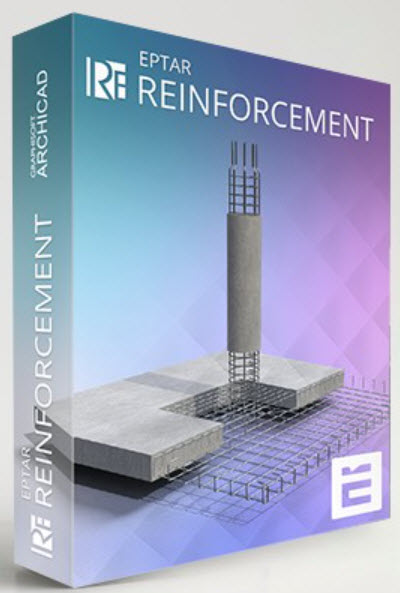
แบ่งปัน EPTAR Reinforcement 7.0.5.0 for ArchiCAD 29 WIN

admin_lnwza

Administrator


0%
สมัครเมื่อ
7 กันยายน 2023
โพสต์
111
Country flag

EPTAR Reinforcement 7 for ArchiCAD 29


ดาวน์โหลด ปลั๊กอิน EPTAR Reinforcement 7.0.5.0 for ArchiCAD 29 WIN ปลั๊กอินสร้างแบบเหล็กเสริมคอนกรีตสำหรับ ArchiCAD 29 ฟรี​


EPTAR Reinforcement 7 เป็นปลั๊กอินสำหรับ ArchiCAD ที่ออกแบบมาเพื่อช่วยสร้างแบบเหล็กเสริมคอนกรีต (Reinforcement) อย่างแม่นยำและเป็นระบบ เหมาะสำหรับวิศวกรโครงสร้าง สถาปนิก และผู้ทำแบบก่อสร้างที่ต้องการเพิ่มความถูกต้องและความรวดเร็วในงานออกแบบโครงสร้างคอนกรีตเสริมเหล็ก

ด้วยเครื่องมืออัตโนมัติและฟังก์ชันที่ครบครัน EPTAR Reinforcement 7 ช่วยสร้าง ตีราคา และจัดทำรายการเหล็กเสริม (BOQ) ได้ง่ายขึ้น รองรับการทำงานร่วมกับโมเดล BIM ของ ArchiCAD ทำให้การทำงานด้านโครงสร้างเป็นระบบมากขึ้น ลดข้อผิดพลาด และช่วยให้ส่งงานได้เร็วขึ้น

จุดเด่นของ EPTAR Reinforcement 7
  • สร้างเหล็กเสริมคอนกรีตใน ArchiCAD ได้แบบอัตโนมัติและปรับแต่งได้
  • รองรับเหล็กเสริมพื้น เสา คาน ผนัง และองค์ประกอบโครงสร้างทุกชนิด
  • จัดทำรายการวัสดุ (Material List / BOQ) อัตโนมัติ
  • ปรับรูปร่าง เหลี่ยม ดัดงอ และความยาวเหล็กได้ตามมาตรฐานวิศวกรรม
  • แสดงผลแบบ 2D และ 3D ช่วยให้ตรวจแบบได้ง่ายขึ้น
  • ลดเวลาการทำแบบโครงสร้างและลดความผิดพลาดจากการทำงานด้วยมือ
  • รองรับการทำงานร่วมกับ BIM ทำให้การออกแบบโครงสร้างมีประสิทธิภาพสูงขึ้น
เหมาะสำหรับใคร
  • วิศวกรโครงสร้างและบริษัทออกแบบโครงสร้าง
  • สถาปนิกที่ใช้ ArchiCAD และต้องการแบบเหล็กเสริมที่ถูกต้อง
  • ผู้เขียนแบบ (Draftsman) และผู้ถอดปริมาณงานก่อสร้าง
  • นักศึกษาและผู้เรียนด้านวิศวกรรมที่ต้องการปลั๊กอินเพิ่มประสิทธิภาพงาน
EPTAR Reinforcement 7 คือปลั๊กอินเสริมสำหรับ ArchiCAD ที่ช่วยทำงานด้านเหล็กเสริมคอนกรีตได้อย่างแม่นยำ รวดเร็ว และเป็นมืออาชีพ รองรับโครงสร้างทุกประเภทและสามารถสร้างแบบ 2D/3D พร้อมรายการวัสดุได้ในคลิกเดียว เหมาะสำหรับผู้ที่ทำงานด้านโครงสร้างและต้องการเพิ่มคุณภาพและความเร็วในการออกแบบอย่างแท้จริง

Features:

New Functions (Version 7)

  • Unfolded Bar Drawings: Create unfolded drawings of reinforcement bars for structural components.
  • Cross-Sectional Drawings: Generate cross-sectional drawings of beam and column reinforcements at custom locations.
  • Flexible Component Drawing Placement: Component and cross-sectional drawings can now be placed in separate views, not just on the floor plan. These drawings automatically update when the element's reinforcement is modified, offering greater documentation flexibility.
  • Long Rebar Splices: Support for drawing splices for long rebars.
  • Customizable Bent End Angles: Define custom angle specifications for bent rebar ends.
  • New rf_single_edge element: A new, simpler element for placing independent edge reinforcements with custom-angle stirrups.
  • New Parameter Palette: A dedicated palette for quickly adjusting the most commonly used parameters of selected elements without opening the full Settings window.
  • Thermal Bridge Breaker: A new element available in the library.
  • Multi-Directional Custom Rebar: Create custom reinforcement bars that can be bent in multiple directions, even in 3D.
Main Features (Includes features from earlier versions)

User Interface & Listing

  • Redesigned Tool Palette.
  • New Listing Functions:
  • Selection management palette with element ID and graphical marking.
  • Zoom function for selected elements.
  • Automatic numbering of elements and rebars (with option to start from a specified number).
  • Handling of identical rebars in complex elements.
  • Option to apply prefixes.
  • Ensures elements are not listed twice.
  • Measurement units moved to the header for easier XLS export.
  • Lists now have their own dedicated layer.
  • Cutting list can include additional, custom text content.
  • Automatic Update System: Notifies users when a newer version is available.
  • ABOUT Window: Provides information about the software.
Reinforcement Modeling
  • Column/Pillar Reinforcement:
  • Indication of rebar rotation in 3D (toggleable in Model View Options).
  • Support for multiple stirrup types.
  • Manual resizing option for placed reinforcement.
  • Automatic placement for circular and simple profiled columns with many settings.
  • Slab Reinforcement:
  • Reinforcement only in the core of slabs.
  • Accurate usage of structural core definition.
  • Reinforcement of concrete slab edges by placing shear rebars in corners of holes.
  • Wall Reinforcement:
  • Concrete cover correction.
  • Reinforcement of slanted walls cropped to a roof.
  • Handling of Archicad openings in the wall.
  • Reinforcement of concrete wall edges by placing shear rebars in corners of openings.
  • Automatic reinforcement of straight, slanted, and curved walls.
  • Reverse bending direction of rebars in slab and wall.
  • Beam Reinforcement:
  • Correct section dimensions.
  • Automatic placement in simple profiled beams using rf_beam complex element.
  • Roof Reinforcement:
  • Rebars in two directions and in top/bottom regions with a direction selector.
  • Using RF_EDGE element (single roof).
  • Mesh element in top/bottom regions.
  • Automatic reinforcement with Mesh and Rebar elements.
  • Automatic reinforcement of complex roofs and multiple roof surfaces.
  • General Rebar & Stirrups:
  • Creation of splice drawings for straight rebars.
  • New handling and representation of curved rebar layouts.
  • Option to set custom rebar weight (in kg/m).
  • Option to set rebar diameter by group.
  • Stirrups can be sized by external dimensions, not along the axis.
  • Spiral stirrup for manual or automatic placement.
  • Preset common rebar and stirrup forms; custom polygonal forms can also be set.
  • Steel elements can be rotated for complex constructions (e.g., stairs).
  • Distributable rebars along curves.
  • Multiple layers of rebar can be placed at a time.
  • Placement of upturned or folded mesh.
  • Automatic array of meshes and bars.
  • Unlimited rebar placement.
  • Complex Elements:
  • RF_CHAIR is included in the Cutting list with necessary parameters.
  • ID handling for RF_BEAM, RF_COLUMN, and RF_EDGE elements (yellow sign warning for duplicate IDs).
  • List of beam and column reinforcement elements.
  • Unlimited use of columns, beams, and crownings.
  • Drawing & Display:
  • Extended 2D view types of rebars.
  • Indication of rebar rotation in the 3D window.
  • Exact display of rebar bending in 3D.
  • Many view and display options.
  • Global display settings (2D, 3D, labels, texts).
  • Displaying views on the floor plan.
  • ABOUT window.
Documentation & Output
  • Labeling:
  • Every element can be labeled using the reinforcement's own label.
  • All groups in a beam or pillar can be labeled separately with real parameters.
  • Option to indicate different text content in floorplan labels of rebar and mesh.
  • Intelligent markers.
  • Label option for views and custom label texts.
  • Cutting List:
  • Generation of automatic cutting lists.
  • RF_CHAIR is included with necessary parameters.
  • More exact Cutting list for Mesh and Rebar.
  • The different length rebars can be displayed separately.
  • For mesh, multidirectional rebars can be listed separately.
  • For circular cross-sections, the radius of the stirrup is displayed.
  • Joint length value is displayed.
  • Option to select all elements listed in an already placed Cutting list on the floor plan.
  • Mesh Board Designer.
  • Exporting List: Export to TXT (and implies XLS for further processing as per "Measurement units have been moved from the list to the header to avoid confusion during further processing in XLS export").

What’s new


Screenshot
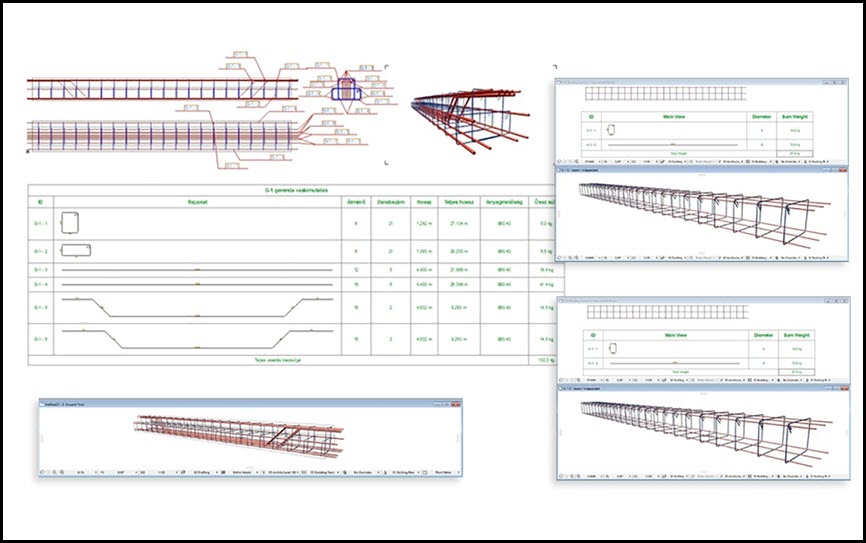
EPTAR Reinforcement 7 for ArchiCAD 29

EPTAR Reinforcement 7 for ArchiCAD 29

System Requirements

ArchiCAD INT 29 WIN
File Info

Official Website : https://www.eptar.hu/reinforcement
License : Trial
Software Version
: 7.0.5.0
File Name : EPTARR7.0.5.0ACAD29.rar
File Size : 160 MB
File Type
: *.rar
Server : Pixeldrain | Box
Upload date : 10/12/2025
Last modified : 10/12/2025
Password : sbz

เนื้อหาเฉพาะผู้ใช้ที่ลงทะเบียนแล้ว!


รหัสแตกไฟล์คือ sbz
 
แก้ไขล่าสุดโดย mod:

vutuan

User title ladder


13%
สมัครเมื่อ
16 กันยายน 2024
โพสต์
16
Country flag

EPTAR Reinforcement 7 dành cho ArchiCAD 29


ดาวน์โหลด ปลั๊กอิน EPTAR Reinforcement 7.0.5.0 for ArchiCAD 29 WIN ปลั๊กอินสร้างแบบเหล็กเสริมคอนกรีตสำหรับ ArchiCAD 29 ฟรี​


EPTAR Reinforcement 7 เป็นปลั๊กอินสำหรับ ArchiCAD ที่ออกแบบมาเพื่อช่วยสร้างแบบเหล็กเสริมคอนกรีต (Reinforcement) อย่างแม่นยำและเป็นระบบ เหมาะสำหรับวิศวกรโครงสร้าง สถาปนิก และผู้ทำแบบก่อสร้างที่ต้องการเพิ่มความถูกต้องและความรวดเร็วในงานออกแบบโครงสร้างคอนกรีตเสริมเหล็ก

ด้วยเครื่องมืออัตโนมัติและฟังก์ชันที่ครบครัน EPTAR Reinforcement 7 ช่วยสร้าง ตีราคา และจัดทำรายการเหล็กเสริม (BOQ) ได้ง่ายขึ้น รองรับการทำงานร่วมกับโมเดล BIM ของ ArchiCAD ทำให้การทำงานด้านโครงสร้างเป็นระบบมากขึ้น ลดข้อผิดพลาด และช่วยให้ส่งงานได้เร็วขึ้น

จุดเด่นของ EPTAR Reinforcement 7
  • สร้างเหล็กเสริมคอนกรีตใน ArchiCAD ได้แบบอัตโนมัติและปรับแต่งได้
  • รองรับเหล็กเสริมพื้น เสา คาน ผนัง และองค์ประกอบโครงสร้างทุกชนิด
  • จัดทำรายการวัสดุ (Material List / BOQ) อัตโนมัติ
  • ปรับรูปร่าง เหลี่ยม ดัดงอ และความยาวเหล็กได้ตามมาตรฐานวิศวกรรม
  • แสดงผลแบบ 2D และ 3D ช่วยให้ตรวจแบบได้ง่ายขึ้น
  • ลดเวลาการทำแบบโครงสร้างและลดความผิดพลาดจากการทำงานด้วยมือ
  • รองรับการทำงานร่วมกับ BIM ทำให้การออกแบบโครงสร้างมีประสิทธิภาพสูงขึ้น
เหมาะสำหรับใคร
  • วิศวกรโครงสร้างและบริษัทออกแบบโครงสร้าง
  • สถาปนิกที่ใช้ ArchiCAD และต้องการแบบเหล็กเสริมที่ถูกต้อง
  • ผู้เขียนแบบ (Draftsman) และผู้ถอดปริมาณงานก่อสร้าง
  • นักศึกษาและผู้เรียนด้านวิศวกรรมที่ต้องการปลั๊กอินเพิ่มประสิทธิภาพงาน
EPTAR Reinforcement 7 คือปลั๊กอินเสริมสำหรับ ArchiCAD ที่ช่วยทำงานด้านเหล็กเสริมคอนกรีตได้อย่างแม่นยำ รวดเร็ว และเป็นมืออาชีพ รองรับโครงสร้างทุกประเภทและสามารถสร้างแบบ 2D/3D พร้อมรายการวัสดุได้ในคลิกเดียว เหมาะสำหรับผู้ที่ทำงานด้านโครงสร้างและต้องการเพิ่มคุณภาพและความเร็วในการออกแบบอย่างแท้จริง

Features:

New Functions (Version 7)

  • Unfolded Bar Drawings: Create unfolded drawings of reinforcement bars for structural components.
  • Cross-Sectional Drawings: Generate cross-sectional drawings of beam and column reinforcements at custom locations.
  • Flexible Component Drawing Placement: Component and cross-sectional drawings can now be placed in separate views, not just on the floor plan. These drawings automatically update when the element's reinforcement is modified, offering greater documentation flexibility.
  • Long Rebar Splices: Support for drawing splices for long rebars.
  • Customizable Bent End Angles: Define custom angle specifications for bent rebar ends.
  • New rf_single_edge element: A new, simpler element for placing independent edge reinforcements with custom-angle stirrups.
  • New Parameter Palette: A dedicated palette for quickly adjusting the most commonly used parameters of selected elements without opening the full Settings window.
  • Thermal Bridge Breaker: A new element available in the library.
  • Multi-Directional Custom Rebar: Create custom reinforcement bars that can be bent in multiple directions, even in 3D.
Main Features (Includes features from earlier versions)

User Interface & Listing

  • Redesigned Tool Palette.
  • New Listing Functions:
  • Selection management palette with element ID and graphical marking.
  • Zoom function for selected elements.
  • Automatic numbering of elements and rebars (with option to start from a specified number).
  • Handling of identical rebars in complex elements.
  • Option to apply prefixes.
  • Ensures elements are not listed twice.
  • Measurement units moved to the header for easier XLS export.
  • Lists now have their own dedicated layer.
  • Cutting list can include additional, custom text content.
  • Automatic Update System: Notifies users when a newer version is available.
  • ABOUT Window: Provides information about the software.
Reinforcement Modeling
  • Column/Pillar Reinforcement:
  • Indication of rebar rotation in 3D (toggleable in Model View Options).
  • Support for multiple stirrup types.
  • Manual resizing option for placed reinforcement.
  • Automatic placement for circular and simple profiled columns with many settings.
  • Slab Reinforcement:
  • Reinforcement only in the core of slabs.
  • Accurate usage of structural core definition.
  • Reinforcement of concrete slab edges by placing shear rebars in corners of holes.
  • Wall Reinforcement:
  • Concrete cover correction.
  • Reinforcement of slanted walls cropped to a roof.
  • Handling of Archicad openings in the wall.
  • Reinforcement of concrete wall edges by placing shear rebars in corners of openings.
  • Tự động gia cố các bức tường thẳng, nghiêng và cong.
  • Đảo chiều uốn cong cốt thép trong sàn và tường.
  • Cốt thép dầm:
  • Kích thước mặt cắt chính xác.
  • Tự động định vị trong các dầm có cấu hình đơn giản bằng cách sử dụng phần tử phức hợp rf_beam.
  • Gia cố mái nhà:
  • Thép gia cường bố trí theo hai hướng và ở vùng trên/dưới với bộ chọn hướng.
  • Sử dụng phần tử RF_EDGE (mái đơn).
  • Phần tử lưới ở vùng trên cùng/dưới cùng.
  • Gia cố tự động bằng lưới thép và cốt thép.
  • Gia cố tự động cho các mái nhà phức tạp và nhiều bề mặt mái.
  • Thép cốt và đai thép thông dụng:
  • Lập bản vẽ mối nối cho cốt thép thẳng.
  • Phương pháp xử lý và hiển thị mới cho bố trí cốt thép cong.
  • Tùy chọn thiết lập trọng lượng cốt thép tùy chỉnh (kg/m).
  • Tùy chọn thiết lập đường kính cốt thép theo nhóm.
  • Kích thước đai thép có thể được xác định theo kích thước bên ngoài, chứ không phải theo trục.
  • Đai đỡ xoắn ốc dùng để đặt thủ công hoặc tự động.
  • Các dạng thép gia cường và đai thép thông dụng được thiết lập sẵn; các dạng đa giác tùy chỉnh cũng có thể được thiết lập.
  • Các cấu kiện thép có thể xoay được để tạo ra các công trình phức tạp (ví dụ: cầu thang).
  • Thép cốt phân bố dọc theo các đường cong.
  • Có thể đặt nhiều lớp cốt thép cùng một lúc.
  • Vị trí đặt lưới lật ngược hoặc gấp lại.
  • Hệ thống lưới và thanh tự động.
  • Không giới hạn số lượng cốt thép được đặt.
  • Các thành phần phức tạp:
  • RF_CHAIR được bao gồm trong danh sách cắt với các thông số cần thiết.
  • Xử lý ID cho các phần tử RF_BEAM, RF_COLUMN và RF_EDGE (cảnh báo màu vàng đối với các ID trùng lặp).
  • Danh sách các thành phần cốt thép dầm và cột.
  • Sử dụng cột, dầm và mái vòm không giới hạn.
  • Vẽ và trưng bày:
  • Các loại thanh cốt thép dạng xem 2D mở rộng.
  • Chỉ ra sự xoay của cốt thép trong cửa sổ 3D.
  • Hiển thị chính xác quá trình uốn thép cốt trong không gian 3D.
  • Nhiều tùy chọn xem và hiển thị.
  • Cài đặt hiển thị toàn cầu (2D, 3D, nhãn, văn bản).
  • Hiển thị các góc nhìn trên bản vẽ mặt bằng.
  • GIỚI THIỆU cửa sổ.
Tài liệu & Đầu ra
  • Ghi nhãn:
  • Mỗi phần tử có thể được dán nhãn bằng nhãn riêng của phần tử gia cường đó.
  • Tất cả các nhóm trong một dầm hoặc cột đều có thể được dán nhãn riêng biệt với các thông số thực.
  • Tùy chọn hiển thị nội dung văn bản khác nhau trong nhãn sơ đồ mặt bằng của cốt thép và lưới thép.
  • Các dấu hiệu thông minh.
  • Tùy chọn nhãn cho chế độ xem và văn bản nhãn tùy chỉnh.
  • Danh sách nguyên liệu cần cắt:
  • Tạo danh sách cắt tự động.
  • RF_CHAIR được bao gồm với các tham số cần thiết.
  • Danh sách cắt chi tiết hơn cho lưới thép và thép cốt.
  • Các thanh thép có chiều dài khác nhau có thể được trưng bày riêng biệt.
  • Đối với lưới thép, các thanh cốt thép đa hướng có thể được liệt kê riêng.
  • Đối với mặt cắt ngang hình tròn, bán kính của đai thép sẽ được hiển thị.
  • Giá trị chiều dài khớp được hiển thị.
  • Tùy chọn chọn tất cả các yếu tố được liệt kê trong danh sách cắt đã có sẵn trên bản vẽ mặt bằng.
  • Nhà thiết kế bảng lưới.
  • Danh sách xuất khẩu: Xuất sang định dạng TXT (và ngụ ý xuất sang XLS để xử lý tiếp theo theo hướng dẫn "Đơn vị đo lường đã được chuyển từ danh sách sang phần tiêu đề để tránh nhầm lẫn trong quá trình xử lý tiếp theo khi xuất sang XLS").

Có gì mới?


Ảnh chụp màn hình

EPTAR Reinforcement 7 dành cho ArchiCAD 29

EPTAR Reinforcement 7 dành cho ArchiCAD 29

Yêu cầu hệ thống

ArchiCAD INT 29 WIN
Thông tin tập tin

Trang web chính thức: https://www.eptar.hu/reinforcement
Giấy phép: Dùng thử
Phiên bản phần mềm
: 7.0.5.0
Tên tệp : EPTARR7.0.5.0ACAD29.rar
Dung lượng file : 160 MB
Loại tệp
: *.rar
Máy chủ : Pixeldrain | Box
Ngày tải lên : 10/12/2025
Cập nhật lần cuối : 10/12/2025
Mật khẩu : sbz

*** Văn bản ẩn: không thể trích dẫn. ***


Mã giải nén tệp là sbz.
Thansk!
 

vutuan

User title ladder


13%
สมัครเมื่อ
16 กันยายน 2024
โพสต์
16
Country flag

EPTAR Reinforcement 7 dành cho ArchiCAD 29


Tải xuống plugin EPTAR Reinforcement 7.0.5.0 cho ArchiCAD 29 WIN, một plugin miễn phí để tạo bản vẽ bê tông cốt thép cho ArchiCAD 29.​


EPTAR Reinforcement 7 là một plugin dành cho ArchiCAD được thiết kế để giúp tạo ra các mô hình cốt thép chính xác và có hệ thống cho các kỹ sư kết cấu, kiến trúc sư và người vẽ bản vẽ muốn tăng độ chính xác và tốc độ thiết kế kết cấu bê tông cốt thép của họ.

Với các công cụ và chức năng tự động hóa toàn diện, EPTAR Reinforcement 7 giúp việc tạo, định giá và chuẩn bị bảng dự toán cốt thép (BOQ) trở nên dễ dàng hơn. Phần mềm hỗ trợ làm việc với mô hình BIM của ArchiCAD, giúp công việc kết cấu được hệ thống hóa hơn, giảm thiểu sai sót và cho phép giao hàng nhanh hơn.

Các tính năng chính của EPTAR Reinforcement 7
  • Bê tông cốt thép có thể được tùy chỉnh tự động trong ArchiCAD.
  • Cung cấp hỗ trợ cho cốt thép ở sàn, cột, dầm, tường và tất cả các loại thành phần kết cấu.
  • Tự động tạo Danh sách vật liệu (BOQ).
  • Thép có thể được tạo hình, uốn cong và điều chỉnh chiều dài theo các tiêu chuẩn kỹ thuật.
  • Việc dựng hình 2D và 3D giúp việc xem xét thiết kế dễ dàng hơn.
  • Giảm thời gian thiết kế kết cấu và hạn chế tối đa sai sót do thao tác thủ công.
  • Tương thích với BIM, cho phép thiết kế kết cấu hiệu quả hơn.
Phù hợp với ai?
  • Các kỹ sư kết cấu và các công ty thiết kế kết cấu.
  • Các kiến trúc sư sử dụng ArchiCAD và cần bản vẽ cốt thép chính xác.
  • Người thiết kế bản vẽ và giám định khối lượng của các dự án xây dựng.
  • Sinh viên và người học kỹ thuật cần plugin để cải thiện hiệu quả công việc.
EPTAR Reinforcement 7 là một plugin dành cho ArchiCAD giúp bạn làm việc với bê tông cốt thép một cách chính xác, nhanh chóng và chuyên nghiệp. Nó hỗ trợ tất cả các loại kết cấu và cho phép bạn tạo bản vẽ 2D/3D với danh sách vật liệu chỉ bằng một cú nhấp chuột. Đây là công cụ lý tưởng cho những người làm việc trong lĩnh vực kết cấu muốn nâng cao chất lượng và tốc độ thiết kế của mình.

Đặc trưng:

Chức năng mới (Phiên bản 7)

  • Bản vẽ thép trải phẳng: Tạo bản vẽ thép trải phẳng của các thanh thép gia cường cho các cấu kiện kết cấu.
  • Bản vẽ mặt cắt ngang: Tạo bản vẽ mặt cắt ngang của cốt thép dầm và cột tại các vị trí tùy chỉnh.
  • Khả năng bố trí bản vẽ cấu kiện linh hoạt: Bản vẽ cấu kiện và mặt cắt giờ đây có thể được đặt trong các khung nhìn riêng biệt, không chỉ trên bản vẽ mặt bằng. Các bản vẽ này tự động cập nhật khi cốt thép của cấu kiện được thay đổi, mang lại tính linh hoạt cao hơn trong việc lập tài liệu.
  • Mối nối thép dài: Giá đỡ để kéo các mối nối cho thép cốt dài.
  • Góc uốn đầu có thể tùy chỉnh: Xác định các thông số góc tùy chỉnh cho các đầu thanh thép uốn cong.
  • Phần tử rf_single_edge mới: Một phần tử mới, đơn giản hơn để đặt các thanh gia cố cạnh độc lập với các thanh giằng góc tùy chỉnh.
  • Bảng thông số mới: Một bảng chuyên dụng để nhanh chóng điều chỉnh các thông số được sử dụng phổ biến nhất của các phần tử đã chọn mà không cần mở cửa sổ Cài đặt đầy đủ.
  • Bộ ngắt cầu nhiệt: Một linh kiện mới có sẵn trong thư viện.
  • Thanh cốt thép tùy chỉnh đa hướng: Tạo các thanh cốt thép tùy chỉnh có thể uốn cong theo nhiều hướng, ngay cả trong không gian 3D.
Các tính năng chính (Bao gồm các tính năng từ các phiên bản trước)

Giao diện người dùng & Danh sách

  • Bảng công cụ được thiết kế lại.
  • Chức năng niêm yết mới:
  • Bảng quản lý lựa chọn với ID phần tử và đánh dấu đồ họa.
  • Chức năng phóng to thu nhỏ cho các phần tử đã chọn.
  • Tự động đánh số các thành phần và thanh cốt thép (có tùy chọn bắt đầu từ số đã chỉ định).
  • Xử lý các thanh cốt thép giống hệt nhau trong các thành phần phức tạp.
  • Tùy chọn áp dụng tiền tố.
  • Đảm bảo các phần tử không bị liệt kê hai lần.
  • Đơn vị đo lường đã được chuyển lên phần đầu trang để dễ dàng xuất sang định dạng XLS hơn.
  • Giờ đây, danh sách đã có lớp riêng biệt.
  • Danh sách cắt có thể bao gồm nội dung văn bản tùy chỉnh bổ sung.
  • Hệ thống cập nhật tự động: Thông báo cho người dùng khi có phiên bản mới hơn.
  • Cửa sổ GIỚI THIỆU: Cung cấp thông tin về phần mềm.
Mô hình hóa gia cường
  • Gia cố cột/trụ:
  • Hiển thị hướng xoay của cốt thép trong không gian 3D (có thể bật/tắt trong Tùy chọn Chế độ xem Mô hình).
  • Hỗ trợ nhiều loại đai yên ngựa khác nhau.
  • Tùy chọn thay đổi kích thước thủ công cho phần gia cố được đặt.
  • Tự động định vị cho các cột tròn và cột có hình dạng đơn giản với nhiều tùy chọn cài đặt.
  • Cốt thép sàn:
  • Chỉ gia cố cốt thép ở phần lõi của tấm bê tông.
  • Sử dụng chính xác định nghĩa cốt lõi cấu trúc.
  • Gia cố các cạnh của tấm bê tông bằng cách đặt cốt thép chịu cắt ở các góc của lỗ.
  • Gia cố tường:
  • Sửa chữa lớp phủ bê tông.
  • Gia cố các bức tường nghiêng được cắt ngang mái nhà.
  • Xử lý các lỗ mở Archicad trên tường.
  • Gia cố các cạnh tường bê tông bằng cách đặt cốt thép chịu cắt ở các góc của các lỗ mở.
  • Tự động gia cố các bức tường thẳng, nghiêng và cong.
  • Đảo chiều uốn cong cốt thép trong sàn và tường.
  • Cốt thép dầm:
  • Kích thước mặt cắt chính xác.
  • Tự động định vị trong các dầm có cấu hình đơn giản bằng cách sử dụng phần tử phức hợp rf_beam.
  • Gia cố mái nhà:
  • Thép gia cường bố trí theo hai hướng và ở vùng trên/dưới với bộ chọn hướng.
  • Sử dụng phần tử RF_EDGE (mái đơn).
  • Phần tử lưới ở vùng trên cùng/dưới cùng.
  • Gia cố tự động bằng lưới thép và cốt thép.
  • Gia cố tự động cho các mái nhà phức tạp và nhiều bề mặt mái.
  • Thép cốt và đai thép thông dụng:
  • Lập bản vẽ mối nối cho cốt thép thẳng.
  • Phương pháp xử lý và hiển thị mới cho bố trí cốt thép cong.
  • Tùy chọn thiết lập trọng lượng cốt thép tùy chỉnh (kg/m).
  • Tùy chọn thiết lập đường kính cốt thép theo nhóm.
  • Kích thước đai thép có thể được xác định theo kích thước bên ngoài, chứ không phải theo trục.
  • Đai đỡ xoắn ốc dùng để đặt thủ công hoặc tự động.
  • Các dạng thép gia cường và đai thép thông dụng được thiết lập sẵn; các dạng đa giác tùy chỉnh cũng có thể được thiết lập.
  • Các cấu kiện thép có thể xoay được để tạo ra các công trình phức tạp (ví dụ: cầu thang).
  • Thép cốt phân bố dọc theo các đường cong.
  • Có thể đặt nhiều lớp cốt thép cùng một lúc.
  • Vị trí đặt lưới lật ngược hoặc gấp lại.
  • Hệ thống lưới và thanh tự động.
  • Không giới hạn số lượng cốt thép được đặt.
  • Các thành phần phức tạp:
  • RF_CHAIR được bao gồm trong danh sách cắt với các thông số cần thiết.
  • Xử lý ID cho các phần tử RF_BEAM, RF_COLUMN và RF_EDGE (cảnh báo màu vàng đối với các ID trùng lặp).
  • Danh sách các thành phần cốt thép dầm và cột.
  • Sử dụng cột, dầm và mái vòm không giới hạn.
  • Vẽ và trưng bày:
  • Các loại thanh cốt thép dạng xem 2D mở rộng.
  • Chỉ ra sự xoay của cốt thép trong cửa sổ 3D.
  • Hiển thị chính xác quá trình uốn thép cốt trong không gian 3D.
  • Nhiều tùy chọn xem và hiển thị.
  • Cài đặt hiển thị toàn cầu (2D, 3D, nhãn, văn bản).
  • Hiển thị các góc nhìn trên bản vẽ mặt bằng.
  • GIỚI THIỆU cửa sổ.
Tài liệu & Đầu ra
  • Ghi nhãn:
  • Mỗi phần tử có thể được dán nhãn bằng nhãn riêng của phần tử gia cường đó.
  • Tất cả các nhóm trong một dầm hoặc cột đều có thể được dán nhãn riêng biệt với các thông số thực.
  • Tùy chọn hiển thị nội dung văn bản khác nhau trong nhãn sơ đồ mặt bằng của cốt thép và lưới thép.
  • Các dấu hiệu thông minh.
  • Tùy chọn nhãn cho chế độ xem và văn bản nhãn tùy chỉnh.
  • Danh sách nguyên liệu cần cắt:
  • Tạo danh sách cắt tự động.
  • RF_CHAIR được bao gồm với các tham số cần thiết.
  • Danh sách cắt chi tiết hơn cho lưới thép và thép cốt.
  • Các thanh thép có chiều dài khác nhau có thể được trưng bày riêng biệt.
  • Đối với lưới thép, các thanh cốt thép đa hướng có thể được liệt kê riêng.
  • Đối với mặt cắt ngang hình tròn, bán kính của đai thép sẽ được hiển thị.
  • Giá trị chiều dài khớp được hiển thị.
  • Tùy chọn chọn tất cả các yếu tố được liệt kê trong danh sách cắt đã có sẵn trên bản vẽ mặt bằng.
  • Nhà thiết kế bảng lưới.
  • Danh sách xuất khẩu: Xuất sang định dạng TXT (và ngụ ý xuất sang XLS để xử lý tiếp theo theo hướng dẫn "Đơn vị đo lường đã được chuyển từ danh sách sang phần tiêu đề để tránh nhầm lẫn trong quá trình xử lý tiếp theo khi xuất sang XLS").

Có gì mới?


Ảnh chụp màn hình

EPTAR Reinforcement 7 dành cho ArchiCAD 29

EPTAR Reinforcement 7 dành cho ArchiCAD 29

Yêu cầu hệ thống

ArchiCAD INT 29 WIN
Thông tin tập tin

Trang web chính thức: https://www.eptar.hu/reinforcement
Giấy phép: Dùng thử
Phiên bản phần mềm
: 7.0.5.0
Tên tệp : EPTARR7.0.5.0ACAD29.rar
Dung lượng file : 160 MB
Loại tệp
: *.rar
Máy chủ : Pixeldrain | Box
Ngày tải lên : 10/12/2025
Cập nhật lần cuối : 10/12/2025
Mật khẩu : sbz

*** Văn bản ẩn: không thể trích dẫn. ***


Mã giải nén tệp là sbz.
Cảm ơn!
 

chuan2568

 
0%
สมัครเมื่อ
10 ธันวาคม 2025
โพสต์
2
Country flag

EPTAR Reinforcement 7 for ArchiCAD 29


ดาวน์โหลด ปลั๊กอิน EPTAR Reinforcement 7.0.5.0 for ArchiCAD 29 WIN ปลั๊กอินสร้างแบบเหล็กเสริมคอนกรีตสำหรับ ArchiCAD 29 ฟรี​


EPTAR Reinforcement 7 เป็นปลั๊กอินสำหรับ ArchiCAD ที่ออกแบบมาเพื่อช่วยสร้างแบบเหล็กเสริมคอนกรีต (Reinforcement) อย่างแม่นยำและเป็นระบบ เหมาะสำหรับวิศวกรโครงสร้าง สถาปนิก และผู้ทำแบบก่อสร้างที่ต้องการเพิ่มความถูกต้องและความรวดเร็วในงานออกแบบโครงสร้างคอนกรีตเสริมเหล็ก

ด้วยเครื่องมืออัตโนมัติและฟังก์ชันที่ครบครัน EPTAR Reinforcement 7 ช่วยสร้าง ตีราคา และจัดทำรายการเหล็กเสริม (BOQ) ได้ง่ายขึ้น รองรับการทำงานร่วมกับโมเดล BIM ของ ArchiCAD ทำให้การทำงานด้านโครงสร้างเป็นระบบมากขึ้น ลดข้อผิดพลาด และช่วยให้ส่งงานได้เร็วขึ้น

จุดเด่นของ EPTAR Reinforcement 7
  • สร้างเหล็กเสริมคอนกรีตใน ArchiCAD ได้แบบอัตโนมัติและปรับแต่งได้
  • รองรับเหล็กเสริมพื้น เสา คาน ผนัง และองค์ประกอบโครงสร้างทุกชนิด
  • จัดทำรายการวัสดุ (Material List / BOQ) อัตโนมัติ
  • ปรับรูปร่าง เหลี่ยม ดัดงอ และความยาวเหล็กได้ตามมาตรฐานวิศวกรรม
  • แสดงผลแบบ 2D และ 3D ช่วยให้ตรวจแบบได้ง่ายขึ้น
  • ลดเวลาการทำแบบโครงสร้างและลดความผิดพลาดจากการทำงานด้วยมือ
  • รองรับการทำงานร่วมกับ BIM ทำให้การออกแบบโครงสร้างมีประสิทธิภาพสูงขึ้น
เหมาะสำหรับใคร
  • วิศวกรโครงสร้างและบริษัทออกแบบโครงสร้าง
  • สถาปนิกที่ใช้ ArchiCAD และต้องการแบบเหล็กเสริมที่ถูกต้อง
  • ผู้เขียนแบบ (Draftsman) และผู้ถอดปริมาณงานก่อสร้าง
  • นักศึกษาและผู้เรียนด้านวิศวกรรมที่ต้องการปลั๊กอินเพิ่มประสิทธิภาพงาน
EPTAR Reinforcement 7 คือปลั๊กอินเสริมสำหรับ ArchiCAD ที่ช่วยทำงานด้านเหล็กเสริมคอนกรีตได้อย่างแม่นยำ รวดเร็ว และเป็นมืออาชีพ รองรับโครงสร้างทุกประเภทและสามารถสร้างแบบ 2D/3D พร้อมรายการวัสดุได้ในคลิกเดียว เหมาะสำหรับผู้ที่ทำงานด้านโครงสร้างและต้องการเพิ่มคุณภาพและความเร็วในการออกแบบอย่างแท้จริง

Features:

New Functions (Version 7)

  • Unfolded Bar Drawings: Create unfolded drawings of reinforcement bars for structural components.
  • Cross-Sectional Drawings: Generate cross-sectional drawings of beam and column reinforcements at custom locations.
  • Flexible Component Drawing Placement: Component and cross-sectional drawings can now be placed in separate views, not just on the floor plan. These drawings automatically update when the element's reinforcement is modified, offering greater documentation flexibility.
  • Long Rebar Splices: Support for drawing splices for long rebars.
  • Customizable Bent End Angles: Define custom angle specifications for bent rebar ends.
  • New rf_single_edge element: A new, simpler element for placing independent edge reinforcements with custom-angle stirrups.
  • New Parameter Palette: A dedicated palette for quickly adjusting the most commonly used parameters of selected elements without opening the full Settings window.
  • Thermal Bridge Breaker: A new element available in the library.
  • Multi-Directional Custom Rebar: Create custom reinforcement bars that can be bent in multiple directions, even in 3D.
Main Features (Includes features from earlier versions)

User Interface & Listing

  • Redesigned Tool Palette.
  • New Listing Functions:
  • Selection management palette with element ID and graphical marking.
  • Zoom function for selected elements.
  • Automatic numbering of elements and rebars (with option to start from a specified number).
  • Handling of identical rebars in complex elements.
  • Option to apply prefixes.
  • Ensures elements are not listed twice.
  • Measurement units moved to the header for easier XLS export.
  • Lists now have their own dedicated layer.
  • Cutting list can include additional, custom text content.
  • Automatic Update System: Notifies users when a newer version is available.
  • ABOUT Window: Provides information about the software.
Reinforcement Modeling
  • Column/Pillar Reinforcement:
  • Indication of rebar rotation in 3D (toggleable in Model View Options).
  • Support for multiple stirrup types.
  • Manual resizing option for placed reinforcement.
  • Automatic placement for circular and simple profiled columns with many settings.
  • Slab Reinforcement:
  • Reinforcement only in the core of slabs.
  • Accurate usage of structural core definition.
  • Reinforcement of concrete slab edges by placing shear rebars in corners of holes.
  • Wall Reinforcement:
  • Concrete cover correction.
  • Reinforcement of slanted walls cropped to a roof.
  • Handling of Archicad openings in the wall.
  • Reinforcement of concrete wall edges by placing shear rebars in corners of openings.
  • Automatic reinforcement of straight, slanted, and curved walls.
  • Reverse bending direction of rebars in slab and wall.
  • Beam Reinforcement:
  • Correct section dimensions.
  • Automatic placement in simple profiled beams using rf_beam complex element.
  • Roof Reinforcement:
  • Rebars in two directions and in top/bottom regions with a direction selector.
  • Using RF_EDGE element (single roof).
  • Mesh element in top/bottom regions.
  • Automatic reinforcement with Mesh and Rebar elements.
  • Automatic reinforcement of complex roofs and multiple roof surfaces.
  • General Rebar & Stirrups:
  • Creation of splice drawings for straight rebars.
  • New handling and representation of curved rebar layouts.
  • Option to set custom rebar weight (in kg/m).
  • Option to set rebar diameter by group.
  • Stirrups can be sized by external dimensions, not along the axis.
  • Spiral stirrup for manual or automatic placement.
  • Preset common rebar and stirrup forms; custom polygonal forms can also be set.
  • Steel elements can be rotated for complex constructions (e.g., stairs).
  • Distributable rebars along curves.
  • Multiple layers of rebar can be placed at a time.
  • Placement of upturned or folded mesh.
  • Automatic array of meshes and bars.
  • Unlimited rebar placement.
  • Complex Elements:
  • RF_CHAIR is included in the Cutting list with necessary parameters.
  • ID handling for RF_BEAM, RF_COLUMN, and RF_EDGE elements (yellow sign warning for duplicate IDs).
  • List of beam and column reinforcement elements.
  • Unlimited use of columns, beams, and crownings.
  • Drawing & Display:
  • Extended 2D view types of rebars.
  • Indication of rebar rotation in the 3D window.
  • Exact display of rebar bending in 3D.
  • Many view and display options.
  • Global display settings (2D, 3D, labels, texts).
  • Displaying views on the floor plan.
  • ABOUT window.
Documentation & Output
  • Labeling:
  • Every element can be labeled using the reinforcement's own label.
  • All groups in a beam or pillar can be labeled separately with real parameters.
  • Option to indicate different text content in floorplan labels of rebar and mesh.
  • Intelligent markers.
  • Label option for views and custom label texts.
  • Cutting List:
  • Generation of automatic cutting lists.
  • RF_CHAIR is included with necessary parameters.
  • More exact Cutting list for Mesh and Rebar.
  • The different length rebars can be displayed separately.
  • For mesh, multidirectional rebars can be listed separately.
  • For circular cross-sections, the radius of the stirrup is displayed.
  • Joint length value is displayed.
  • Option to select all elements listed in an already placed Cutting list on the floor plan.
  • Mesh Board Designer.
  • Exporting List: Export to TXT (and implies XLS for further processing as per "Measurement units have been moved from the list to the header to avoid confusion during further processing in XLS export").

What’s new


Screenshot
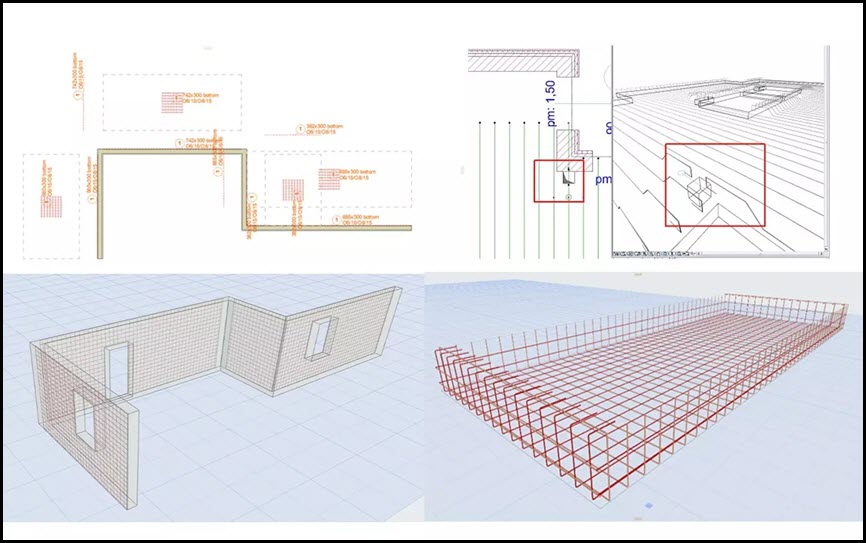
EPTAR Reinforcement 7 for ArchiCAD 29

EPTAR Reinforcement 7 for ArchiCAD 29

System Requirements

ArchiCAD INT 29 WIN
File Info

Official Website : https://www.eptar.hu/reinforcement
License : Trial
Software Version
: 7.0.5.0
File Name : EPTARR7.0.5.0ACAD29.rar
File Size : 160 MB
File Type
: *.rar
Server : Pixeldrain | Box
Upload date : 10/12/2025
Last modified : 10/12/2025
Password : sb

EPTAR Reinforcement 7 for ArchiCAD 29


ดาวน์โหลด ปลั๊กอิน EPTAR Reinforcement 7.0.5.0 for ArchiCAD 29 WIN ปลั๊กอินสร้างแบบเหล็กเสริมคอนกรีตสำหรับ ArchiCAD 29 ฟรี​


EPTAR Reinforcement 7 เป็นปลั๊กอินสำหรับ ArchiCAD ที่ออกแบบมาเพื่อช่วยสร้างแบบเหล็กเสริมคอนกรีต (Reinforcement) อย่างแม่นยำและเป็นระบบ เหมาะสำหรับวิศวกรโครงสร้าง สถาปนิก และผู้ทำแบบก่อสร้างที่ต้องการเพิ่มความถูกต้องและความรวดเร็วในงานออกแบบโครงสร้างคอนกรีตเสริมเหล็ก

ด้วยเครื่องมืออัตโนมัติและฟังก์ชันที่ครบครัน EPTAR Reinforcement 7 ช่วยสร้าง ตีราคา และจัดทำรายการเหล็กเสริม (BOQ) ได้ง่ายขึ้น รองรับการทำงานร่วมกับโมเดล BIM ของ ArchiCAD ทำให้การทำงานด้านโครงสร้างเป็นระบบมากขึ้น ลดข้อผิดพลาด และช่วยให้ส่งงานได้เร็วขึ้น

จุดเด่นของ EPTAR Reinforcement 7
  • สร้างเหล็กเสริมคอนกรีตใน ArchiCAD ได้แบบอัตโนมัติและปรับแต่งได้
  • รองรับเหล็กเสริมพื้น เสา คาน ผนัง และองค์ประกอบโครงสร้างทุกชนิด
  • จัดทำรายการวัสดุ (Material List / BOQ) อัตโนมัติ
  • ปรับรูปร่าง เหลี่ยม ดัดงอ และความยาวเหล็กได้ตามมาตรฐานวิศวกรรม
  • แสดงผลแบบ 2D และ 3D ช่วยให้ตรวจแบบได้ง่ายขึ้น
  • ลดเวลาการทำแบบโครงสร้างและลดความผิดพลาดจากการทำงานด้วยมือ
  • รองรับการทำงานร่วมกับ BIM ทำให้การออกแบบโครงสร้างมีประสิทธิภาพสูงขึ้น
เหมาะสำหรับใคร
  • วิศวกรโครงสร้างและบริษัทออกแบบโครงสร้าง
  • สถาปนิกที่ใช้ ArchiCAD และต้องการแบบเหล็กเสริมที่ถูกต้อง
  • ผู้เขียนแบบ (Draftsman) และผู้ถอดปริมาณงานก่อสร้าง
  • นักศึกษาและผู้เรียนด้านวิศวกรรมที่ต้องการปลั๊กอินเพิ่มประสิทธิภาพงาน
EPTAR Reinforcement 7 คือปลั๊กอินเสริมสำหรับ ArchiCAD ที่ช่วยทำงานด้านเหล็กเสริมคอนกรีตได้อย่างแม่นยำ รวดเร็ว และเป็นมืออาชีพ รองรับโครงสร้างทุกประเภทและสามารถสร้างแบบ 2D/3D พร้อมรายการวัสดุได้ในคลิกเดียว เหมาะสำหรับผู้ที่ทำงานด้านโครงสร้างและต้องการเพิ่มคุณภาพและความเร็วในการออกแบบอย่างแท้จริง

Features:

New Functions (Version 7)

  • Unfolded Bar Drawings: Create unfolded drawings of reinforcement bars for structural components.
  • Cross-Sectional Drawings: Generate cross-sectional drawings of beam and column reinforcements at custom locations.
  • Flexible Component Drawing Placement: Component and cross-sectional drawings can now be placed in separate views, not just on the floor plan. These drawings automatically update when the element's reinforcement is modified, offering greater documentation flexibility.
  • Long Rebar Splices: Support for drawing splices for long rebars.
  • Customizable Bent End Angles: Define custom angle specifications for bent rebar ends.
  • New rf_single_edge element: A new, simpler element for placing independent edge reinforcements with custom-angle stirrups.
  • New Parameter Palette: A dedicated palette for quickly adjusting the most commonly used parameters of selected elements without opening the full Settings window.
  • Thermal Bridge Breaker: A new element available in the library.
  • Multi-Directional Custom Rebar: Create custom reinforcement bars that can be bent in multiple directions, even in 3D.
Main Features (Includes features from earlier versions)

User Interface & Listing

  • Redesigned Tool Palette.
  • New Listing Functions:
  • Selection management palette with element ID and graphical marking.
  • Zoom function for selected elements.
  • Automatic numbering of elements and rebars (with option to start from a specified number).
  • Handling of identical rebars in complex elements.
  • Option to apply prefixes.
  • Ensures elements are not listed twice.
  • Measurement units moved to the header for easier XLS export.
  • Lists now have their own dedicated layer.
  • Cutting list can include additional, custom text content.
  • Automatic Update System: Notifies users when a newer version is available.
  • ABOUT Window: Provides information about the software.
Reinforcement Modeling
  • Column/Pillar Reinforcement:
  • Indication of rebar rotation in 3D (toggleable in Model View Options).
  • Support for multiple stirrup types.
  • Manual resizing option for placed reinforcement.
  • Automatic placement for circular and simple profiled columns with many settings.
  • Slab Reinforcement:
  • Reinforcement only in the core of slabs.
  • Accurate usage of structural core definition.
  • Reinforcement of concrete slab edges by placing shear rebars in corners of holes.
  • Wall Reinforcement:
  • Concrete cover correction.
  • Reinforcement of slanted walls cropped to a roof.
  • Handling of Archicad openings in the wall.
  • Reinforcement of concrete wall edges by placing shear rebars in corners of openings.
  • Automatic reinforcement of straight, slanted, and curved walls.
  • Reverse bending direction of rebars in slab and wall.
  • Beam Reinforcement:
  • Correct section dimensions.
  • Automatic placement in simple profiled beams using rf_beam complex element.
  • Roof Reinforcement:
  • Rebars in two directions and in top/bottom regions with a direction selector.
  • Using RF_EDGE element (single roof).
  • Mesh element in top/bottom regions.
  • Automatic reinforcement with Mesh and Rebar elements.
  • Automatic reinforcement of complex roofs and multiple roof surfaces.
  • General Rebar & Stirrups:
  • Creation of splice drawings for straight rebars.
  • New handling and representation of curved rebar layouts.
  • Option to set custom rebar weight (in kg/m).
  • Option to set rebar diameter by group.
  • Stirrups can be sized by external dimensions, not along the axis.
  • Spiral stirrup for manual or automatic placement.
  • Preset common rebar and stirrup forms; custom polygonal forms can also be set.
  • Steel elements can be rotated for complex constructions (e.g., stairs).
  • Distributable rebars along curves.
  • Multiple layers of rebar can be placed at a time.
  • Placement of upturned or folded mesh.
  • Automatic array of meshes and bars.
  • Unlimited rebar placement.
  • Complex Elements:
  • RF_CHAIR is included in the Cutting list with necessary parameters.
  • ID handling for RF_BEAM, RF_COLUMN, and RF_EDGE elements (yellow sign warning for duplicate IDs).
  • List of beam and column reinforcement elements.
  • Unlimited use of columns, beams, and crownings.
  • Drawing & Display:
  • Extended 2D view types of rebars.
  • Indication of rebar rotation in the 3D window.
  • Exact display of rebar bending in 3D.
  • Many view and display options.
  • Global display settings (2D, 3D, labels, texts).
  • Displaying views on the floor plan.
  • ABOUT window.
Documentation & Output
  • Labeling:
  • Every element can be labeled using the reinforcement's own label.
  • All groups in a beam or pillar can be labeled separately with real parameters.
  • Option to indicate different text content in floorplan labels of rebar and mesh.
  • Intelligent markers.
  • Label option for views and custom label texts.
  • Cutting List:
  • Generation of automatic cutting lists.
  • RF_CHAIR is included with necessary parameters.
  • More exact Cutting list for Mesh and Rebar.
  • The different length rebars can be displayed separately.
  • For mesh, multidirectional rebars can be listed separately.
  • For circular cross-sections, the radius of the stirrup is displayed.
  • Joint length value is displayed.
  • Option to select all elements listed in an already placed Cutting list on the floor plan.
  • Mesh Board Designer.
  • Exporting List: Export to TXT (and implies XLS for further processing as per "Measurement units have been moved from the list to the header to avoid confusion during further processing in XLS export").

What’s new


Screenshot

EPTAR Reinforcement 7 for ArchiCAD 29

EPTAR Reinforcement 7 for ArchiCAD 29

System Requirements

ArchiCAD INT 29 WIN
File Info

Official Website : https://www.eptar.hu/reinforcement
License : Trial
Software Version
: 7.0.5.0
File Name : EPTARR7.0.5.0ACAD29.rar
File Size : 160 MB
File Type
: *.rar
Server : Pixeldrain | Box
Upload date : 10/12/2025
Last modified : 10/12/2025
Password : sbz

*** Hidden text: cannot be quoted. ***


รหัสแตกไฟล์คือ sbz
thank you very much
 

Trourle

User title ladder


13%
สมัครเมื่อ
11 กรกฎาคม 2025
โพสต์
12
Country flag

EPTAR Reinforcement 7 for ArchiCAD 29


ดาวน์โหลด ปลั๊กอิน EPTAR Reinforcement 7.0.5.0 for ArchiCAD 29 WIN ปลั๊กอินสร้างแบบเหล็กเสริมคอนกรีตสำหรับ ArchiCAD 29 ฟรี​


EPTAR Reinforcement 7 เป็นปลั๊กอินสำหรับ ArchiCAD ที่ออกแบบมาเพื่อช่วยสร้างแบบเหล็กเสริมคอนกรีต (Reinforcement) อย่างแม่นยำและเป็นระบบ เหมาะสำหรับวิศวกรโครงสร้าง สถาปนิก และผู้ทำแบบก่อสร้างที่ต้องการเพิ่มความถูกต้องและความรวดเร็วในงานออกแบบโครงสร้างคอนกรีตเสริมเหล็ก

ด้วยเครื่องมืออัตโนมัติและฟังก์ชันที่ครบครัน EPTAR Reinforcement 7 ช่วยสร้าง ตีราคา และจัดทำรายการเหล็กเสริม (BOQ) ได้ง่ายขึ้น รองรับการทำงานร่วมกับโมเดล BIM ของ ArchiCAD ทำให้การทำงานด้านโครงสร้างเป็นระบบมากขึ้น ลดข้อผิดพลาด และช่วยให้ส่งงานได้เร็วขึ้น

จุดเด่นของ EPTAR Reinforcement 7
  • สร้างเหล็กเสริมคอนกรีตใน ArchiCAD ได้แบบอัตโนมัติและปรับแต่งได้
  • รองรับเหล็กเสริมพื้น เสา คาน ผนัง และองค์ประกอบโครงสร้างทุกชนิด
  • จัดทำรายการวัสดุ (Material List / BOQ) อัตโนมัติ
  • ปรับรูปร่าง เหลี่ยม ดัดงอ และความยาวเหล็กได้ตามมาตรฐานวิศวกรรม
  • แสดงผลแบบ 2D และ 3D ช่วยให้ตรวจแบบได้ง่ายขึ้น
  • ลดเวลาการทำแบบโครงสร้างและลดความผิดพลาดจากการทำงานด้วยมือ
  • รองรับการทำงานร่วมกับ BIM ทำให้การออกแบบโครงสร้างมีประสิทธิภาพสูงขึ้น
เหมาะสำหรับใคร
  • วิศวกรโครงสร้างและบริษัทออกแบบโครงสร้าง
  • สถาปนิกที่ใช้ ArchiCAD และต้องการแบบเหล็กเสริมที่ถูกต้อง
  • ผู้เขียนแบบ (Draftsman) และผู้ถอดปริมาณงานก่อสร้าง
  • นักศึกษาและผู้เรียนด้านวิศวกรรมที่ต้องการปลั๊กอินเพิ่มประสิทธิภาพงาน
EPTAR Reinforcement 7 คือปลั๊กอินเสริมสำหรับ ArchiCAD ที่ช่วยทำงานด้านเหล็กเสริมคอนกรีตได้อย่างแม่นยำ รวดเร็ว และเป็นมืออาชีพ รองรับโครงสร้างทุกประเภทและสามารถสร้างแบบ 2D/3D พร้อมรายการวัสดุได้ในคลิกเดียว เหมาะสำหรับผู้ที่ทำงานด้านโครงสร้างและต้องการเพิ่มคุณภาพและความเร็วในการออกแบบอย่างแท้จริง

Features:

New Functions (Version 7)

  • Unfolded Bar Drawings: Create unfolded drawings of reinforcement bars for structural components.
  • Cross-Sectional Drawings: Generate cross-sectional drawings of beam and column reinforcements at custom locations.
  • Flexible Component Drawing Placement: Component and cross-sectional drawings can now be placed in separate views, not just on the floor plan. These drawings automatically update when the element's reinforcement is modified, offering greater documentation flexibility.
  • Long Rebar Splices: Support for drawing splices for long rebars.
  • Customizable Bent End Angles: Define custom angle specifications for bent rebar ends.
  • New rf_single_edge element: A new, simpler element for placing independent edge reinforcements with custom-angle stirrups.
  • New Parameter Palette: A dedicated palette for quickly adjusting the most commonly used parameters of selected elements without opening the full Settings window.
  • Thermal Bridge Breaker: A new element available in the library.
  • Multi-Directional Custom Rebar: Create custom reinforcement bars that can be bent in multiple directions, even in 3D.
Main Features (Includes features from earlier versions)

User Interface & Listing

  • Redesigned Tool Palette.
  • New Listing Functions:
  • Selection management palette with element ID and graphical marking.
  • Zoom function for selected elements.
  • Automatic numbering of elements and rebars (with option to start from a specified number).
  • Handling of identical rebars in complex elements.
  • Option to apply prefixes.
  • Ensures elements are not listed twice.
  • Measurement units moved to the header for easier XLS export.
  • Lists now have their own dedicated layer.
  • Cutting list can include additional, custom text content.
  • Automatic Update System: Notifies users when a newer version is available.
  • ABOUT Window: Provides information about the software.
Reinforcement Modeling
  • Column/Pillar Reinforcement:
  • Indication of rebar rotation in 3D (toggleable in Model View Options).
  • Support for multiple stirrup types.
  • Manual resizing option for placed reinforcement.
  • Automatic placement for circular and simple profiled columns with many settings.
  • Slab Reinforcement:
  • Reinforcement only in the core of slabs.
  • Accurate usage of structural core definition.
  • Reinforcement of concrete slab edges by placing shear rebars in corners of holes.
  • Wall Reinforcement:
  • Concrete cover correction.
  • Reinforcement of slanted walls cropped to a roof.
  • Handling of Archicad openings in the wall.
  • Reinforcement of concrete wall edges by placing shear rebars in corners of openings.
  • Automatic reinforcement of straight, slanted, and curved walls.
  • Reverse bending direction of rebars in slab and wall.
  • Beam Reinforcement:
  • Correct section dimensions.
  • Automatic placement in simple profiled beams using rf_beam complex element.
  • Roof Reinforcement:
  • Rebars in two directions and in top/bottom regions with a direction selector.
  • Using RF_EDGE element (single roof).
  • Mesh element in top/bottom regions.
  • Automatic reinforcement with Mesh and Rebar elements.
  • Automatic reinforcement of complex roofs and multiple roof surfaces.
  • General Rebar & Stirrups:
  • Creation of splice drawings for straight rebars.
  • New handling and representation of curved rebar layouts.
  • Option to set custom rebar weight (in kg/m).
  • Option to set rebar diameter by group.
  • Stirrups can be sized by external dimensions, not along the axis.
  • Spiral stirrup for manual or automatic placement.
  • Preset common rebar and stirrup forms; custom polygonal forms can also be set.
  • Steel elements can be rotated for complex constructions (e.g., stairs).
  • Distributable rebars along curves.
  • Multiple layers of rebar can be placed at a time.
  • Placement of upturned or folded mesh.
  • Automatic array of meshes and bars.
  • Unlimited rebar placement.
  • Complex Elements:
  • RF_CHAIR is included in the Cutting list with necessary parameters.
  • ID handling for RF_BEAM, RF_COLUMN, and RF_EDGE elements (yellow sign warning for duplicate IDs).
  • List of beam and column reinforcement elements.
  • Unlimited use of columns, beams, and crownings.
  • Drawing & Display:
  • Extended 2D view types of rebars.
  • Indication of rebar rotation in the 3D window.
  • Exact display of rebar bending in 3D.
  • Many view and display options.
  • Global display settings (2D, 3D, labels, texts).
  • Displaying views on the floor plan.
  • ABOUT window.
Documentation & Output
  • Labeling:
  • Every element can be labeled using the reinforcement's own label.
  • All groups in a beam or pillar can be labeled separately with real parameters.
  • Option to indicate different text content in floorplan labels of rebar and mesh.
  • Intelligent markers.
  • Label option for views and custom label texts.
  • Cutting List:
  • Generation of automatic cutting lists.
  • RF_CHAIR is included with necessary parameters.
  • More exact Cutting list for Mesh and Rebar.
  • The different length rebars can be displayed separately.
  • For mesh, multidirectional rebars can be listed separately.
  • For circular cross-sections, the radius of the stirrup is displayed.
  • Joint length value is displayed.
  • Option to select all elements listed in an already placed Cutting list on the floor plan.
  • Mesh Board Designer.
  • Exporting List: Export to TXT (and implies XLS for further processing as per "Measurement units have been moved from the list to the header to avoid confusion during further processing in XLS export").

What’s new


Screenshot

EPTAR Reinforcement 7 for ArchiCAD 29

EPTAR Reinforcement 7 for ArchiCAD 29

System Requirements

ArchiCAD INT 29 WIN
File Info

Official Website : https://www.eptar.hu/reinforcement
License : Trial
Software Version
: 7.0.5.0
File Name : EPTARR7.0.5.0ACAD29.rar
File Size : 160 MB
File Type
: *.rar
Server : Pixeldrain | Box
Upload date : 10/12/2025
Last modified : 10/12/2025
Password : sbz

*** Hidden text: cannot be quoted. ***


รหัสแตกไฟล์คือ sbz
THANKS BRO
 

tattooscars

 
0%
สมัครเมื่อ
11 ธันวาคม 2025
โพสต์
1

EPTAR Reinforcement 7 for ArchiCAD 29


ดาวน์โหลด ปลั๊กอิน EPTAR Reinforcement 7.0.5.0 for ArchiCAD 29 WIN ปลั๊กอินสร้างแบบเหล็กเสริมคอนกรีตสำหรับ ArchiCAD 29 ฟรี​


EPTAR Reinforcement 7 เป็นปลั๊กอินสำหรับ ArchiCAD ที่ออกแบบมาเพื่อช่วยสร้างแบบเหล็กเสริมคอนกรีต (Reinforcement) อย่างแม่นยำและเป็นระบบ เหมาะสำหรับวิศวกรโครงสร้าง สถาปนิก และผู้ทำแบบก่อสร้างที่ต้องการเพิ่มความถูกต้องและความรวดเร็วในงานออกแบบโครงสร้างคอนกรีตเสริมเหล็ก

ด้วยเครื่องมืออัตโนมัติและฟังก์ชันที่ครบครัน EPTAR Reinforcement 7 ช่วยสร้าง ตีราคา และจัดทำรายการเหล็กเสริม (BOQ) ได้ง่ายขึ้น รองรับการทำงานร่วมกับโมเดล BIM ของ ArchiCAD ทำให้การทำงานด้านโครงสร้างเป็นระบบมากขึ้น ลดข้อผิดพลาด และช่วยให้ส่งงานได้เร็วขึ้น

จุดเด่นของ EPTAR Reinforcement 7
  • สร้างเหล็กเสริมคอนกรีตใน ArchiCAD ได้แบบอัตโนมัติและปรับแต่งได้
  • รองรับเหล็กเสริมพื้น เสา คาน ผนัง และองค์ประกอบโครงสร้างทุกชนิด
  • จัดทำรายการวัสดุ (Material List / BOQ) อัตโนมัติ
  • ปรับรูปร่าง เหลี่ยม ดัดงอ และความยาวเหล็กได้ตามมาตรฐานวิศวกรรม
  • แสดงผลแบบ 2D และ 3D ช่วยให้ตรวจแบบได้ง่ายขึ้น
  • ลดเวลาการทำแบบโครงสร้างและลดความผิดพลาดจากการทำงานด้วยมือ
  • รองรับการทำงานร่วมกับ BIM ทำให้การออกแบบโครงสร้างมีประสิทธิภาพสูงขึ้น
เหมาะสำหรับใคร
  • วิศวกรโครงสร้างและบริษัทออกแบบโครงสร้าง
  • สถาปนิกที่ใช้ ArchiCAD และต้องการแบบเหล็กเสริมที่ถูกต้อง
  • ผู้เขียนแบบ (Draftsman) และผู้ถอดปริมาณงานก่อสร้าง
  • นักศึกษาและผู้เรียนด้านวิศวกรรมที่ต้องการปลั๊กอินเพิ่มประสิทธิภาพงาน
EPTAR Reinforcement 7 คือปลั๊กอินเสริมสำหรับ ArchiCAD ที่ช่วยทำงานด้านเหล็กเสริมคอนกรีตได้อย่างแม่นยำ รวดเร็ว และเป็นมืออาชีพ รองรับโครงสร้างทุกประเภทและสามารถสร้างแบบ 2D/3D พร้อมรายการวัสดุได้ในคลิกเดียว เหมาะสำหรับผู้ที่ทำงานด้านโครงสร้างและต้องการเพิ่มคุณภาพและความเร็วในการออกแบบอย่างแท้จริง

Features:

New Functions (Version 7)

  • Unfolded Bar Drawings: Create unfolded drawings of reinforcement bars for structural components.
  • Cross-Sectional Drawings: Generate cross-sectional drawings of beam and column reinforcements at custom locations.
  • Flexible Component Drawing Placement: Component and cross-sectional drawings can now be placed in separate views, not just on the floor plan. These drawings automatically update when the element's reinforcement is modified, offering greater documentation flexibility.
  • Long Rebar Splices: Support for drawing splices for long rebars.
  • Customizable Bent End Angles: Define custom angle specifications for bent rebar ends.
  • New rf_single_edge element: A new, simpler element for placing independent edge reinforcements with custom-angle stirrups.
  • New Parameter Palette: A dedicated palette for quickly adjusting the most commonly used parameters of selected elements without opening the full Settings window.
  • Thermal Bridge Breaker: A new element available in the library.
  • Multi-Directional Custom Rebar: Create custom reinforcement bars that can be bent in multiple directions, even in 3D.
Main Features (Includes features from earlier versions)

User Interface & Listing

  • Redesigned Tool Palette.
  • New Listing Functions:
  • Selection management palette with element ID and graphical marking.
  • Zoom function for selected elements.
  • Automatic numbering of elements and rebars (with option to start from a specified number).
  • Handling of identical rebars in complex elements.
  • Option to apply prefixes.
  • Ensures elements are not listed twice.
  • Measurement units moved to the header for easier XLS export.
  • Lists now have their own dedicated layer.
  • Cutting list can include additional, custom text content.
  • Automatic Update System: Notifies users when a newer version is available.
  • ABOUT Window: Provides information about the software.
Reinforcement Modeling
  • Column/Pillar Reinforcement:
  • Indication of rebar rotation in 3D (toggleable in Model View Options).
  • Support for multiple stirrup types.
  • Manual resizing option for placed reinforcement.
  • Automatic placement for circular and simple profiled columns with many settings.
  • Slab Reinforcement:
  • Reinforcement only in the core of slabs.
  • Accurate usage of structural core definition.
  • Reinforcement of concrete slab edges by placing shear rebars in corners of holes.
  • Wall Reinforcement:
  • Concrete cover correction.
  • Reinforcement of slanted walls cropped to a roof.
  • Handling of Archicad openings in the wall.
  • Reinforcement of concrete wall edges by placing shear rebars in corners of openings.
  • Automatic reinforcement of straight, slanted, and curved walls.
  • Reverse bending direction of rebars in slab and wall.
  • Beam Reinforcement:
  • Correct section dimensions.
  • Automatic placement in simple profiled beams using rf_beam complex element.
  • Roof Reinforcement:
  • Rebars in two directions and in top/bottom regions with a direction selector.
  • Using RF_EDGE element (single roof).
  • Mesh element in top/bottom regions.
  • Automatic reinforcement with Mesh and Rebar elements.
  • Automatic reinforcement of complex roofs and multiple roof surfaces.
  • General Rebar & Stirrups:
  • Creation of splice drawings for straight rebars.
  • New handling and representation of curved rebar layouts.
  • Option to set custom rebar weight (in kg/m).
  • Option to set rebar diameter by group.
  • Stirrups can be sized by external dimensions, not along the axis.
  • Spiral stirrup for manual or automatic placement.
  • Preset common rebar and stirrup forms; custom polygonal forms can also be set.
  • Steel elements can be rotated for complex constructions (e.g., stairs).
  • Distributable rebars along curves.
  • Multiple layers of rebar can be placed at a time.
  • Placement of upturned or folded mesh.
  • Automatic array of meshes and bars.
  • Unlimited rebar placement.
  • Complex Elements:
  • RF_CHAIR is included in the Cutting list with necessary parameters.
  • ID handling for RF_BEAM, RF_COLUMN, and RF_EDGE elements (yellow sign warning for duplicate IDs).
  • List of beam and column reinforcement elements.
  • Unlimited use of columns, beams, and crownings.
  • Drawing & Display:
  • Extended 2D view types of rebars.
  • Indication of rebar rotation in the 3D window.
  • Exact display of rebar bending in 3D.
  • Many view and display options.
  • Global display settings (2D, 3D, labels, texts).
  • Displaying views on the floor plan.
  • ABOUT window.
Documentation & Output
  • Labeling:
  • Every element can be labeled using the reinforcement's own label.
  • All groups in a beam or pillar can be labeled separately with real parameters.
  • Option to indicate different text content in floorplan labels of rebar and mesh.
  • Intelligent markers.
  • Label option for views and custom label texts.
  • Cutting List:
  • Generation of automatic cutting lists.
  • RF_CHAIR is included with necessary parameters.
  • More exact Cutting list for Mesh and Rebar.
  • The different length rebars can be displayed separately.
  • For mesh, multidirectional rebars can be listed separately.
  • For circular cross-sections, the radius of the stirrup is displayed.
  • Joint length value is displayed.
  • Option to select all elements listed in an already placed Cutting list on the floor plan.
  • Mesh Board Designer.
  • Exporting List: Export to TXT (and implies XLS for further processing as per "Measurement units have been moved from the list to the header to avoid confusion during further processing in XLS export").

What’s new


Screenshot

EPTAR Reinforcement 7 for ArchiCAD 29

EPTAR Reinforcement 7 for ArchiCAD 29

System Requirements

ArchiCAD INT 29 WIN
File Info

Official Website : https://www.eptar.hu/reinforcement
License : Trial
Software Version
: 7.0.5.0
File Name : EPTARR7.0.5.0ACAD29.rar
File Size : 160 MB
File Type
: *.rar
Server : Pixeldrain | Box
Upload date : 10/12/2025
Last modified : 10/12/2025
Password : sbz

*** Hidden text: cannot be quoted. ***


รหัสแตกไฟล์คือ sbz
Thank you
 

pisanucivil

User title ladder


8%
สมัครเมื่อ
8 ตุลาคม 2024
โพสต์
9
Country flag

EPTAR Reinforcement 7 for ArchiCAD 29


ดาวน์โหลด ปลั๊กอิน EPTAR Reinforcement 7.0.5.0 for ArchiCAD 29 WIN ปลั๊กอินสร้างแบบเหล็กเสริมคอนกรีตสำหรับ ArchiCAD 29 ฟรี​


EPTAR Reinforcement 7 เป็นปลั๊กอินสำหรับ ArchiCAD ที่ออกแบบมาเพื่อช่วยสร้างแบบเหล็กเสริมคอนกรีต (Reinforcement) อย่างแม่นยำและเป็นระบบ เหมาะสำหรับวิศวกรโครงสร้าง สถาปนิก และผู้ทำแบบก่อสร้างที่ต้องการเพิ่มความถูกต้องและความรวดเร็วในงานออกแบบโครงสร้างคอนกรีตเสริมเหล็ก

ด้วยเครื่องมืออัตโนมัติและฟังก์ชันที่ครบครัน EPTAR Reinforcement 7 ช่วยสร้าง ตีราคา และจัดทำรายการเหล็กเสริม (BOQ) ได้ง่ายขึ้น รองรับการทำงานร่วมกับโมเดล BIM ของ ArchiCAD ทำให้การทำงานด้านโครงสร้างเป็นระบบมากขึ้น ลดข้อผิดพลาด และช่วยให้ส่งงานได้เร็วขึ้น

จุดเด่นของ EPTAR Reinforcement 7
  • สร้างเหล็กเสริมคอนกรีตใน ArchiCAD ได้แบบอัตโนมัติและปรับแต่งได้
  • รองรับเหล็กเสริมพื้น เสา คาน ผนัง และองค์ประกอบโครงสร้างทุกชนิด
  • จัดทำรายการวัสดุ (Material List / BOQ) อัตโนมัติ
  • ปรับรูปร่าง เหลี่ยม ดัดงอ และความยาวเหล็กได้ตามมาตรฐานวิศวกรรม
  • แสดงผลแบบ 2D และ 3D ช่วยให้ตรวจแบบได้ง่ายขึ้น
  • ลดเวลาการทำแบบโครงสร้างและลดความผิดพลาดจากการทำงานด้วยมือ
  • รองรับการทำงานร่วมกับ BIM ทำให้การออกแบบโครงสร้างมีประสิทธิภาพสูงขึ้น
เหมาะสำหรับใคร
  • วิศวกรโครงสร้างและบริษัทออกแบบโครงสร้าง
  • สถาปนิกที่ใช้ ArchiCAD และต้องการแบบเหล็กเสริมที่ถูกต้อง
  • ผู้เขียนแบบ (Draftsman) และผู้ถอดปริมาณงานก่อสร้าง
  • นักศึกษาและผู้เรียนด้านวิศวกรรมที่ต้องการปลั๊กอินเพิ่มประสิทธิภาพงาน
EPTAR Reinforcement 7 คือปลั๊กอินเสริมสำหรับ ArchiCAD ที่ช่วยทำงานด้านเหล็กเสริมคอนกรีตได้อย่างแม่นยำ รวดเร็ว และเป็นมืออาชีพ รองรับโครงสร้างทุกประเภทและสามารถสร้างแบบ 2D/3D พร้อมรายการวัสดุได้ในคลิกเดียว เหมาะสำหรับผู้ที่ทำงานด้านโครงสร้างและต้องการเพิ่มคุณภาพและความเร็วในการออกแบบอย่างแท้จริง

Features:

New Functions (Version 7)

  • Unfolded Bar Drawings: Create unfolded drawings of reinforcement bars for structural components.
  • Cross-Sectional Drawings: Generate cross-sectional drawings of beam and column reinforcements at custom locations.
  • Flexible Component Drawing Placement: Component and cross-sectional drawings can now be placed in separate views, not just on the floor plan. These drawings automatically update when the element's reinforcement is modified, offering greater documentation flexibility.
  • Long Rebar Splices: Support for drawing splices for long rebars.
  • Customizable Bent End Angles: Define custom angle specifications for bent rebar ends.
  • New rf_single_edge element: A new, simpler element for placing independent edge reinforcements with custom-angle stirrups.
  • New Parameter Palette: A dedicated palette for quickly adjusting the most commonly used parameters of selected elements without opening the full Settings window.
  • Thermal Bridge Breaker: A new element available in the library.
  • Multi-Directional Custom Rebar: Create custom reinforcement bars that can be bent in multiple directions, even in 3D.
Main Features (Includes features from earlier versions)

User Interface & Listing

  • Redesigned Tool Palette.
  • New Listing Functions:
  • Selection management palette with element ID and graphical marking.
  • Zoom function for selected elements.
  • Automatic numbering of elements and rebars (with option to start from a specified number).
  • Handling of identical rebars in complex elements.
  • Option to apply prefixes.
  • Ensures elements are not listed twice.
  • Measurement units moved to the header for easier XLS export.
  • Lists now have their own dedicated layer.
  • Cutting list can include additional, custom text content.
  • Automatic Update System: Notifies users when a newer version is available.
  • ABOUT Window: Provides information about the software.
Reinforcement Modeling
  • Column/Pillar Reinforcement:
  • Indication of rebar rotation in 3D (toggleable in Model View Options).
  • Support for multiple stirrup types.
  • Manual resizing option for placed reinforcement.
  • Automatic placement for circular and simple profiled columns with many settings.
  • Slab Reinforcement:
  • Reinforcement only in the core of slabs.
  • Accurate usage of structural core definition.
  • Reinforcement of concrete slab edges by placing shear rebars in corners of holes.
  • Wall Reinforcement:
  • Concrete cover correction.
  • Reinforcement of slanted walls cropped to a roof.
  • Handling of Archicad openings in the wall.
  • Reinforcement of concrete wall edges by placing shear rebars in corners of openings.
  • Automatic reinforcement of straight, slanted, and curved walls.
  • Reverse bending direction of rebars in slab and wall.
  • Beam Reinforcement:
  • Correct section dimensions.
  • Automatic placement in simple profiled beams using rf_beam complex element.
  • Roof Reinforcement:
  • Rebars in two directions and in top/bottom regions with a direction selector.
  • Using RF_EDGE element (single roof).
  • Mesh element in top/bottom regions.
  • Automatic reinforcement with Mesh and Rebar elements.
  • Automatic reinforcement of complex roofs and multiple roof surfaces.
  • General Rebar & Stirrups:
  • Creation of splice drawings for straight rebars.
  • New handling and representation of curved rebar layouts.
  • Option to set custom rebar weight (in kg/m).
  • Option to set rebar diameter by group.
  • Stirrups can be sized by external dimensions, not along the axis.
  • Spiral stirrup for manual or automatic placement.
  • Preset common rebar and stirrup forms; custom polygonal forms can also be set.
  • Steel elements can be rotated for complex constructions (e.g., stairs).
  • Distributable rebars along curves.
  • Multiple layers of rebar can be placed at a time.
  • Placement of upturned or folded mesh.
  • Automatic array of meshes and bars.
  • Unlimited rebar placement.
  • Complex Elements:
  • RF_CHAIR is included in the Cutting list with necessary parameters.
  • ID handling for RF_BEAM, RF_COLUMN, and RF_EDGE elements (yellow sign warning for duplicate IDs).
  • List of beam and column reinforcement elements.
  • Unlimited use of columns, beams, and crownings.
  • Drawing & Display:
  • Extended 2D view types of rebars.
  • Indication of rebar rotation in the 3D window.
  • Exact display of rebar bending in 3D.
  • Many view and display options.
  • Global display settings (2D, 3D, labels, texts).
  • Displaying views on the floor plan.
  • ABOUT window.
Documentation & Output
  • Labeling:
  • Every element can be labeled using the reinforcement's own label.
  • All groups in a beam or pillar can be labeled separately with real parameters.
  • Option to indicate different text content in floorplan labels of rebar and mesh.
  • Intelligent markers.
  • Label option for views and custom label texts.
  • Cutting List:
  • Generation of automatic cutting lists.
  • RF_CHAIR is included with necessary parameters.
  • More exact Cutting list for Mesh and Rebar.
  • The different length rebars can be displayed separately.
  • For mesh, multidirectional rebars can be listed separately.
  • For circular cross-sections, the radius of the stirrup is displayed.
  • Joint length value is displayed.
  • Option to select all elements listed in an already placed Cutting list on the floor plan.
  • Mesh Board Designer.
  • Exporting List: Export to TXT (and implies XLS for further processing as per "Measurement units have been moved from the list to the header to avoid confusion during further processing in XLS export").

What’s new


Screenshot

EPTAR Reinforcement 7 for ArchiCAD 29

EPTAR Reinforcement 7 for ArchiCAD 29

System Requirements

ArchiCAD INT 29 WIN
File Info

Official Website : https://www.eptar.hu/reinforcement
License : Trial
Software Version
: 7.0.5.0
File Name : EPTARR7.0.5.0ACAD29.rar
File Size : 160 MB
File Type
: *.rar
Server : Pixeldrain | Box
Upload date : 10/12/2025
Last modified : 10/12/2025
Password : sbz

*** Hidden text: cannot be quoted. ***


รหัสแตกไฟล์คือ sbz ขอบคุณครับ
 
ด้านบน ด้านล่าง